Skip to content

KandZ - Tuts

  • Operating Systems ▾
    • Linux ▾
      • Distros ▾
        • Fedora
        • Other Distros
        • Ubuntu
      • Gnome 48
      • KDE
      • LFCA - Linux Foundation Certified IT Associate
      • LFCS - Linux Foundation Certified Sysadmin
      • LFCE - Linux Foundation Certified Engineer (Sysadmin + Network Admin)
      • Linux CLI
      • Various
      • Bash Scripting
  • Paths ▾
    • Core Web Stack
    • React & Modern UI Stack
    • Linux Core
  • Programming ▾
    • Frontend (FED) ▾
      • React Ecosystem ▾
        • React
        • React Router
        • TanStack Router
        • TanStack Query (React Query)
        • Zustand
        • Redux Toolkit
      • Angular Ecosystem ▾
        • Angular
      • Vue Ecosystem ▾
        • Vue.js
      • Styling & UI Components ▾
        • Tailwind CSS
    • Languages & Runtimes ▾
      • CSS
      • Dart
      • HTML
      • JavaScript
      • Node.js
      • Rust
      • SQL
      • TypeScript
    • Tools & Build Systems ▾
      • Version Control ▾
        • GitHub
        • Git
        • GitLab
      • Package Managers ▾
        • npm
        • Bun
        • yarn
        • pnpm
      • DevOps & Containers ▾
        • Docker
  • Servers & Self-Hosting ▾
    • Internet ▾
      • Internet Backend - Coming Soon
      • Internet Beginner
      • Internet Frontend - Coming Soon
    • Networking & DNS ▾
      • REST API
  • Tools
  • Windows ▾
    • Windows 11
KandZ - Tuts
AngularBunCSSDartDockerGitGitHubGitLabHTMLJavaScriptNode.jsnpmpnpmReactReact RouterRedux ToolkitRustSQLTailwind CSSTanStack Query (React Query)TanStack RouterTypeScriptVue.jsyarnZustandBash ScriptingFedoraGnome 48KDELFCA - Linux Foundation Certified IT AssociateLFCE - Linux Foundation Certified Engineer (Sysadmin + Network Admin)LFCS - Linux Foundation Certified SysadminLinux CLIOther DistrosUbuntuVariousCore Web StackInternet Backend - Coming SoonInternet BeginnerInternet Frontend - Coming SoonLinux CoreReact & Modern UI StackREST APIToolsWindows 11
  • Rust 117 🦀 Exception Safety in Unsafe Rust and Abort-On-Panic Strategies
    Programming | Languages & Runtimes | Rust

    Rust 117 🦀 Exception Safety in Unsafe Rust and Abort-On-Panic Strategies

    ByKandZ October 26, 2026October 26, 2026

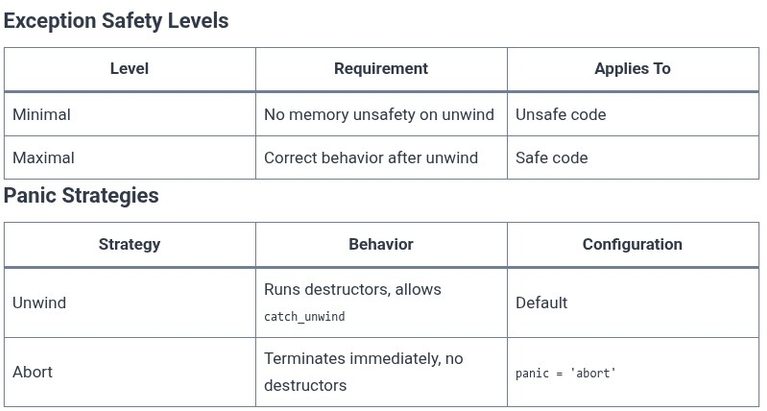
    Unsafe Rust code inherits a contract that safe code does not: it must maintain memory safety even when a panic unwinds through it. This is called minimal exception safety, and violating it produces undefined behavior. The second half of the problem is strategic: sometimes the right response to a potential panic is not to unwind…
    Read More Rust 117 🦀 Exception Safety in Unsafe Rust and Abort-On-Panic StrategiesContinue

  • Rust 116 🦀 Explicit Drop Flag Management and Panic Safety Guarantees
    Programming | Languages & Runtimes | Rust

    Rust 116 🦀 Explicit Drop Flag Management and Panic Safety Guarantees

    ByKandZ October 26, 2026October 26, 2026

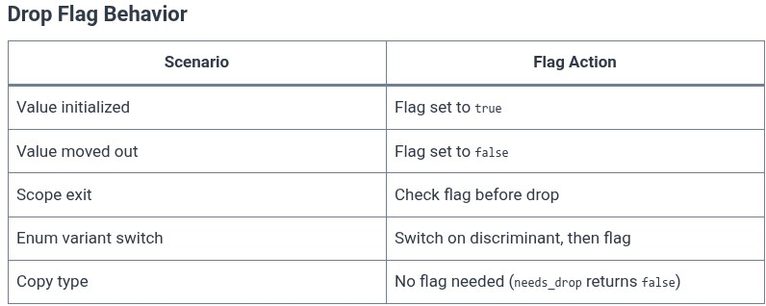
    When a Rust value moves out of its original location, the compiler cannot know at compile time whether the original location still needs to be cleaned up. The solution is drop flags—hidden boolean variables that track initialization state at runtime. This machinery is mostly invisible, but understanding it is essential for reasoning about panic safety,…

    Read More Rust 116 🦀 Explicit Drop Flag Management and Panic Safety GuaranteesContinue

  • Yarn 05 🧶 Adding, Upgrading, and Removing Packages
    Programming | Tools & Build Systems | yarn

    Yarn 05 🧶 Adding, Upgrading, and Removing Packages

    ByKandZ October 26, 2026October 26, 2026

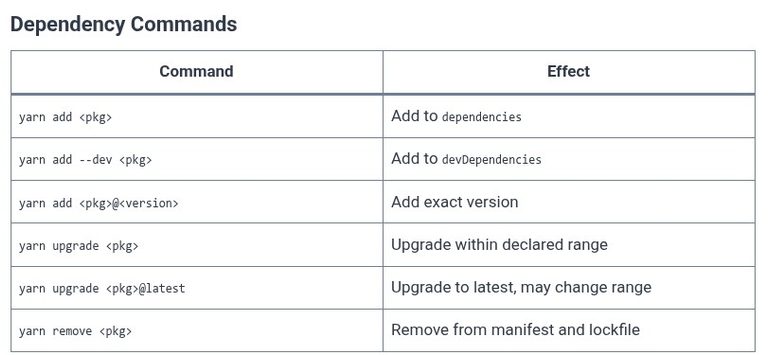
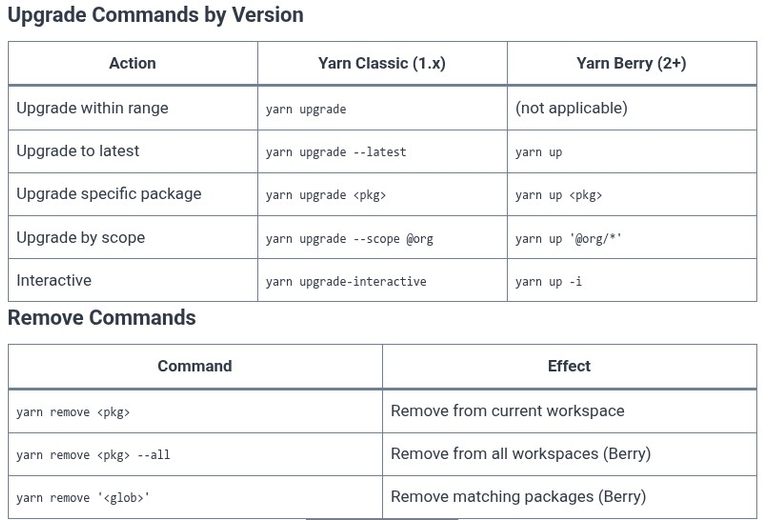
    Package management is the daily rhythm of working with Yarn. You add a library to solve a problem, upgrade it when a bug is fixed or a feature lands, and remove it when the dependency is no longer needed. Each of these operations modifies two files—package.json and yarn.lock—and the commands that perform them differ significantly…

    Read More Yarn 05 🧶 Adding, Upgrading, and Removing PackagesContinue

  • Yarn 04 🧶 Managing Dependencies and yarn.lock
    Programming | Tools & Build Systems | yarn

    Yarn 04 🧶 Managing Dependencies and yarn.lock

    ByKandZ October 26, 2026October 26, 2026

    Every dependency you add, upgrade, or remove triggers a two-file update: package.json records the intent (a version range like ^4.18.0), and yarn.lock records the reality (the exact version and integrity hash that was resolved). The manifest is what you write; the lockfile is what Yarn writes. Understanding this division is the difference between a project…

    Read More Yarn 04 🧶 Managing Dependencies and yarn.lockContinue

  • Yarn 03 🧶 Initializing Projects and package.json
    Programming | Tools & Build Systems | yarn

    Yarn 03 🧶 Initializing Projects and package.json

    ByKandZ October 26, 2026October 26, 2026

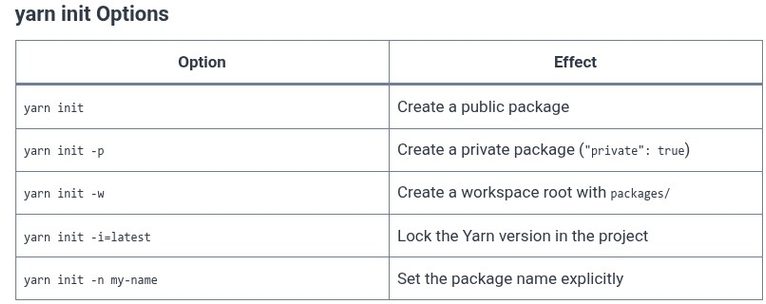
    Every Yarn project begins with a single file. Before dependencies are installed, before scripts are run, and before lockfiles are generated, there is package.json. This file is the manifest—the contract between your project, the package manager, and anyone who clones the repository. Running yarn init is the first command in any new project, and understanding…

    Read More Yarn 03 🧶 Initializing Projects and package.jsonContinue

  • Yarn 02 🧶 Installing and Upgrading Yarn
    Programming | Tools & Build Systems | yarn

    Yarn 02 🧶 Installing and Upgrading Yarn

    ByKandZ October 26, 2026October 26, 2026

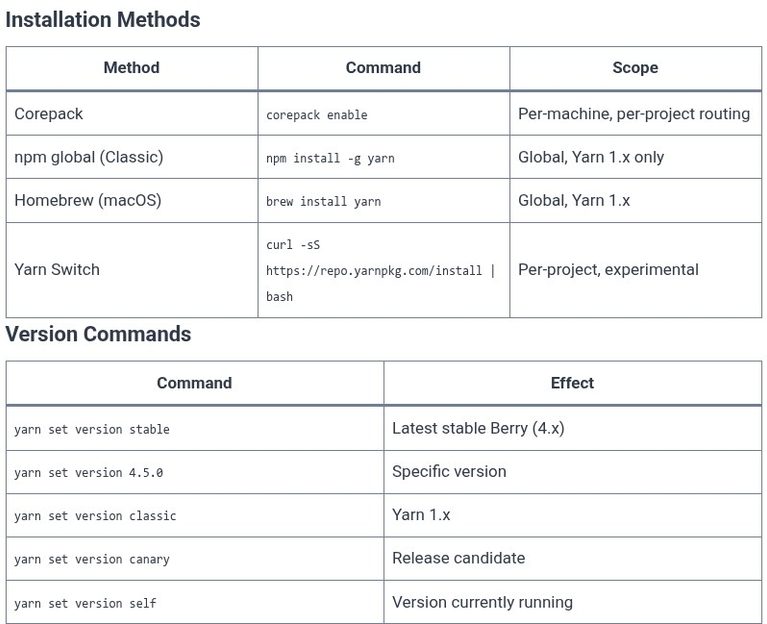
    Installing Yarn used to mean a single global command. That era is over. Modern Yarn—versions 2, 3, and 4, collectively called “Berry”—is designed to be installed per-project, not globally. The tool that makes this possible is Corepack, a Node.js utility that intercepts yarn commands and routes them to the exact version declared in your project’s…

    Read More Yarn 02 🧶 Installing and Upgrading YarnContinue

  • Yarn 01 🧶 Introduction to Yarn vs npm
    Programming | Tools & Build Systems | yarn

    Yarn 01 🧶 Introduction to Yarn vs npm

    ByKandZ October 26, 2026October 26, 2026

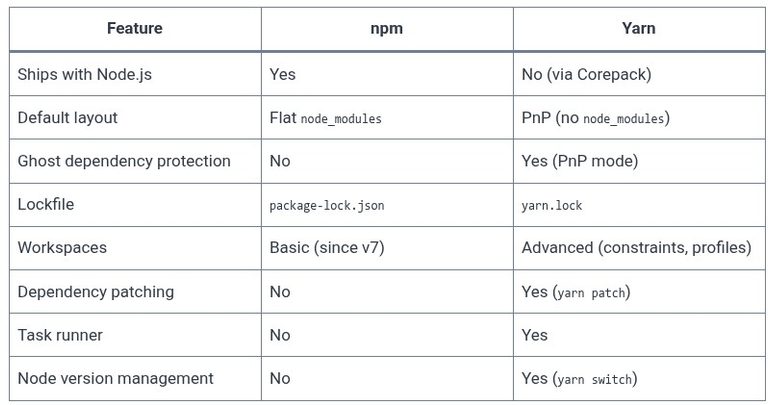
    The JavaScript ecosystem has never had a single package manager. For years, npm was the default—it shipped with Node.js, and it worked. But in 2016, Yarn arrived with a promise of speed, determinism, and better dependency management. Nearly a decade later, the landscape is more complicated: Yarn has evolved through multiple major versions, npm has…

    Read More Yarn 01 🧶 Introduction to Yarn vs npmContinue

  • GitHub 05 🌐 README.md, Markdown Basics, and Repository Documentation
    Programming | GitHub | Tools & Build Systems

    GitHub 05 🌐 README.md, Markdown Basics, and Repository Documentation

    ByKandZ October 26, 2026October 26, 2026

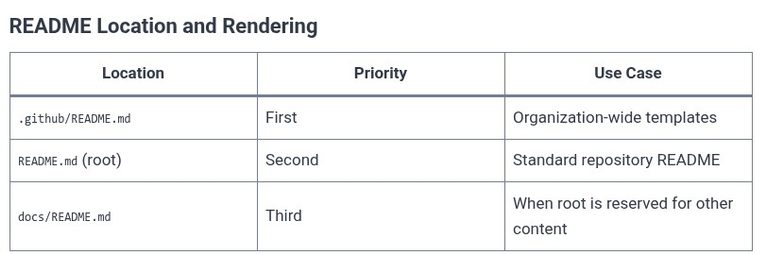
    A repository without a README is a closed door. Visitors arrive, see a list of files with cryptic names, and leave. The README is the first thing GitHub renders on the repository home page, and it is the single artifact that determines whether a stranger becomes a user, a contributor, or a bounce. This chapter…

    Read More GitHub 05 🌐 README.md, Markdown Basics, and Repository DocumentationContinue

  • GitHub 04 🌐 Creating and Initializing a Repository (Public vs Private)
    Programming | GitHub | Tools & Build Systems

    GitHub 04 🌐 Creating and Initializing a Repository (Public vs Private)

    ByKandZ October 26, 2026October 26, 2026

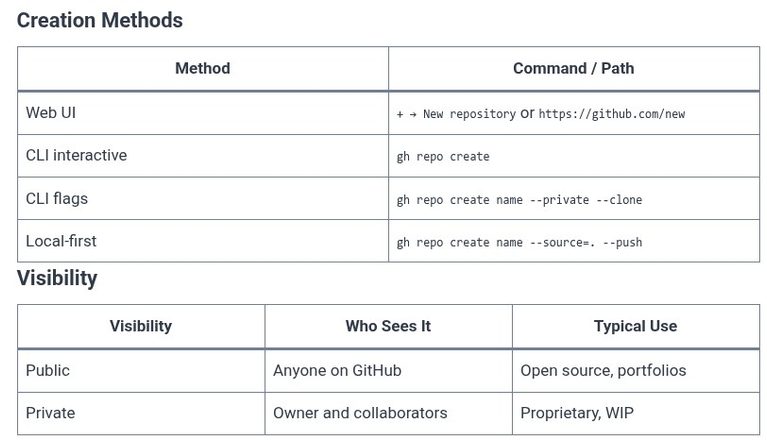
    A repository is the container that holds a project’s files and their complete revision history. Creating one on GitHub is a four-step form: name it, choose who can see it, optionally seed it with starter files, and click create. The visibility choice—public or private—is the only decision that cannot be changed without consequences, and the…

    Read More GitHub 04 🌐 Creating and Initializing a Repository (Public vs Private)Continue

  • GitHub 03 🌐 SSH Keys and Personal Access Tokens (PATs) Authentication
    Programming | GitHub | Tools & Build Systems

    GitHub 03 🌐 SSH Keys and Personal Access Tokens (PATs) Authentication

    ByKandZ October 26, 2026October 26, 2026

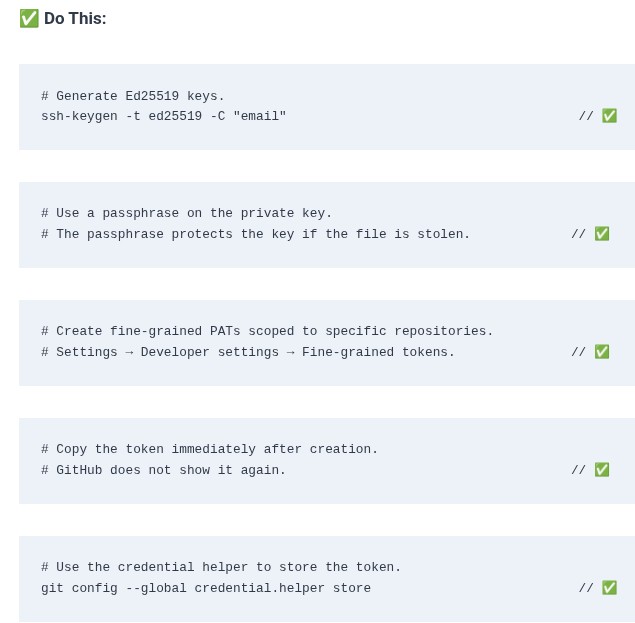
    GitHub disabled password authentication for Git operations over HTTPS in August 2021. Passwords are reused, phished, and leaked in bulk; the replacements—SSH keys and personal access tokens—are revocable, scoped, and often time-limited . The choice between them is not about which is “better.” It is about which one matches the workflow: SSH keys for your…

    Read More GitHub 03 🌐 SSH Keys and Personal Access Tokens (PATs) AuthenticationContinue

Page navigation

Previous PagePrevious 1 … 29 30 31 32 33 … 257 Next PageNext
    Search