JavaScript 3 🧬 Comments
Comments are used to explain your code or disable a portion of it. They are ignored by JavaScript and are purely for humans (including your future self).
Overview of Comment Types
| Type | Syntax | Use Case |
|---|---|---|
| Single-line | // comment | Brief explanations, inline notes |
| Multi-line | /* comment */ | Longer explanations, disabling code blocks |
a. JavaScript Comments
Comments are used to explain your code or disable a portion of it.
There are two types of comments in JavaScript:
1. Single-line comments — start with // and extend until the end of the line.
- Everything following
//is ignored by JavaScript - Used for brief explanations or to document code quickly
- Ideal for adding comments next to lines of code
2. Multi-line comments — enclosed within /* */.
- Everything between the opening
/*and closing*/is considered a comment - Useful for longer explanations or disabling a block of code
1. Single-Line Comments
Use // to comment out a single line.
// This is a single-line comment
let message = "Hello, World!"; // This comment explains the line of code

// You can use multiple single-line comments
// to create a multi-line effect
// like this

let x = 5; // Initialize x with 5
let y = 10; // Initialize y with 10
Key Points:
- Everything after
//on that line is ignored - Can be placed on their own line or at the end of a code line
- Great for quick notes and explanations
2. Multi-Line Comments
Use /* */ to comment out multiple lines.
/* This is
   a multi-line comment */

let newMessage = "Hello, World!";

/*
   This is a longer comment
   that spans multiple lines.
   It can explain complex logic
   or document a whole function.
*/
function calculateTotal(price, quantity) {
    return price * quantity;
}
Key Points:
- Can span any number of lines
- Cannot be nested (a
/* */inside another/* */will break) - Useful for function documentation and longer explanations
3. Comments for Code Documentation
JSDoc-style comments — a special convention for documenting functions:
/**
 * Calculates the total price of items.
 * @param {number} price - The price per item.
 * @param {number} quantity - The number of items.
 * @returns {number} The total price.
 */
function calculateTotal(price, quantity) {
    return price * quantity;
}

/**
 * Greets a user by name.
 * @param {string} name - The user's name.
 * @returns {string} A greeting message.
 */
function greet(name) {
    return `Hello, ${name}!`;
}
Common JSDoc tags:
| Tag | Description |
|---|---|
@param | Describes a function parameter |
@returns | Describes the return value |
@example | Provides an example |
@deprecated | Marks as deprecated |
@throws | Describes errors thrown |
@author | Author information |
@todo | Notes for future work |
4. Comments for Disabling Code
Comments are useful for temporarily disabling code during debugging.
// Single line disabled
// console.log('This will not run');

/* Multiple lines disabled
console.log('This will not run either');
alert('Nor will this');
*/

let x = 5;
console.log(x); // This still runs
Common use cases:
- Testing different code paths
- Debugging by isolating problems
- Keeping old code for reference
- Temporarily removing features
5. Comments in the Example Code
Here’s the example from the lesson, annotated:
// this is a single-line comment
let message = "Hello, World!"; // This comment explains the line of code

/* This is
   a multi-line comment */
let newMessage = "Hello, World!";

// Declaration of a variable (without initialization)
let a;

// Declaration and initialization
var x = 10;   // var — function-scoped (older)
let y = 10;   // let — block-scoped (modern)
const z = 10; // const — block-scoped, cannot be reassigned
Complete Example
<!DOCTYPE html>
<html lang="en">
<head>
    <meta charset="UTF-8">
    <meta name="viewport" content="width=device-width, initial-scale=1.0">
    <title>JavaScript Comments</title>
    <style>
        body {
            font-family: 'Segoe UI', Tahoma, Geneva, Verdana, sans-serif;
            max-width: 800px;
            margin: 0 auto;
            padding: 20px;
            background: #f8f9fa;
            color: #333;
            line-height: 1.6;
        }
        h1 { color: #007bff; border-bottom: 3px solid #007bff; padding-bottom: 10px; }
        h2 { color: #28a745; border-left: 4px solid #28a745; padding-left: 15px; margin-top: 30px; }
        .demo-box {
            background: white;
            padding: 20px;
            border-radius: 8px;
            box-shadow: 0 2px 10px rgba(0, 0, 0, 0.1);
            margin: 15px 0;
        }
        pre {
            background: #1e1e1e;
            color: #d4d4d4;
            padding: 15px;
            border-radius: 8px;
            overflow-x: auto;
            font-family: 'Courier New', monospace;
            font-size: 0.9rem;
            line-height: 1.8;
        }
        .comment { color: #6a9955; }
        .keyword { color: #569cd6; }
        .string { color: #ce9178; }
        .number { color: #b5cea8; }
        .function { color: #dcdcaa; }
        #output {
            background: #e9ecef;
            padding: 15px;
            border-radius: 8px;
            margin-top: 15px;
            min-height: 40px;
            font-family: 'Courier New', monospace;
            border-left: 4px solid #007bff;
        }
    </style>
</head>
<body>

    <h1>JavaScript Comments</h1>

    <div class="demo-box">
        <h2>1. Single-Line Comments</h2>
        <pre>
<span class="comment">// This is a single-line comment</span>
<span class="keyword">let</span> message = <span class="string">"Hello, World!"</span>; <span class="comment">// This comment explains the line of code</span>

<span class="comment">// You can stack single-line comments</span>
<span class="comment">// to create a multi-line effect</span>
<span class="comment">// like this</span>

<span class="keyword">let</span> x = <span class="number">5</span>; <span class="comment">// Initialize x with 5</span>
<span class="keyword">let</span> y = <span class="number">10</span>; <span class="comment">// Initialize y with 10</span>
        </pre>
    </div>

    <div class="demo-box">
        <h2>2. Multi-Line Comments</h2>
        <pre>
<span class="comment">/* This is
   a multi-line comment */</span>

<span class="keyword">let</span> newMessage = <span class="string">"Hello, World!"</span>;

<span class="comment">/*
   This is a longer comment
   that spans multiple lines.
   It can explain complex logic.
*/</span>
<span class="keyword">function</span> <span class="function">calculateTotal</span>(price, quantity) {
    <span class="keyword">return</span> price * quantity;
}
        </pre>
    </div>

    <div class="demo-box">
        <h2>3. Variable Declarations with Comments</h2>
        <pre>
<span class="comment">// Declaration of a variable (without initialization)</span>
<span class="keyword">let</span> a;

<span class="comment">// Declaration and initialization</span>
<span class="keyword">var</span> x = <span class="number">10</span>;   <span class="comment">// var — function-scoped (older)</span>
<span class="keyword">let</span> y = <span class="number">10</span>;   <span class="comment">// let — block-scoped (modern)</span>
<span class="keyword">const</span> z = <span class="number">10</span>; <span class="comment">// const — block-scoped, cannot be reassigned</span>
        </pre>
    </div>

    <div class="demo-box">
        <h2>4. Comments for Disabling Code</h2>
        <pre>
<span class="comment">// Single line disabled</span>
<span class="comment">// console.log('This will not run');</span>

<span class="comment">/* Multiple lines disabled
console.log('This will not run either');
alert('Nor will this');
*/</span>

<span class="keyword">let</span> visible = <span class="string">"I am visible"</span>;
console.log(visible); <span class="comment">// This still runs</span>
        </pre>
    </div>

    <div class="demo-box">
        <h2>5. JSDoc Comments</h2>
        <pre>
<span class="comment">/**
 * Calculates the total price of items.
 * @param {number} price - The price per item.
 * @param {number} quantity - The number of items.
 * @returns {number} The total price.
 */</span>
<span class="keyword">function</span> <span class="function">calculateTotal</span>(price, quantity) {
    <span class="keyword">return</span> price * quantity;
}
        </pre>
    </div>

    <div class="demo-box">
        <h2>6. Live Output</h2>
        <p>Open the console (F12) to see which logs actually run:</p>
        <div id="output">Check the console...</div>
    </div>

    <script>
        // ============================================
        // JavaScript Comments — Live Demo
        // ============================================

        // This line runs
        console.log('✅ This line runs (not commented)');

        // console.log('❌ This line does NOT run (single-line comment)');

        /*
        console.log('❌ This line does NOT run (multi-line comment)');
        console.log('❌ Neither does this one');
        */

        let message = "Hello, World!"; // Inline comment
        console.log('✅ Message:', message);

        // Update the output div
        document.getElementById('output').textContent =
            '✅ Check the console (F12) — only uncommented code ran!';

        /*
           This is a multi-line comment
           used for documentation
        */
    </script>

</body>
</html>
Comments Reference
| Type | Syntax | Example |
|---|---|---|
| Single-line | // comment | // This is a comment |
| Multi-line | /* comment */ | /* This is a\n multi-line comment */ |
| JSDoc | /** ... */ | /** @param {number} x */ |
| Inline | code // comment | let x = 5; // set x to 5 |
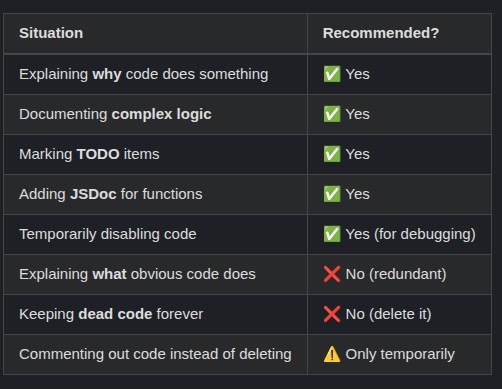
When to Use Comments
| Situation | Recommended? |
|---|---|
| Explaining why code does something | ✅ Yes |
| Documenting complex logic | ✅ Yes |
| Marking TODO items | ✅ Yes |
| Adding JSDoc for functions | ✅ Yes |
| Temporarily disabling code | ✅ Yes (for debugging) |
| Explaining what obvious code does | ❌ No (redundant) |
| Keeping dead code forever | ❌ No (delete it) |
| Commenting out code instead of deleting | ⚠️ Only temporarily |
Best Practices
✅ Do This:
// Calculate the total price including tax
function calculateTotal(price, quantity) {
    const TAX_RATE = 0.08; // 8% sales tax
    return price * quantity * (1 + TAX_RATE);
}

/**
 * Greets a user by name.
 * @param {string} name - The user's name.
 * @returns {string} A greeting message.
 */
function greet(name) {
    return `Hello, ${name}!`;
}

// TODO: Add validation for negative numbers
function processOrder(quantity) {
    return quantity * 10;
}
❌ Don’t Do This:
// Increment x by 1
x++; // Redundant — obvious from the code

// Set name to "John"
let name = "John"; // Redundant

// This function adds two numbers
function add(a, b) {
    return a + b; // Redundant comment
}

// Don't leave commented-out code forever
// function oldFunction() {
//     // ... 50 lines of old code
// }
Comment Shortcuts in VS Code
| Shortcut | Action |
|---|---|
Ctrl + / (Windows/Linux) | Toggle line comment |
Cmd + / (Mac) | Toggle line comment |
Shift + Alt + A (Windows/Linux) | Toggle block comment |
Shift + Option + A (Mac) | Toggle block comment |
Pro Tip: Comments should explain WHY you wrote the code, not WHAT the code does. If your code needs a comment to explain what it does, consider rewriting it to be more self-explanatory. Use comments for:
- Non-obvious decisions (“We use this algorithm because…”)
- Warnings (“Don’t change this without updating…”)
- Context (“This is a workaround for…”)
- Documentation (JSDoc for public functions)
And remember: commented-out code is not a backup — that’s what Git is for. Delete it!
Stop using slow, ad-bloated tool sites! 🤮
🔎 Search “KandZ Tools” on Google to use many professional utilities for free.
KandZ.me is the ultimate minimalist hub for:
✅ Finance (Mortgage, Interest, Inflation)
✅ Tech (Base64, JSON, Dev Suite, IP)
✅ Health (BMI, BMR, TDEE)
✅ Productivity (Timer, Workspace, QR)
⚡️ Fast & Private
🔒 No data leaves your device
💎 100% Free
🔗 Use it now: https://tools.kandz.me
🔖 Bookmark it—you’ll need it later!