Docker 72 🐳 Alternative Container Runtimes: CRI-O, Podman (Podman vs Docker Differences)
The container runtime landscape is not a single tool but a layered ecosystem, and understanding the alternatives requires understanding what problem each one solves. CRI-O and Podman are both Red Hat-originated projects that emerged from the same architectural insight: Docker’s monolithic daemon was too much for most use cases, and the OCI specifications made it possible to decompose Docker into smaller, purpose-built tools. CRI-O exists for one purpose—to be the container runtime for Kubernetes, nothing more. Podman exists for a different purpose—to be a daemonset, rootless replacement for the Docker CLI that a developer or administrator uses directly. They are not competitors; they occupy different layers of the stack.
The relationship between Podman and Docker is the one that matters for daily work. Podman’s CLI is deliberately compatible with Docker’s, and most Docker commands work with podman substituted for docker. But the alias hides a fundamental architectural difference: Docker runs a privileged daemon (dockerd) that owns every container on the host, while Podman has no daemon at all. Each Podman container is a child process of the command that started it, managed by conmon and, for long-running services, by systemd. This difference determines the security posture, the failure mode, and the operational model.
Key point: CRI-O is a Kubernetes-only CRI runtime that does nothing but run OCI containers for kubelet; Podman is a daemonless, rootless Docker-compatible CLI for direct container management. Podman is not a CRI runtime and does not replace CRI-O. Docker’s daemon is a single point of failure and a root-level attack surface; Podman eliminates the daemon and defaults to rootless execution, at the cost of some ecosystem maturity and Compose parity.
Why CRI-O and Podman exist
The “do one thing” problem. Docker was designed to build images, run containers, manage networks, and orchestrate clusters. Kubernetes needs only the “run containers” part. Every additional capability in the runtime is additional attack surface and additional code that can break when Kubernetes changes. CRI-O was built to do exactly what Kubernetes needs and nothing else. Its stated goal is “to never break Kubernetes” .
The CRI alignment problem. Kubernetes defines the Container Runtime Interface (CRI) as the API between the kubelet and the runtime. CRI-O is released in lock-step with Kubernetes: CRI-O 1.10 matches Kubernetes 1.10, CRI-O 1.11 matches Kubernetes 1.11, and so on . When the CRI specification changes, CRI-O changes in the matching release. This tight coupling is the opposite of Docker’s independent release cycle, and it is what makes CRI-O a reliable Kubernetes component.
The OCI delegation problem. CRI-O does not implement the container lifecycle itself. It delegates to an OCI-compatible runtime like runc or crun to create the actual container process. It uses the containers/image library to pull images and the containers/storage library to unpack them. It uses CNI plugins for networking. Every layer is a standard component with a standard interface, and CRI-O is the glue that connects them to the kubelet .
The daemon problem. Docker’s dockerd is a root-level process that supervises every container on the host. If it crashes, every container is affected. The socket it exposes is a root-level interface: anyone who can access it can spawn a privileged container and escalate to root. Podman removes the daemon entirely. Each container is a child process of the command that started it, and the conmon utility handles logging and supervision. The root inside the container is mapped to the invoking user’s UID via user namespaces .
The rootless problem. Docker runs as root by default. Podman runs as the invoking user by default. The root inside the container is mapped to the user’s UID on the host, and the container has only the privileges of that user. A compromised container is limited to the user’s permissions, not root. This is a security improvement, but it has operational consequences for volume mounts, SELinux labels, and registry credentials .
The Kubernetes alignment problem. Podman’s orchestration story is Kubernetes. podman generate kube converts running containers and pods into Kubernetes YAML, and podman play kube runs a Kubernetes YAML file locally . For teams already using Kubernetes, this is a native path. Docker’s orchestration story is Compose and Swarm, which are not Kubernetes.
a. CRI-O: the Kubernetes-only runtime
CRI-O is not a user-facing tool. It is the runtime that kubelet talks to on a Kubernetes node. It implements the CRI API and delegates the actual container lifecycle to an OCI runtime.
The components are standard and replaceable. The image pull and unpack are handled by containers/image and containers/storage. The container execution is handled by runc or crun. The networking is handled by CNI plugins. CRI-O’s job is to translate CRI requests into these lower-level operations.
The version alignment is deliberate. CRI-O 1.10 matches Kubernetes 1.10, CRI-O 1.11 matches Kubernetes 1.11, and so on. The project’s release notes state that “CRI-O is released in lock-step with Kubernetes” . When Kubernetes adds a new CRI feature, CRI-O adds it in the matching release.
# On a Kubernetes node, CRI-O is the runtime endpoint
# kubelet is configured with:
# --container-runtime-endpoint=unix:///var/run/crio/crio.sock

# Check the runtime status
crio status

# Check the CRI version
crictl version

# List containers managed by CRI-O
crictl ps

# List images pulled by CRI-O
crictl images
The crictl tool is the CRI-compatible CLI. It is not a Docker replacement; it is for inspecting and debugging the CRI runtime. crictl ps shows the containers that kubelet is running, crictl images shows the images that CRI-O has pulled, and crictl logs shows the logs of a specific container.
CRI-O graduated from the CNCF in July 2023, with adopters including Lyft, Reddit, Adobe, and IBM . It is the default runtime in OpenShift and is available as an alternative to containerd on any Kubernetes node.
b. Podman: the daemonless CLI
Podman is a Docker-compatible CLI. The commands are the same, and most Docker workflows work with podman substituted. The difference is the architecture: no daemon, rootless by default, and systemd integration for long-running services.
The daemonless model means the container is a child process of the podman command. When the command exits, the conmon process continues to supervise the container and handle logging. If you want the container to start at boot and restart on failure, you generate a systemd unit with podman generate systemd and let systemd supervise it.
# Run an nginx container with port publishing
# The container is a child of this command, not a daemon
podman run -d --name web -p 8080:80 nginx:latest

# List running containers
podman ps

# Generate a systemd unit for the container
# --name web: use the container name in the unit
# --files: write the unit to a file
# --new: create a new container on each start
podman generate systemd --name web --files --new

# Enable and start the service
# systemd is the supervisor, not a daemon
systemctl --user enable --now container-web.service

# The container starts at boot and restarts on failure
The rootless model means the container runs with the user’s UID, not root. The root inside the container is mapped to the user’s UID on the host via user namespaces. This is a security improvement, but it has consequences.
Volume mounts that worked under Docker may fail under Podman because the UID mapping means the container cannot write to a directory owned by a different UID. On SELinux-enabled systems (RHEL, Fedora), the :z or :Z suffix on the volume flag is required to relabel the directory for the container.
# This may fail under rootless Podman
podman run -v /host/data:/data nginx

# The fix is the :Z suffix for SELinux relabeling
podman run -v /host/data:/data:Z nginx

# Or fix the ownership of the host directory
sudo chown -R $(id -u):$(id -g) /host/data
The Kubernetes integration is Podman’s differentiator. podman generate kube converts a pod to a Kubernetes YAML file, and podman play kube runs a Kubernetes YAML file locally.
# Create a pod with two containers
podman pod create --name myapp -p 8080:80

# Run the containers inside the pod
podman run -d --pod myapp --name web nginx:latest
podman run -d --pod myapp --name redis redis:latest

# Generate Kubernetes YAML from the pod
podman generate kube myapp > myapp.yaml

# Apply the YAML to a Kubernetes cluster
kubectl apply -f myapp.yaml

# Or run the YAML locally
podman play kube myapp.yaml
The generated YAML contains the pod, the containers, and the port mapping. It can be applied to a Kubernetes cluster or run locally. This makes Podman a better local development environment for workloads that will eventually run on Kubernetes, because the local topology matches the production topology.
c. Podman vs Docker: the practical differences
The CLI compatibility is real, and most Docker commands work with podman substituted. The differences appear in the areas where the architecture matters.
| Aspect | Docker | Podman |
|---|---|---|
| Architecture | Daemon (dockerd) | Daemonless |
| Default privilege | Root | Rootless |
| Single point of failure | Daemon | None |
| Compose | Native | podman-compose |
| Swarm | Yes | No |
| Pods | No | Yes |
| Kubernetes YAML | No | generate kube |
| Desktop cost | Paid for teams | Free |
| Ecosystem maturity | Larger | Growing |
The Compose difference is the most practical. Docker Compose is the standard tool for local multi-container development. Podman supports Compose through a separate podman-compose utility that is not always installed by default, and its parity with Docker Compose is not complete. For teams using Compose, Docker is still the more reliable choice.
The Swarm difference is absolute. Docker has a built-in orchestrator. Podman has no equivalent. If you are using Swarm, Podman is not a replacement.
The desktop difference is licensing. Docker Desktop requires a paid subscription for larger teams. Podman Desktop is a free alternative, but its Windows and macOS experience runs through a Podman machine VM that has a shorter track record than Docker Desktop’s virtualization layer.
The performance difference is negligible. Both use the same low-level OCI runtimes (runc or crun), so the runtime performance of the containers themselves is equivalent. The difference is in startup and idle overhead. Docker’s daemon is always running, so starting a container is marginally faster. Podman has no daemon, so idle overhead is zero, but each podman run has to initialize the container runtime. For CI pipelines that run many short-lived containers, the daemonless model can be faster overall.
Complete Example Session
The following session shows the same operations in Docker and Podman, the systemd integration that replaces the daemon, and the Kubernetes manifest generation that replaces Compose for teams moving to Kubernetes.
# ============================================
# PART 1: THE SAME COMMANDS IN DOCKER AND PODMAN
# ============================================
# Run an nginx container with port publishing
docker run -d --name web -p 8080:80 nginx:latest
podman run -d --name web -p 8080:80 nginx:latest

# List running containers
docker ps
podman ps

# View logs
docker logs web
podman logs web

# Execute a command inside the container
docker exec -it web sh
podman exec -it web sh

# The CLI is compatible; the architecture is not

# ============================================
# PART 2: THE SYSTEMD INTEGRATION
# ============================================
# Docker relies on the daemon and restart policies
# Podman generates a systemd unit for the container

# Generate a systemd unit file for the container
podman generate systemd --name web --files --new

# The generated unit:
# [Unit]
# Description=Podman container-web.service
# [Service]
# Restart=on-failure
# ExecStart=/usr/bin/podman run --name web -p 8080:80 nginx:latest
# ExecStop=/usr/bin/podman stop -t 10 web
# [Install]
# WantedBy=default.target

# Enable and start the service
systemctl --user enable --now container-web.service

# The container now starts at boot and restarts on failure
# systemd is the supervisor, not a daemon

# ============================================
# PART 3: THE KUBERNETES MANIFEST GENERATION
# ============================================
# Docker Compose is the local orchestration tool
# Podman can convert a pod to Kubernetes YAML

# Create a pod with two containers
podman pod create --name myapp -p 8080:80
podman run -d --pod myapp --name web nginx:latest
podman run -d --pod myapp --name redis redis:latest

# Generate Kubernetes YAML from the pod
podman generate kube myapp > myapp.yaml

# The YAML contains the pod, the containers, and the port mapping
# It can be applied to a Kubernetes cluster
kubectl apply -f myapp.yaml

# ============================================
# PART 4: THE ROOTLESS VOLUME MOUNT ISSUE
# ============================================
# Docker (rootful) allows this silently
docker run -v /host/data:/data nginx

# Podman (rootless) may reject it because of UID mapping
# The fix is the :Z suffix for SELinux relabeling
podman run -v /host/data:/data:Z nginx

# Or fix the ownership of the host directory
sudo chown -R $(id -u):$(id -g) /host/data

# ============================================
# PART 5: THE CRI-O ROLE
# ============================================
# CRI-O is not a user-facing tool
# It is the runtime that kubelet talks to on a Kubernetes node
# To use CRI-O instead of containerd:
# 1. Install CRI-O on the node
# 2. Configure kubelet with --container-runtime-endpoint=unix:///var/run/crio/crio.sock
# 3. Restart kubelet
# CRI-O then handles all image pulls and container execution for the node
The five parts cover the CLI compatibility, the systemd integration that replaces the daemon, the Kubernetes manifest generation, the rootless volume mount issue, and the CRI-O role. What the session demonstrates is that Podman is a drop-in replacement for the CLI but not for the architecture, and that the architectural difference is what determines the operational model.
Quick Reference
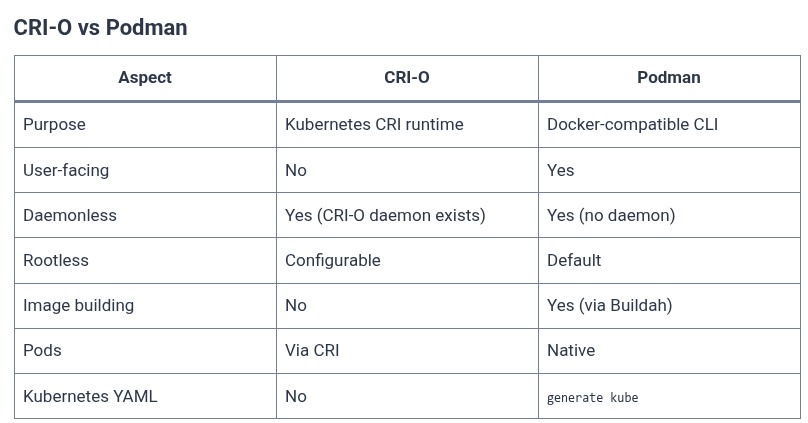
CRI-O vs Podman
| Aspect | CRI-O | Podman |
|---|---|---|
| Purpose | Kubernetes CRI runtime | Docker-compatible CLI |
| User-facing | No | Yes |
| Daemonless | Yes (CRI-O daemon exists) | Yes (no daemon) |
| Rootless | Configurable | Default |
| Image building | No | Yes (via Buildah) |
| Pods | Via CRI | Native |
| Kubernetes YAML | No | generate kube |
Podman vs Docker
| Aspect | Docker | Podman |
|---|---|---|
| Architecture | Daemon (dockerd) | Daemonless |
| Default privilege | Root | Rootless |
| Single point of failure | Daemon | None |
| Compose | Native | podman-compose |
| Swarm | Yes | No |
| Pods | No | Yes |
| Kubernetes YAML | No | generate kube |
| Desktop cost | Paid for teams | Free |
| Ecosystem maturity | Larger | Growing |
When to Use Which
| Situation | Choice |
|---|---|
| Kubernetes node runtime | CRI-O or containerd |
| Local development, Docker familiar | Docker |
| Rootless, security-sensitive | Podman |
| RHEL/Fedora, SELinux | Podman |
| Docker Swarm | Docker |
| Kubernetes-first workflow | Podman |
Best Practices
✅ Do This:
# Use Podman rootless by default
podman run --rm -it alpine

# Add :Z for SELinux volume mounts
podman run -v /data:/data:Z nginx

# Generate systemd units for long-running containers
podman generate systemd --name web --files --new

# Use generate kube for Kubernetes-ready manifests
podman generate kube mypod > mypod.yaml
❌ Don’t Do This:
# Assume Docker Compose works perfectly
podman-compose up # test edge cases first

# Use Podman as a Kubernetes runtime
# Podman is not a CRI runtime; use CRI-O or containerd

# Ignore rootless volume permission issues
podman run -v /data:/data nginx # may fail without :Z

# Assume Swarm works on Podman
# Podman has no Swarm equivalent
Common Pitfalls
| Pitfall | Why It Happens | Fix |
|---|---|---|
| Registry auth fails | Credentials stored differently | podman login explicitly |
| Volume mount permission denied | Rootless UID mapping | :Z suffix or fix ownership |
| Compose file fails | podman-compose not installed | Install and test parity |
| Swarm does not work | Podman has no Swarm | Use Kubernetes or Docker |
| CI Docker-in-Docker fails | No daemon to nest | Use rootless Podman or Buildah |
Real-World Examples
1. Podman run
podman run -d --name web -p 8080:80 nginx:latest2. Docker run
docker run -d --name web -p 8080:80 nginx:latest3. Podman systemd unit
podman generate systemd --name web --files --new4. Podman Kubernetes YAML
podman generate kube myapp > myapp.yaml5. Podman play kube
podman play kube myapp.yaml6. Rootless volume with SELinux
podman run -v /data:/data:Z nginx7. CRI-O runtime endpoint
kubelet --container-runtime-endpoint=unix:///var/run/crio/crio.sock8. CRI-O status
crio status9. Podman pod creation
podman pod create --name myapp -p 8080:8010. Podman Compose
podman-compose up -dVisual
The Runtime Layers
┌──────────────────────────────────────────────┐
│  KUBERNETES                                  │
│         │                                    │
│         ▼                                    │
│  CRI (Container Runtime Interface)           │
│         │                                    │
│    ┌────┴────┐                               │
│    │         │                               │
│    ▼         ▼                               │
│  CRI-O    containerd                         │
│    │         │                               │
│    └────┬────┘                               │
│         ▼                                    │
│  OCI Runtime (runc / crun)                   │
│         │                                    │
│         ▼                                    │
│  Linux kernel (namespaces, cgroups)          │
└──────────────────────────────────────────────┘
Daemon vs Daemonless
┌──────────────────────────────────────────────┐
│  DOCKER (daemon)                             │
│  docker CLI → dockerd → containerd → runc    │
│  daemon supervises all containers            │
│  daemon crash = all containers affected      │
│                                              │
│  PODMAN (daemonless)                         │
│  podman CLI → conmon → runc                  │
│  each container is a child of the command    │
│  no central process to crash                 │
└──────────────────────────────────────────────┘
Rootless UID Mapping
┌──────────────────────────────────────────────┐
│  HOST                                        │
│  user UID 1000                               │
│         │                                    │
│         ▼                                    │
│  USER NAMESPACE                              │
│  root inside container → UID 1000 on host   │
│         │                                    │
│         ▼                                    │
│  CONTAINER                                   │
│  process runs as root inside                 │
│  but only has user 1000's privileges on host │
└──────────────────────────────────────────────┘
Podman Kubernetes Workflow
┌──────────────────────────────────────────────┐
│  podman pod create --name myapp              │
│  podman run --pod myapp web                  │
│  podman run --pod myapp redis                │
│         │                                    │
│         ▼                                    │
│  podman generate kube myapp                  │
│         │                                    │
│         ▼                                    │
│  myapp.yaml                                  │
│         │                                    │
│    ┌────┴────┐                               │
│    │         │                               │
│    ▼         ▼                               │
│  kubectl   podman                            │
│  apply     play kube                         │
└──────────────────────────────────────────────┘
Summary
| Item | Value |
|---|---|
| CRI-O purpose | Kubernetes CRI runtime |
| Podman purpose | Docker-compatible CLI |
| Podman architecture | Daemonless |
| Docker architecture | Daemon (dockerd) |
| Rootless | Podman default; Docker opt-in |
| Pods | Podman native; Docker no |
| Kubernetes YAML | Podman generate kube |
| CRI-O graduation | CNCF, July 2023 |
Key takeaways:
- CRI-O and Podman solve different problems. CRI-O is the Kubernetes runtime that does nothing but run OCI containers for kubelet. Podman is the user-facing CLI that replaces Docker for direct container management. They are not alternatives to each other.
- Podman’s daemonless architecture eliminates the single point of failure. Docker’s
dockerdis a root-level process that supervises every container; if it crashes, every container is affected. Podman has no daemon, so a container’s lifecycle is independent of the tool that started it. - Podman defaults to rootless. The root inside the container is mapped to the invoking user’s UID on the host. This is a security improvement, but it requires attention to volume mount ownership and SELinux labels.
- The CLI is compatible, but the ecosystem is not. Most Docker commands work with
podmansubstituted. Compose works through a separate wrapper, Swarm has no equivalent, and the desktop experience is less polished. - Podman’s Kubernetes alignment is its differentiator.
podman generate kubeconverts local pods to Kubernetes YAML, andpodman play kuberuns Kubernetes YAML locally. This makes Podman a better local development environment for Kubernetes workloads. - Docker’s ecosystem is still larger. Docker Hub, Docker Compose, Docker Desktop, and the broader third-party tool support are more mature. The choice depends on whether the security and Kubernetes alignment of Podman outweigh the ecosystem maturity of Docker.
Remember: The container runtime landscape is layered. CRI-O is the Kubernetes runtime, designed to do one thing and do it well. Podman is the user-facing CLI, designed to be a drop-in Docker replacement without the daemon and without the root privilege. Docker is the full platform, with the daemon, the Compose ecosystem, and the desktop experience. The choice is not about which is “better”—it is about which layer you are working at and what constraints you have. For a Kubernetes node, CRI-O or containerd is the right runtime. For a developer on RHEL who wants rootless containers and Kubernetes-native workflows, Podman is the right CLI. For a team that needs Docker Compose, Docker Swarm, or the Docker Desktop GUI, Docker is still the right platform.
Stop using slow, ad-bloated tool sites! 🤮
🔎 Search “KandZ Tools” on Google to use many professional utilities for free.
KandZ.me is the ultimate minimalist hub for:
✅ Finance (Mortgage, Interest, Inflation)
✅ Tech (Base64, JSON, Dev Suite, IP)
✅ Health (BMI, BMR, TDEE)
✅ Productivity (Timer, Workspace, QR)
⚡️ Fast & Private
🔒 No data leaves your device
💎 100% Free
🔗 Use it now: https://tools.kandz.me
🔖 Bookmark it—you’ll need it later!