Skip to content

KandZ - Tuts

  • Operating Systems ▾
    • Linux ▾
      • Distros ▾
        • Fedora
        • Other Distros
        • Ubuntu
      • Gnome 48
      • KDE
      • LFCA - Linux Foundation Certified IT Associate
      • LFCS - Linux Foundation Certified Sysadmin
      • LFCE - Linux Foundation Certified Engineer (Sysadmin + Network Admin)
      • Linux CLI
      • Various
      • Bash Scripting
  • Paths ▾
    • Core Web Stack
    • React & Modern UI Stack
    • Linux Core
  • Programming ▾
    • Frontend (FED) ▾
      • React Ecosystem ▾
        • React
        • React Router
        • TanStack Router
        • TanStack Query (React Query)
        • Zustand
        • Redux Toolkit
      • Angular Ecosystem ▾
        • Angular
      • Vue Ecosystem ▾
        • Vue.js
      • Styling & UI Components ▾
        • Tailwind CSS
    • Languages & Runtimes ▾
      • CSS
      • Dart
      • HTML
      • JavaScript
      • Node.js
      • Rust
      • SQL
      • TypeScript
    • Tools & Build Systems ▾
      • Version Control ▾
        • GitHub
        • Git
        • GitLab
      • Package Managers ▾
        • npm
        • Bun
        • yarn
        • pnpm
      • DevOps & Containers ▾
        • Docker
  • Servers & Self-Hosting ▾
    • Internet ▾
      • Internet Backend - Coming Soon
      • Internet Beginner
      • Internet Frontend - Coming Soon
    • Networking & DNS ▾
      • REST API
  • Tools
  • Windows ▾
    • Windows 11
KandZ - Tuts
AngularBunCSSDartDockerGitGitHubGitLabHTMLJavaScriptNode.jsnpmpnpmReactReact RouterRedux ToolkitRustSQLTailwind CSSTanStack Query (React Query)TanStack RouterTypeScriptVue.jsyarnZustandBash ScriptingFedoraGnome 48KDELFCA - Linux Foundation Certified IT AssociateLFCE - Linux Foundation Certified Engineer (Sysadmin + Network Admin)LFCS - Linux Foundation Certified SysadminLinux CLIOther DistrosUbuntuVariousCore Web StackInternet Backend - Coming SoonInternet BeginnerInternet Frontend - Coming SoonLinux CoreReact & Modern UI StackREST APIToolsWindows 11
  • Yarn 11 🧶 Offline Caching and Mirroring
    Programming | Tools & Build Systems | yarn

    Yarn 11 🧶 Offline Caching and Mirroring

    ByKandZ October 26, 2026October 26, 2026

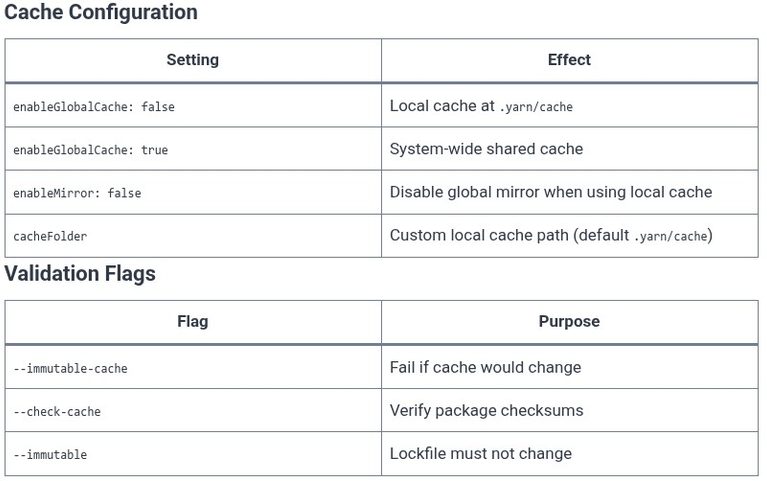
    Every yarn install is a network request away from failure. The npm registry can go down, a corporate proxy can block a scoped package, or a build server can be air-gapped entirely. Yarn’s offline caching and mirroring features exist to eliminate that dependency: once packages are downloaded, they are stored locally and can be reused…
    Read More Yarn 11 🧶 Offline Caching and MirroringContinue

  • GitHub 15 🌐 GitHub Pages: Hosting Static Sites
    Programming | GitHub | Tools & Build Systems

    GitHub 15 🌐 GitHub Pages: Hosting Static Sites

    ByKandZ October 26, 2026October 26, 2026

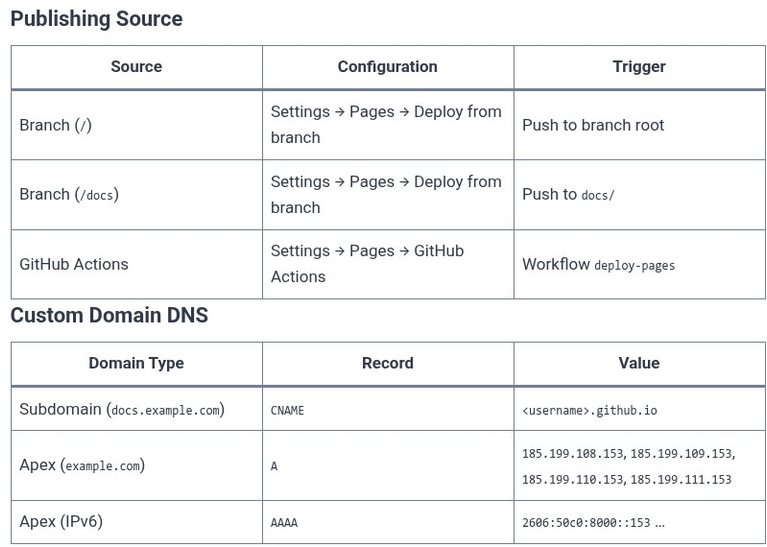
    GitHub Pages turns a repository into a static website. It is not a general-purpose web host. It serves HTML, CSS, JavaScript, and assets directly from a branch or a GitHub Actions artifact, with no server-side execution, no database, and no dynamic request handling. For documentation, project landing pages, and personal blogs, it is free, integrated…

    Read More GitHub 15 🌐 GitHub Pages: Hosting Static SitesContinue

  • GitHub 14 🌐 GitHub Releases, Tags, and Versioning
    Programming | GitHub | Tools & Build Systems

    GitHub 14 🌐 GitHub Releases, Tags, and Versioning

    ByKandZ October 26, 2026October 26, 2026

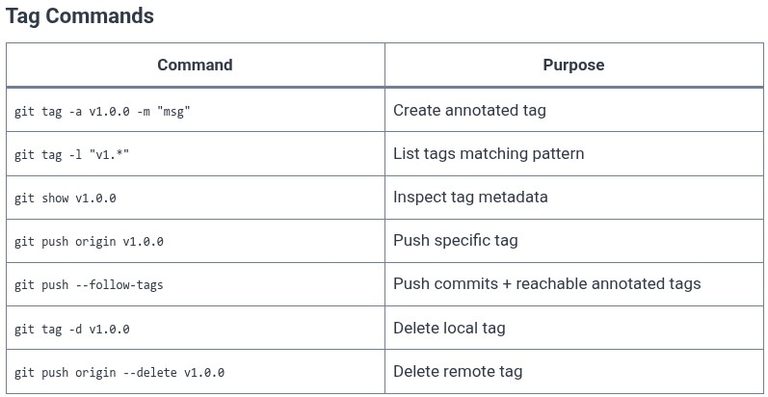
    A tag is a Git concept: a fixed pointer to a specific commit that never moves. A release is a GitHub concept layered on top of a tag: a page with release notes and downloadable binary artifacts. Confusing the two is common. You can tag a commit without creating a release, but you cannot create…

    Read More GitHub 14 🌐 GitHub Releases, Tags, and VersioningContinue

  • GitHub 13 🌐 Managing Project Boards and GitHub Projects (v2)
    Programming | GitHub | Tools & Build Systems

    GitHub 13 🌐 Managing Project Boards and GitHub Projects (v2)

    ByKandZ October 26, 2026October 26, 2026

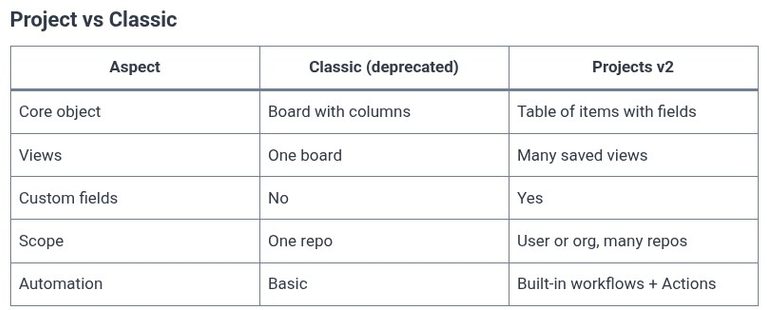
    GitHub Projects (v2) is not a board. It is a database with multiple views. This distinction is the single most important concept to internalize before touching the interface. The classic Projects product—columns of cards, one board per repository—is deprecated and being retired. The modern Projects product stores items as rows in a table, and the…

    Read More GitHub 13 🌐 Managing Project Boards and GitHub Projects (v2)Continue

  • GitHub 12 🌐 Branch Protection Rules and CODEOWNERS
    Programming | GitHub | Tools & Build Systems

    GitHub 12 🌐 Branch Protection Rules and CODEOWNERS

    ByKandZ October 26, 2026October 26, 2026

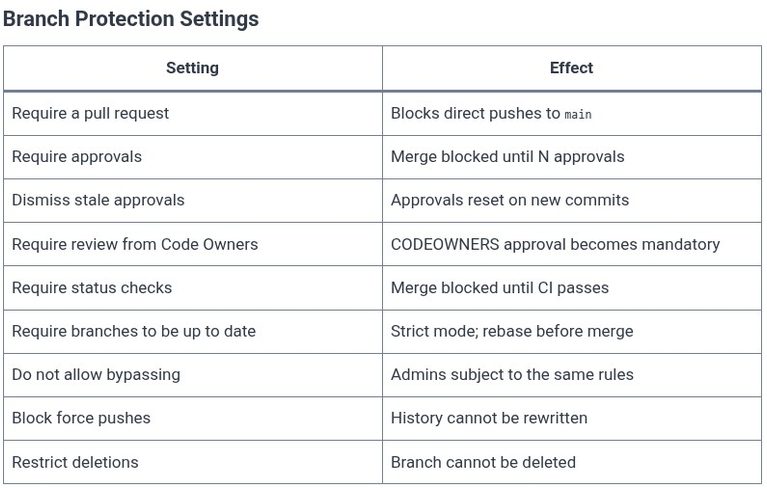
    A repository is only as safe as the gates that guard its main branch. Branch protection rules are those gates: they define who can push, what must pass before a merge, and whether history can be rewritten. CODEOWNERS is the routing table that ensures the right people review the right files. Used together, they turn…

    Read More GitHub 12 🌐 Branch Protection Rules and CODEOWNERSContinue

  • GitHub 11 🌐 Merging PRs: Merge, Squash, and Rebase Strategies
    Programming | GitHub | Tools & Build Systems

    GitHub 11 🌐 Merging PRs: Merge, Squash, and Rebase Strategies

    ByKandZ October 26, 2026October 26, 2026

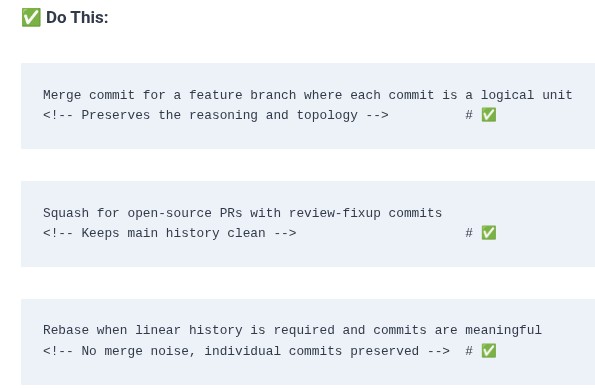
    A pull request is the proposal. Merging is the execution. When a pull request is approved and its checks pass, GitHub offers three distinct buttons: “Merge commit”, “Squash and merge”, and “Rebase and merge”. These are not cosmetic variations of the same action. Each produces a fundamentally different shape of Git history, and the choice…

    Read More GitHub 11 🌐 Merging PRs: Merge, Squash, and Rebase StrategiesContinue

  • LFCS 100 🐧 NetworkManager — nmcli Basics
    Linux | Operating Systems | LFCS - Linux Foundation Certified Sysadmin

    LFCS 100 🐧 NetworkManager — nmcli Basics

    ByKandZ October 26, 2026October 26, 2026

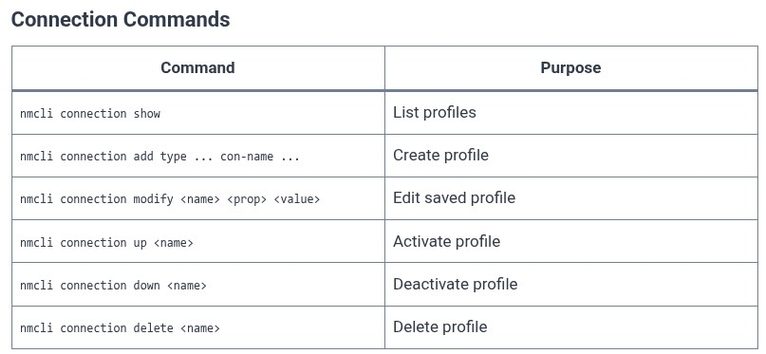
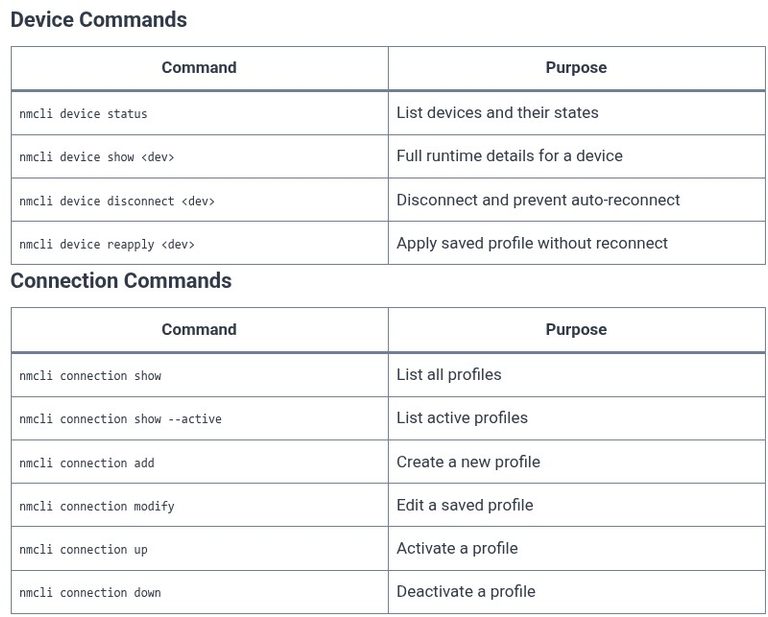
    The nmcli command is the primary interface for NetworkManager. It translates human-readable commands into D-Bus messages that the daemon processes. The LFCS exam tests the command syntax for creating, modifying, activating, and deleting connections, with particular attention to the distinction between modifying a profile (which saves the configuration) and activating it (which applies the configuration…

    Read More LFCS 100 🐧 NetworkManager — nmcli BasicsContinue

  • LFCS 99 🐧 NetworkManager — Concepts
    Linux | Operating Systems | LFCS - Linux Foundation Certified Sysadmin

    LFCS 99 🐧 NetworkManager — Concepts

    ByKandZ October 26, 2026October 26, 2026

    NetworkManager is a daemon that manages network interfaces and connections on modern Linux systems. It is not a configuration file format or a wrapper around ip—it is a privileged service that runs in the background, detecting hardware, activating profiles, and applying configuration through the kernel. The LFCS exam tests the conceptual model: the separation between…

    Read More LFCS 99 🐧 NetworkManager — ConceptsContinue

  • LFCS 98 🐧 Routing Table — ip route
    Linux | Operating Systems | LFCS - Linux Foundation Certified Sysadmin

    LFCS 98 🐧 Routing Table — ip route

    ByKandZ October 26, 2026October 26, 2026

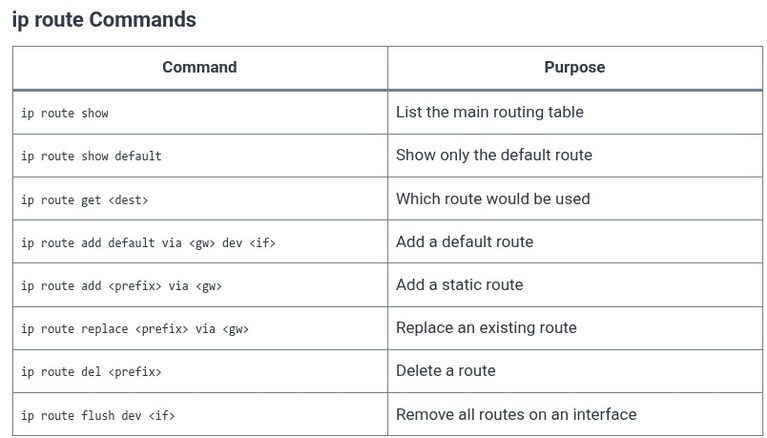
    The routing table is the kernel’s map of where to send packets. Every packet destined for an address that is not on a directly connected subnet must be matched against a route entry to determine the next hop—the gateway that will forward the packet toward its destination. Without a default route, a host can only…

    Read More LFCS 98 🐧 Routing Table — ip routeContinue

  • LFCS 97 🐧 Network Interfaces — ip link
    Linux | Operating Systems | LFCS - Linux Foundation Certified Sysadmin

    LFCS 97 🐧 Network Interfaces — ip link

    ByKandZ October 26, 2026October 26, 2026

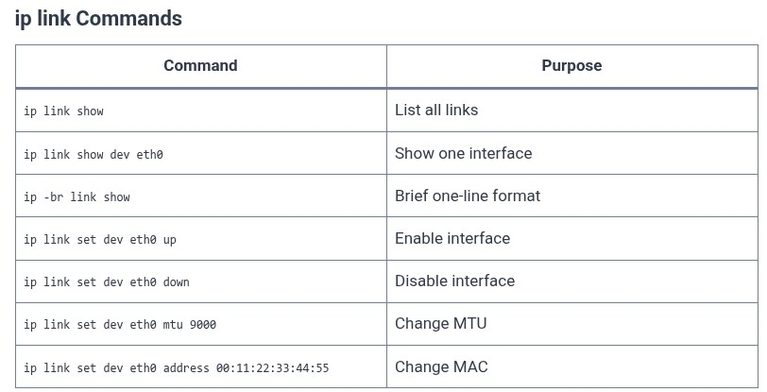
    The previous chapter covered ip addr, which manages Layer 3 protocol addresses. But an address is meaningless if the underlying link is administratively disabled. The ip link command operates one layer below: it manages the network device itself—bringing it up or down, changing its MTU, altering its MAC address, and creating virtual devices like bridges,…

    Read More LFCS 97 🐧 Network Interfaces — ip linkContinue

Page navigation

Previous PagePrevious 1 … 25 26 27 28 29 … 257 Next PageNext
    Search