Skip to content

KandZ - Tuts

  • Operating Systems ▾
    • Linux ▾
      • Distros ▾
        • Fedora
        • Other Distros
        • Ubuntu
      • Gnome 48
      • KDE
      • LFCA - Linux Foundation Certified IT Associate
      • LFCS - Linux Foundation Certified Sysadmin
      • LFCE - Linux Foundation Certified Engineer (Sysadmin + Network Admin)
      • Linux CLI
      • Various
      • Bash Scripting
  • Paths ▾
    • Core Web Stack
    • React & Modern UI Stack
    • Linux Core
  • Programming ▾
    • Frontend (FED) ▾
      • React Ecosystem ▾
        • React
        • React Router
        • TanStack Router
        • TanStack Query (React Query)
        • Zustand
        • Redux Toolkit
      • Angular Ecosystem ▾
        • Angular
      • Vue Ecosystem ▾
        • Vue.js
      • Styling & UI Components ▾
        • Tailwind CSS
    • Languages & Runtimes ▾
      • CSS
      • Dart
      • HTML
      • JavaScript
      • Node.js
      • Rust
      • SQL
      • TypeScript
    • Tools & Build Systems ▾
      • Version Control ▾
        • GitHub
        • Git
        • GitLab
      • Package Managers ▾
        • npm
        • Bun
        • yarn
        • pnpm
      • DevOps & Containers ▾
        • Docker
  • Servers & Self-Hosting ▾
    • Internet ▾
      • Internet Backend - Coming Soon
      • Internet Beginner
      • Internet Frontend - Coming Soon
    • Networking & DNS ▾
      • REST API
  • Tools
  • Windows ▾
    • Windows 11
KandZ - Tuts
AngularBunCSSDartDockerGitGitHubGitLabHTMLJavaScriptNode.jsnpmpnpmReactReact RouterRedux ToolkitRustSQLTailwind CSSTanStack Query (React Query)TanStack RouterTypeScriptVue.jsyarnZustandBash ScriptingFedoraGnome 48KDELFCA - Linux Foundation Certified IT AssociateLFCE - Linux Foundation Certified Engineer (Sysadmin + Network Admin)LFCS - Linux Foundation Certified SysadminLinux CLIOther DistrosUbuntuVariousCore Web StackInternet Backend - Coming SoonInternet BeginnerInternet Frontend - Coming SoonLinux CoreReact & Modern UI StackREST APIToolsWindows 11
  • LFCS 104 🐧 Connectivity Testing — ping, traceroute, mtr
    Linux | Operating Systems | LFCS - Linux Foundation Certified Sysadmin

    LFCS 104 🐧 Connectivity Testing — ping, traceroute, mtr

    ByKandZ October 27, 2026October 27, 2026

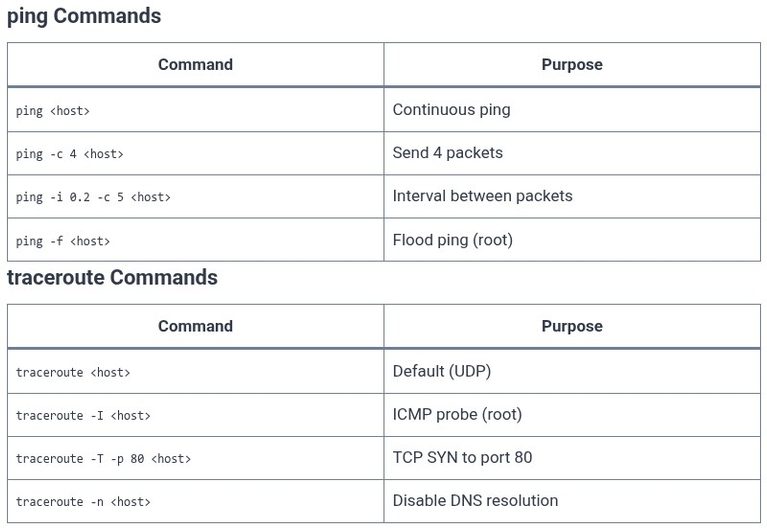
    Network troubleshooting begins with a simple question: can machine A reach machine B? The tools ping, traceroute, and mtr answer this question at increasingly deep levels. ping tests whether a host is reachable and measures round-trip time. traceroute reveals the path packets take through the network, hop by hop. mtr combines both into a continuous,…
    Read More LFCS 104 🐧 Connectivity Testing — ping, traceroute, mtrContinue

  • LFCS 103 🐧 DNS Client Tools — dig, host, nslookup
    Linux | Operating Systems | LFCS - Linux Foundation Certified Sysadmin

    LFCS 103 🐧 DNS Client Tools — dig, host, nslookup

    ByKandZ October 27, 2026October 27, 2026

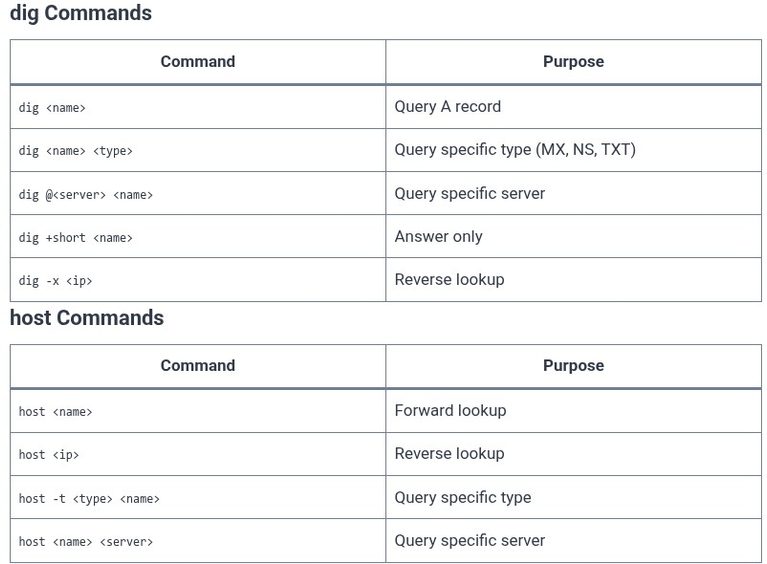
    When a name resolution fails, the first question is whether the failure is in the local configuration files (/etc/hosts, /etc/resolv.conf, /etc/nsswitch.conf) or in the DNS server itself. The tools dig, host, and nslookup exist to answer that question. They query DNS servers directly, bypassing the local resolution order, and display the raw records returned. The…

    Read More LFCS 103 🐧 DNS Client Tools — dig, host, nslookupContinue

  • LFCS 102 🐧 Name Resolution — /etc/hosts and /etc/resolv.conf
    Linux | Operating Systems | LFCS - Linux Foundation Certified Sysadmin

    LFCS 102 🐧 Name Resolution — /etc/hosts and /etc/resolv.conf

    ByKandZ October 27, 2026October 27, 2026

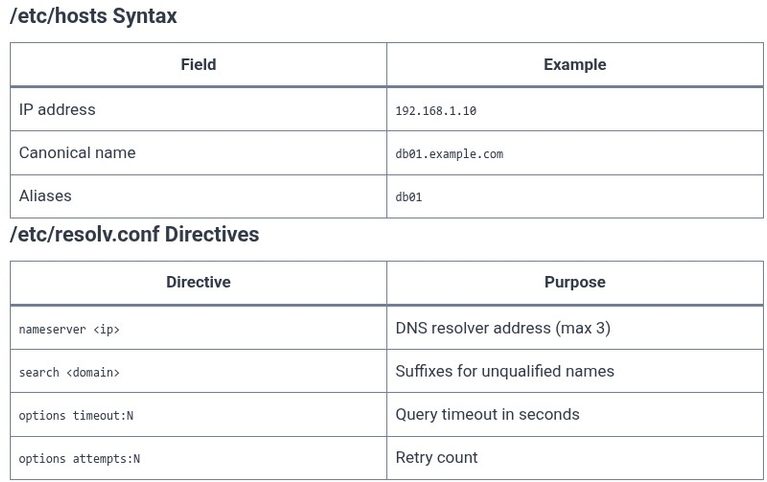
    When a program on a Linux system needs to connect to a hostname, the kernel does not perform the lookup. A userspace library, the GNU C Library (glibc), does. It reads a configuration file called /etc/nsswitch.conf to determine the order of lookup sources, then consults those sources one by one until it finds a match….

    Read More LFCS 102 🐧 Name Resolution — /etc/hosts and /etc/resolv.confContinue

  • LFCS 101 🐧 Hostname Configuration
    Linux | Operating Systems | LFCS - Linux Foundation Certified Sysadmin

    LFCS 101 🐧 Hostname Configuration

    ByKandZ October 27, 2026October 27, 2026

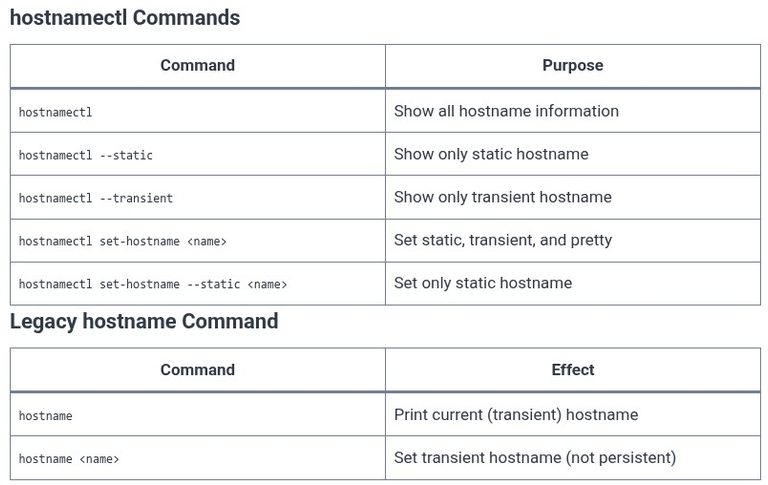
    A hostname is the label that identifies a machine on a network. In systemd-based Linux distributions, the concept is split into three distinct values: the static hostname (the persistent name stored in /etc/hostname), the transient hostname (a runtime value that can be set by DHCP or mDNS), and the pretty hostname (a free-form display name…

    Read More LFCS 101 🐧 Hostname ConfigurationContinue

  • Bun 05 ⚡ Managing Packages: Add, Remove, and Update Operations
    Programming | Tools & Build Systems | Bun | Package Managers

    Bun 05 ⚡ Managing Packages: Add, Remove, and Update Operations

    ByKandZ October 27, 2026October 27, 2026

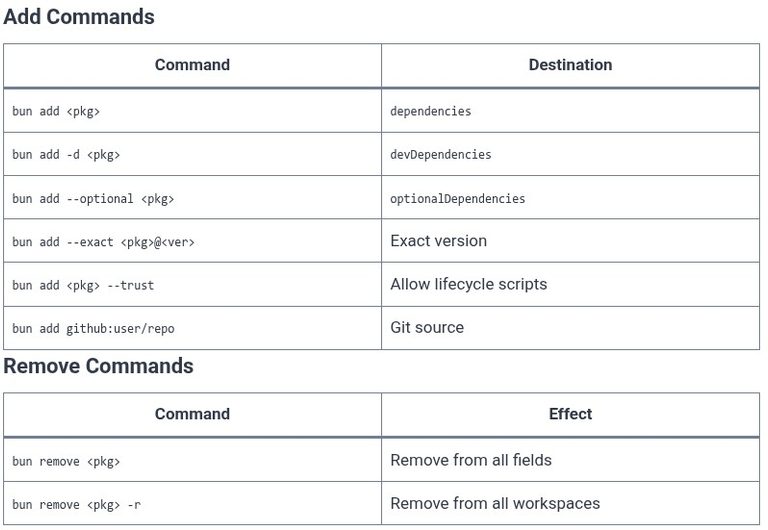
    Package management in Bun follows the familiar add, remove, and update pattern, but the execution engine underneath is fundamentally different. Because Bun is a native binary with a global install cache and a highly optimized resolver, the same commands that take seconds in npm or minutes in Yarn complete in milliseconds. This chapter covers the…

    Read More Bun 05 ⚡ Managing Packages: Add, Remove, and Update OperationsContinue

  • Bun 04 ⚡ Installing Dependencies with Bun’s Ultra-Fast Lockfile (bun.lockb)
    Programming | Tools & Build Systems | Bun | Package Managers

    Bun 04 ⚡ Installing Dependencies with Bun’s Ultra-Fast Lockfile (bun.lockb)

    ByKandZ October 27, 2026October 27, 2026

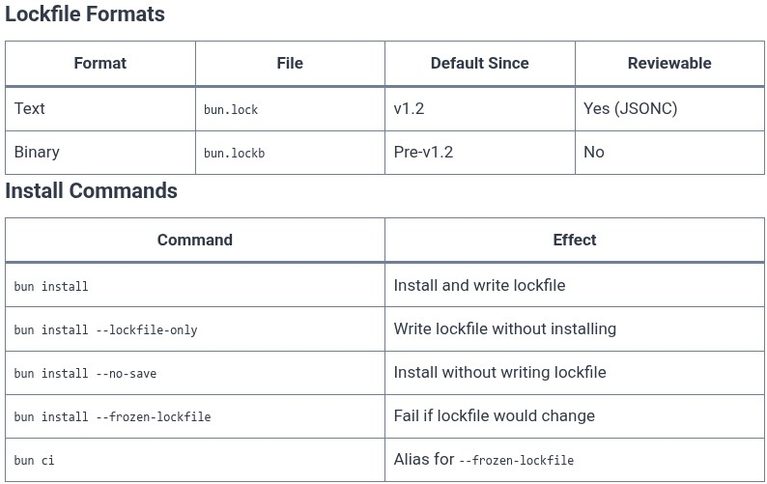
    Bun’s package manager is defined by its lockfile strategy. For its first two years, Bun used a binary lockfile named bun.lockb, which was faster to parse but opaque to review, Git diffs, and merge tools. In December 2024, Bun introduced a text-based alternative (bun.lock), and since Bun v1.2, it has become the default. This chapter…

    Read More Bun 04 ⚡ Installing Dependencies with Bun’s Ultra-Fast Lockfile (bun.lockb)Continue

  • Bun 03 ⚡ Initializing Projects and package.json Integration
    Programming | Tools & Build Systems | Bun | Package Managers

    Bun 03 ⚡ Initializing Projects and package.json Integration

    ByKandZ October 27, 2026October 27, 2026

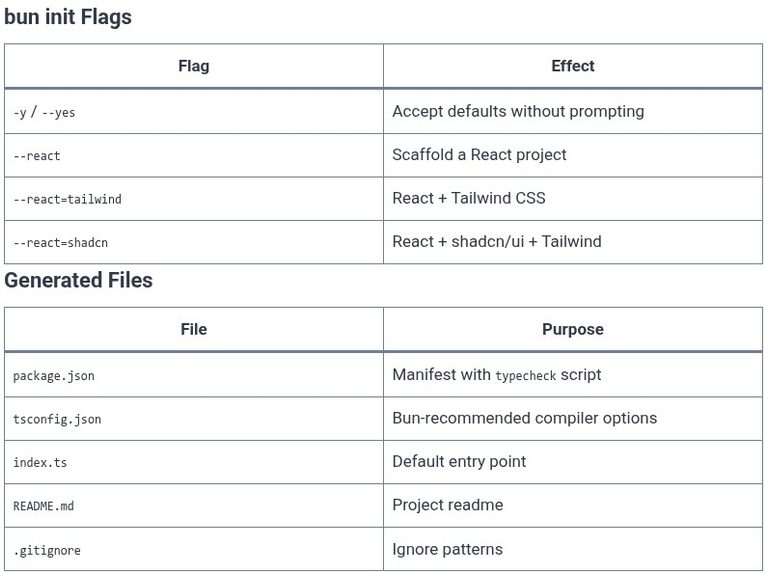
    Bun’s project initialization is designed to eliminate the configuration burden that Node.js projects typically carry. Running bun init generates a complete, working project with sensible defaults, and it integrates with package.json in ways that differ from npm and Yarn: it writes a typecheck script, it understands workspaces natively, and it defaults to treating package scripts…

    Read More Bun 03 ⚡ Initializing Projects and package.json IntegrationContinue

  • Bun 02 ⚡ Installing Bun and Managing Global Versions
    Programming | Tools & Build Systems | Bun | Package Managers

    Bun 02 ⚡ Installing Bun and Managing Global Versions

    ByKandZ October 27, 2026October 27, 2026

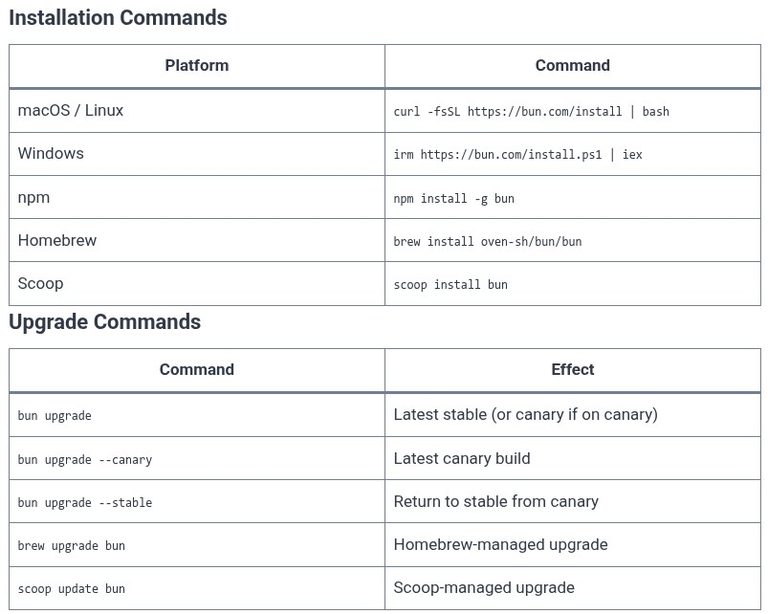
    Bun is distributed as a single, dependency-free executable. There is no runtime environment to configure, no virtual machine to install, and no package manager to bootstrap. The installation is one command, and the resulting binary contains everything: the runtime, the package manager, the bundler, and the test runner. Managing versions is equally direct: bun upgrade…

    Read More Bun 02 ⚡ Installing Bun and Managing Global VersionsContinue

  • Bun 01 ⚡ Introduction to Bun: All-in-One Runtime, Bundler, and Package Manager
    Programming | Tools & Build Systems | Bun | Package Managers

    Bun 01 ⚡ Introduction to Bun: All-in-One Runtime, Bundler, and Package Manager

    ByKandZ October 27, 2026October 27, 2026

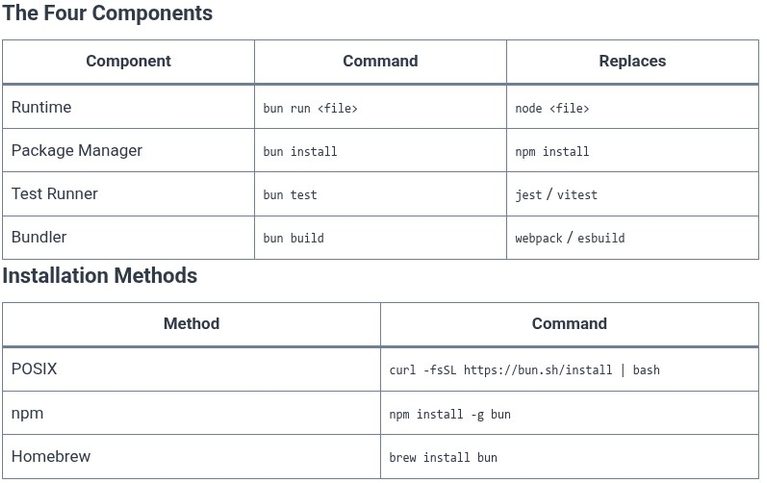
    Bun is not a package manager in the traditional sense. It is a complete JavaScript and TypeScript toolkit delivered as a single executable, combining a runtime, a package manager, a bundler, and a test runner into one cohesive tool . The package manager is one component of this toolkit, but it is inseparable from the…

    Read More Bun 01 ⚡ Introduction to Bun: All-in-One Runtime, Bundler, and Package ManagerContinue

  • pnpm 05 📦 Managing Dependencies: Add, Update, and Remove Operations
    Programming | Tools & Build Systems | pnpm | Package Managers

    pnpm 05 📦 Managing Dependencies: Add, Update, and Remove Operations

    ByKandZ October 27, 2026October 27, 2026

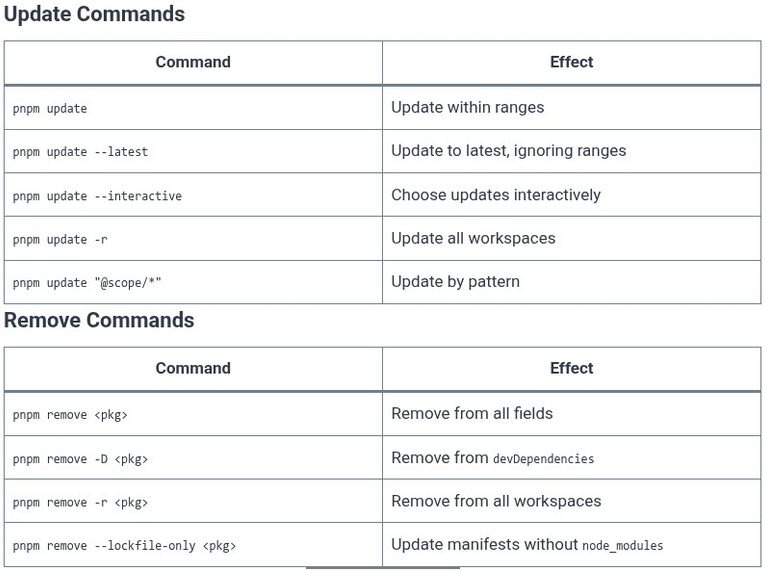
    The daily rhythm of package management is a three-command cycle: add what you need, update what has changed, and remove what is no longer used. pnpm’s commands for these operations follow a consistent pattern: they modify package.json, resolve the change into pnpm-lock.yaml, and update the virtual store and symlinks in node_modules. The critical difference from…

    Read More pnpm 05 📦 Managing Dependencies: Add, Update, and Remove OperationsContinue

Page navigation

Previous PagePrevious 1 … 23 24 25 26 27 … 257 Next PageNext
    Search