Skip to content

KandZ - Tuts

  • Operating Systems ▾
    • Linux ▾
      • Distros ▾
        • Fedora
        • Other Distros
        • Ubuntu
      • Gnome 48
      • KDE
      • LFCA - Linux Foundation Certified IT Associate
      • LFCS - Linux Foundation Certified Sysadmin
      • LFCE - Linux Foundation Certified Engineer (Sysadmin + Network Admin)
      • Linux CLI
      • Various
      • Bash Scripting
  • Paths ▾
    • Core Web Stack
    • React & Modern UI Stack
    • Linux Core
  • Programming ▾
    • Frontend (FED) ▾
      • React Ecosystem ▾
        • React
        • React Router
        • TanStack Router
        • TanStack Query (React Query)
        • Zustand
        • Redux Toolkit
      • Angular Ecosystem ▾
        • Angular
      • Vue Ecosystem ▾
        • Vue.js
      • Styling & UI Components ▾
        • Tailwind CSS
    • Languages & Runtimes ▾
      • CSS
      • Dart
      • HTML
      • JavaScript
      • Node.js
      • Rust
      • SQL
      • TypeScript
    • Tools & Build Systems ▾
      • Version Control ▾
        • GitHub
        • Git
        • GitLab
      • Package Managers ▾
        • npm
        • Bun
        • yarn
        • pnpm
      • DevOps & Containers ▾
        • Docker
  • Servers & Self-Hosting ▾
    • Internet ▾
      • Internet Backend - Coming Soon
      • Internet Beginner
      • Internet Frontend - Coming Soon
    • Networking & DNS ▾
      • REST API
  • Tools
  • Windows ▾
    • Windows 11
KandZ - Tuts
AngularBunCSSDartDockerGitGitHubGitLabHTMLJavaScriptNode.jsnpmpnpmReactReact RouterRedux ToolkitRustSQLTailwind CSSTanStack Query (React Query)TanStack RouterTypeScriptVue.jsyarnZustandBash ScriptingFedoraGnome 48KDELFCA - Linux Foundation Certified IT AssociateLFCE - Linux Foundation Certified Engineer (Sysadmin + Network Admin)LFCS - Linux Foundation Certified SysadminLinux CLIOther DistrosUbuntuVariousCore Web StackInternet Backend - Coming SoonInternet BeginnerInternet Frontend - Coming SoonLinux CoreReact & Modern UI StackREST APIToolsWindows 11
  • GitLab 25 🦊 Cheat Sheet
    Programming | Tools & Build Systems | Version Control | GitLab

    GitLab 25 🦊 Cheat Sheet

    ByKandZ October 30, 2026October 30, 2026

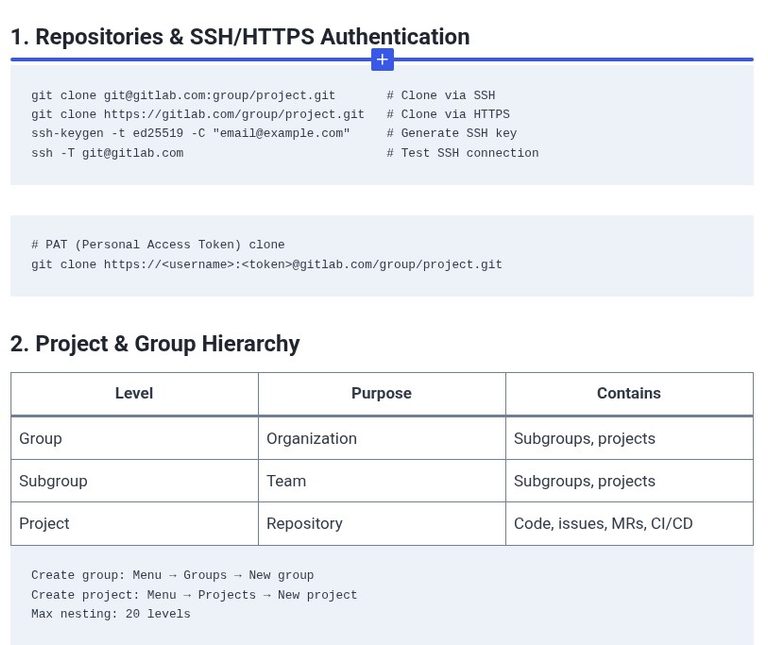
    1. Repositories & SSH/HTTPS Authentication 2. Project & Group Hierarchy Level Purpose Contains Group Organization Subgroups, projects Subgroup Team Subgroups, projects Project Repository Code, issues, MRs, CI/CD 3. Merge Requests (MRs) 4. Protected Branches Role Can Push to main? (Default) Guest No Reporter No Developer No (protected) Maintainer Yes Owner Yes 5. .gitlab-ci.yml Basic Structure…
    Read More GitLab 25 🦊 Cheat SheetContinue

  • GitLab 24 🦊 Migrating Repositories and Issues from GitHub or Bitbucket to GitLab
    Programming | Tools & Build Systems | Version Control | GitLab

    GitLab 24 🦊 Migrating Repositories and Issues from GitHub or Bitbucket to GitLab

    ByKandZ October 30, 2026October 30, 2026

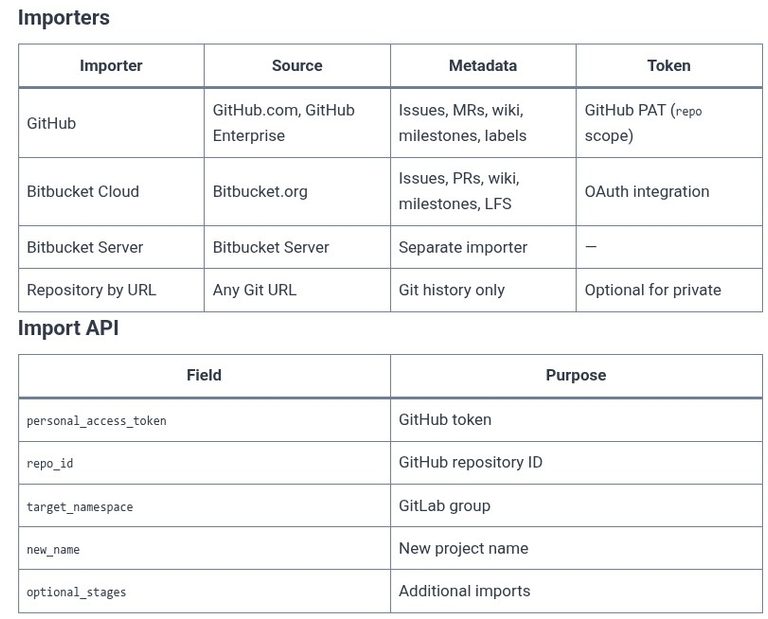
    A migration is not a clone. A clone copies the Git history. A migration copies the history, the issues, the merge requests, the comments, the labels, the milestones, and the wiki pages, and it attempts to map the original authors to GitLab users. The LFCS exam does not test GitLab, but the GitLab Certified Associate…

    Read More GitLab 24 🦊 Migrating Repositories and Issues from GitHub or Bitbucket to GitLabContinue

  • GitLab 23 🦊 Project Analytics, Value Stream Management, and Productivity Metrics
    Programming | Tools & Build Systems | Version Control | GitLab

    GitLab 23 🦊 Project Analytics, Value Stream Management, and Productivity Metrics

    ByKandZ October 30, 2026October 30, 2026

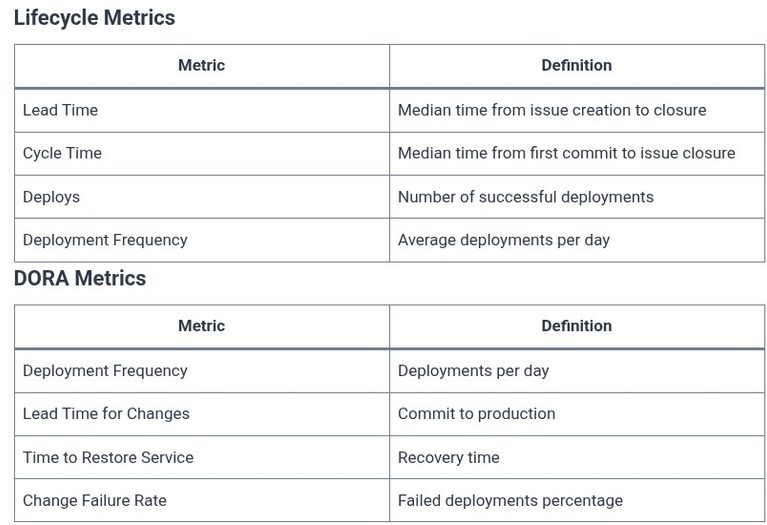
    A pipeline that runs and a repository that stores code are not, by themselves, a measure of software delivery performance. GitLab provides analytics features that answer the questions that matter to engineering leadership: how long does it take from idea to production, where is the bottleneck in the workflow, and what is the team’s throughput?…

    Read More GitLab 23 🦊 Project Analytics, Value Stream Management, and Productivity MetricsContinue

  • GitLab 22 🦊 Webhooks, API Integration, and System Automation
    Programming | Tools & Build Systems | Version Control | GitLab

    GitLab 22 🦊 Webhooks, API Integration, and System Automation

    ByKandZ October 30, 2026October 30, 2026

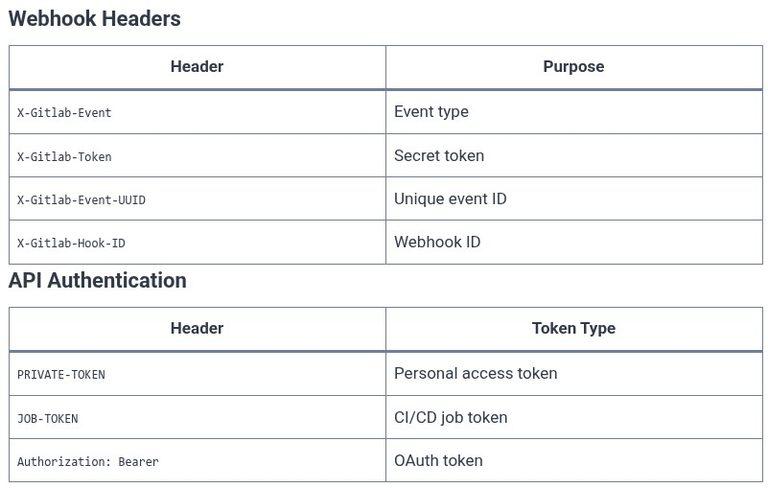
    The previous chapters covered the GitLab UI, the CI/CD pipeline, and the access control model. This chapter covers the mechanisms that allow external systems to interact with GitLab programmatically: webhooks, which push events to an external URL, and the REST/GraphQL API, which allows an external system to query and modify GitLab resources. The LFCS exam…

    Read More GitLab 22 🦊 Webhooks, API Integration, and System AutomationContinue

  • GitLab 21 🦊 Managing Project Permissions, Roles, and Access Control
    Programming | Tools & Build Systems | Version Control | GitLab

    GitLab 21 🦊 Managing Project Permissions, Roles, and Access Control

    ByKandZ October 30, 2026October 30, 2026

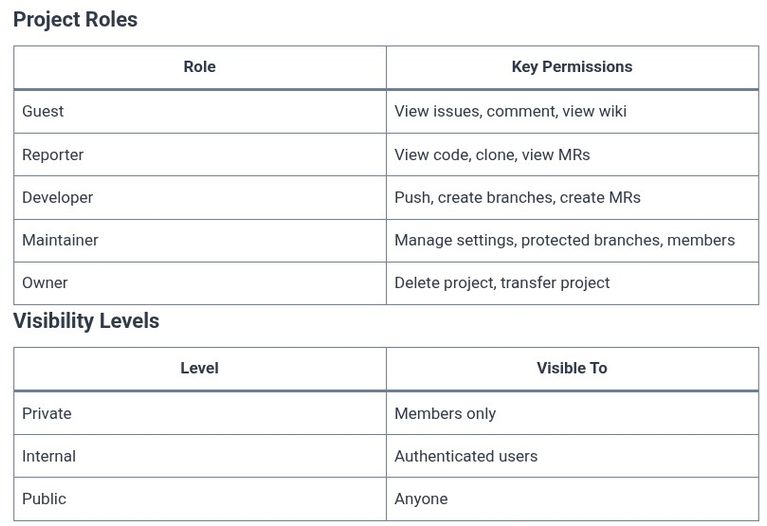
    The previous chapters covered the CI/CD pipeline and its security scanners. This chapter covers the permission model that governs who can do what within a project. GitLab’s access control is built on roles: Guest, Reporter, Developer, Maintainer, and Owner. Each role is a bundle of permissions. The exam tests the distinction between the roles, the…

    Read More GitLab 21 🦊 Managing Project Permissions, Roles, and Access ControlContinue

  • LFCS 135 🐧 Monitoring — free and uptime
    Linux | Operating Systems | LFCS - Linux Foundation Certified Sysadmin

    LFCS 135 🐧 Monitoring — free and uptime

    ByKandZ October 30, 2026October 30, 2026

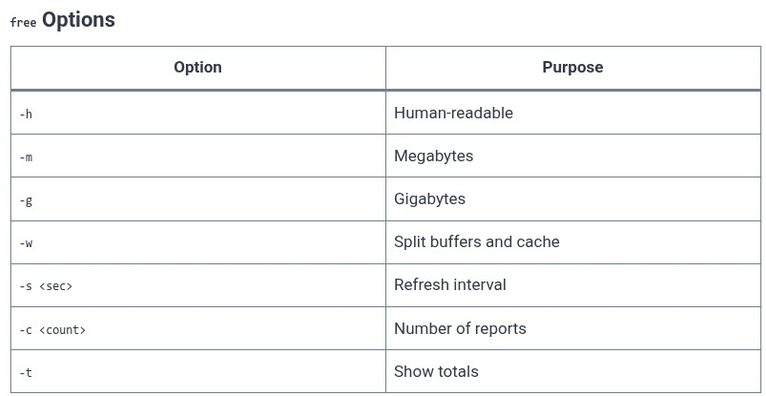
    The previous chapters covered process monitoring with top and htop, and system-wide metrics with vmstat and iostat. This chapter covers two smaller, focused commands that answer two of the most common questions: free, which reports the memory usage, and uptime, which reports the system load average and uptime. Both commands are part of the procps…

    Read More LFCS 135 🐧 Monitoring — free and uptimeContinue

  • LFCS 134 🐧 Monitoring — vmstat and iostat
    Linux | Operating Systems | LFCS - Linux Foundation Certified Sysadmin

    LFCS 134 🐧 Monitoring — vmstat and iostat

    ByKandZ October 30, 2026October 30, 2026

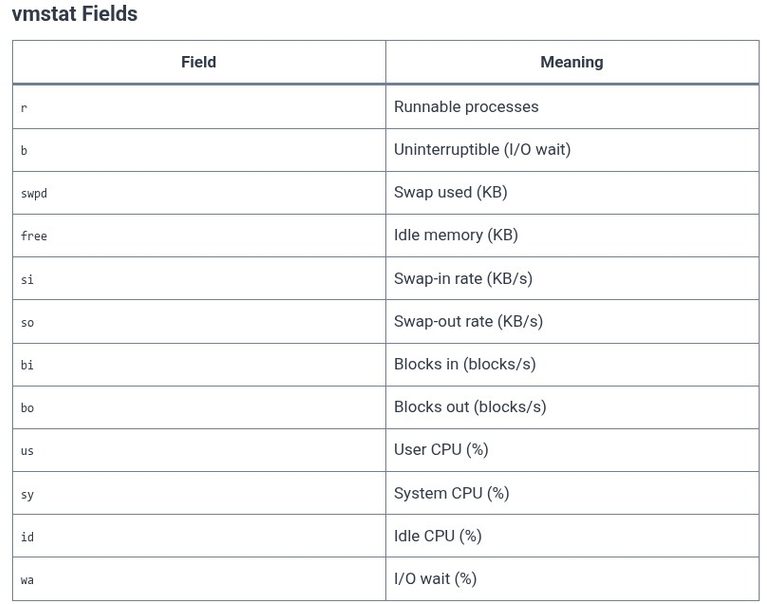
    The previous chapter covered process monitoring with top and htop, which show the CPU and memory usage of individual processes. This chapter covers the system-wide monitoring tools that reveal the aggregate state of memory, swap, I/O, and CPU: vmstat and iostat. These tools answer a different question. top answers “which process is using the CPU?”…

    Read More LFCS 134 🐧 Monitoring — vmstat and iostatContinue

  • LFCS 133 🐧 Monitoring — top and htop
    Linux | Operating Systems | LFCS - Linux Foundation Certified Sysadmin

    LFCS 133 🐧 Monitoring — top and htop

    ByKandZ October 30, 2026October 30, 2026

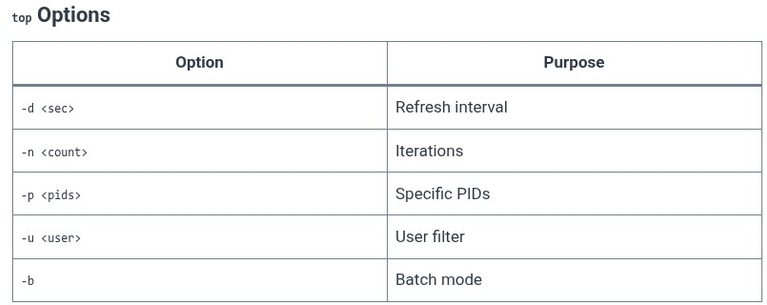
    The previous chapters covered logs and their rotation. This chapter covers real-time process monitoring: the top command, which is available on every Unix-like system, and htop, which is the enhanced interactive alternative. Both tools show a snapshot of the running processes, updated at a configurable interval. The LFCS exam tests the interpretation of the top…

    Read More LFCS 133 🐧 Monitoring — top and htopContinue

  • LFCS 132 🐧 Log Rotation with logrotate
    Linux | Operating Systems | LFCS - Linux Foundation Certified Sysadmin

    LFCS 132 🐧 Log Rotation with logrotate

    ByKandZ October 30, 2026October 30, 2026

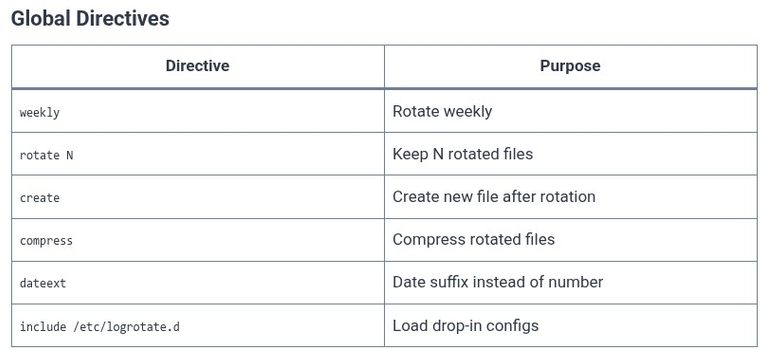
    The previous chapter covered the rsyslog configuration: the rules that write messages to text files under /var/log/. This chapter covers the mechanism that prevents those files from growing indefinitely. The logrotate command is a scheduled utility that rotates, compresses, removes, and mails log files. It is not a daemon; it is a process invoked by…

    Read More LFCS 132 🐧 Log Rotation with logrotateContinue

  • LFCS 131 🐧 rsyslog — Configuration
    Linux | Operating Systems | LFCS - Linux Foundation Certified Sysadmin

    LFCS 131 🐧 rsyslog — Configuration

    ByKandZ October 30, 2026October 30, 2026

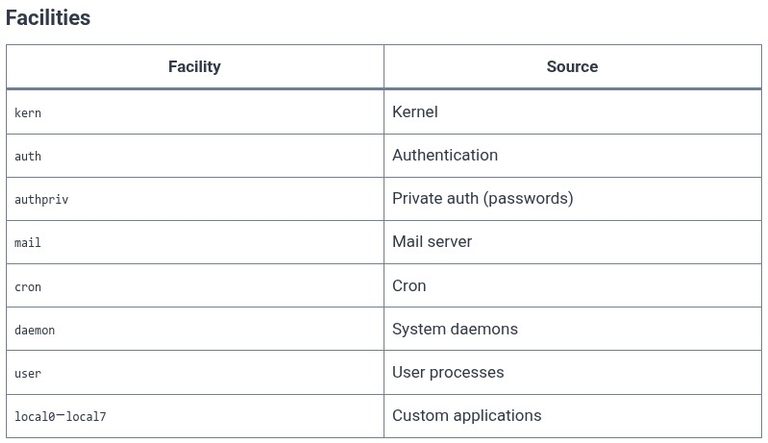
    The systemd journal is the default log store on modern Linux distributions, but it is not the only one. The rsyslog daemon runs alongside the journal and writes traditional text files to /var/log/. It is the mechanism that produces /var/log/syslog, /var/log/auth.log, /var/log/messages, and /var/log/kern.log. The LFCS exam tests the configuration syntax of /etc/rsyslog.conf, the rule…

    Read More LFCS 131 🐧 rsyslog — ConfigurationContinue

Page navigation

Previous PagePrevious 1 … 13 14 15 16 17 … 256 Next PageNext
    Search