Skip to content

KandZ - Tuts

  • Operating Systems ▾
    • Linux ▾
      • Distros ▾
        • Fedora
        • Other Distros
        • Ubuntu
      • Gnome 48
      • KDE
      • LFCA - Linux Foundation Certified IT Associate
      • LFCS - Linux Foundation Certified Sysadmin
      • LFCE - Linux Foundation Certified Engineer (Sysadmin + Network Admin)
      • Linux CLI
      • Various
      • Bash Scripting
  • Paths ▾
    • Core Web Stack
    • React & Modern UI Stack
    • Linux Core
  • Programming ▾
    • Frontend (FED) ▾
      • React Ecosystem ▾
        • React
        • React Router
        • TanStack Router
        • TanStack Query (React Query)
        • Zustand
        • Redux Toolkit
      • Angular Ecosystem ▾
        • Angular
      • Vue Ecosystem ▾
        • Vue.js
      • Styling & UI Components ▾
        • Tailwind CSS
    • Languages & Runtimes ▾
      • CSS
      • Dart
      • HTML
      • JavaScript
      • Node.js
      • Rust
      • SQL
      • TypeScript
    • Tools & Build Systems ▾
      • Version Control ▾
        • GitHub
        • Git
        • GitLab
      • Package Managers ▾
        • npm
        • Bun
        • yarn
        • pnpm
      • DevOps & Containers ▾
        • Docker
  • Servers & Self-Hosting ▾
    • Internet ▾
      • Internet Backend - Coming Soon
      • Internet Beginner
      • Internet Frontend - Coming Soon
    • Networking & DNS ▾
      • REST API
  • Tools
  • Windows ▾
    • Windows 11
KandZ - Tuts
AngularBunCSSDartDockerGitGitHubGitLabHTMLJavaScriptNode.jsnpmpnpmReactReact RouterRedux ToolkitRustSQLTailwind CSSTanStack Query (React Query)TanStack RouterTypeScriptVue.jsyarnZustandBash ScriptingFedoraGnome 48KDELFCA - Linux Foundation Certified IT AssociateLFCE - Linux Foundation Certified Engineer (Sysadmin + Network Admin)LFCS - Linux Foundation Certified SysadminLinux CLIOther DistrosUbuntuVariousCore Web StackInternet Backend - Coming SoonInternet BeginnerInternet Frontend - Coming SoonLinux CoreReact & Modern UI StackREST APIToolsWindows 11
  • React & Modern UI Stack
    Paths | React & Modern UI Stack

    React & Modern UI Stack

    ByKandZ October 29, 2026October 31, 2026

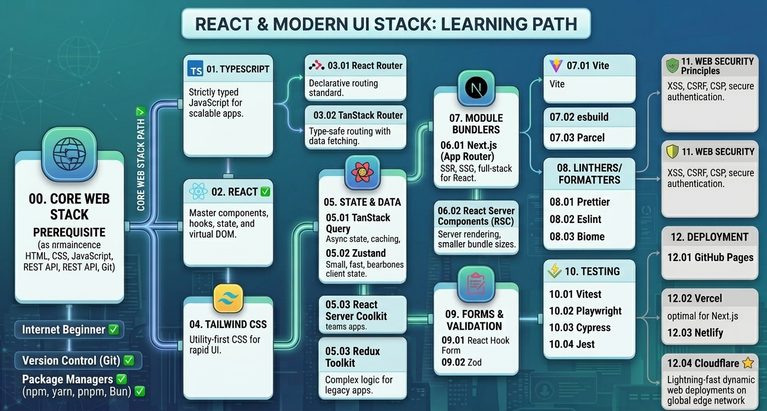
    Intro The React & Modern UI Stack path covers the essential frontend ecosystem and modern tooling roadmap, built directly on top of the Core Web Stack foundation. Tutorials
    Read More React & Modern UI StackContinue

  • LFCS 130 🐧 journalctl — Filtering and Persistence
    Linux | Operating Systems | LFCS - Linux Foundation Certified Sysadmin

    LFCS 130 🐧 journalctl — Filtering and Persistence

    ByKandZ October 29, 2026October 29, 2026

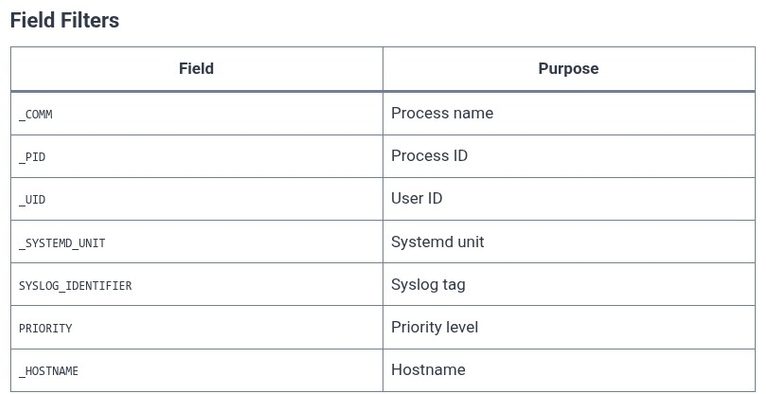
    The previous chapter introduced the journalctl command and its basic filtering options. This chapter goes deeper into the filtering syntax and the persistence configuration. The LFCS exam tests the _FIELD matching, the –grep option, the -o output format, the boot-time filtering, and the journald.conf settings that control whether logs survive a reboot. The critical distinction…
    Read More LFCS 130 🐧 journalctl — Filtering and PersistenceContinue

  • LFCS 129 🐧 journalctl — Reading System Logs
    Linux | Operating Systems | LFCS - Linux Foundation Certified Sysadmin

    LFCS 129 🐧 journalctl — Reading System Logs

    ByKandZ October 29, 2026October 29, 2026

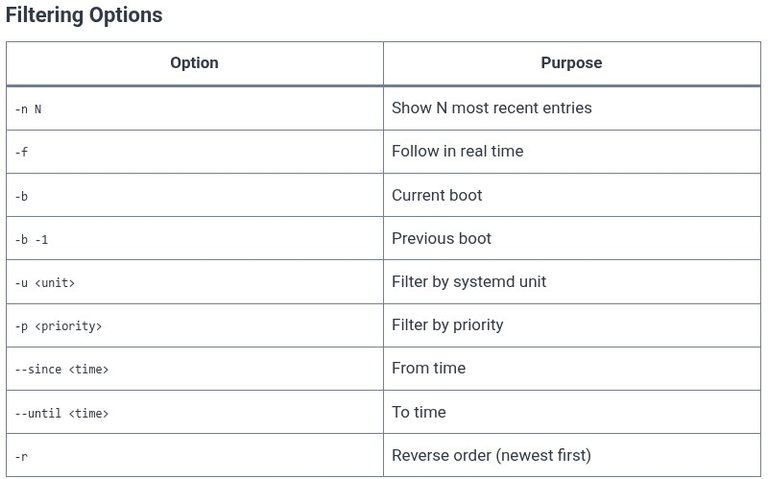
    The previous chapters covered shell scripting and its debugging mechanisms. This chapter returns to system administration: the journalctl command, which is the interface to the systemd journal. Unlike traditional text-based log files (/var/log/syslog, /var/log/messages), the journal is a binary store. It is not read with cat, grep, or less directly. The journalctl command is the…
    Read More LFCS 129 🐧 journalctl — Reading System LogsContinue

  • LFCS 128 🐧 Shell Scripting — Debugging
    Linux | Operating Systems | LFCS - Linux Foundation Certified Sysadmin

    LFCS 128 🐧 Shell Scripting — Debugging

    ByKandZ October 29, 2026October 29, 2026

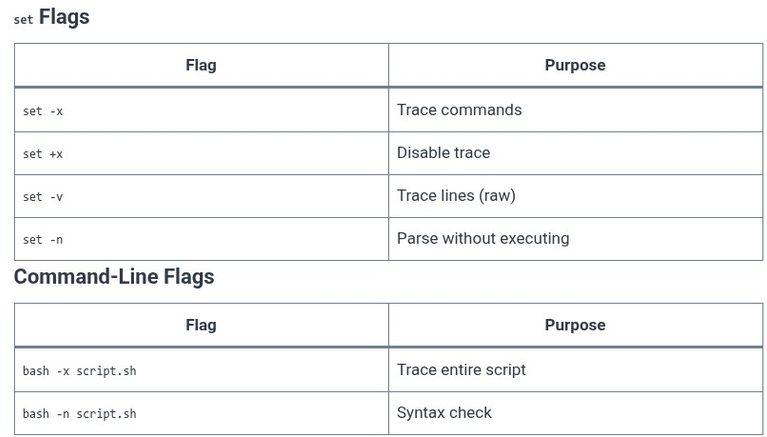
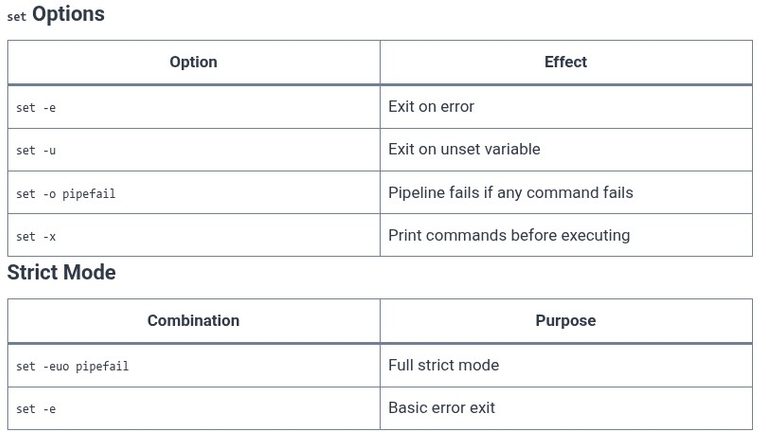
    A script that fails silently or behaves unexpectedly is a script that needs debugging. The shell provides three mechanisms for this: set -x prints each command before executing it, set -v prints each line before parsing it, and the -n flag parses the script without executing it. Beyond these, there are the PS4 prompt customization,…
    Read More LFCS 128 🐧 Shell Scripting — DebuggingContinue

  • LFCS 127 🐧 Shell Scripting — Error Handling
    Linux | Operating Systems | LFCS - Linux Foundation Certified Sysadmin

    LFCS 127 🐧 Shell Scripting — Error Handling

    ByKandZ October 29, 2026October 29, 2026

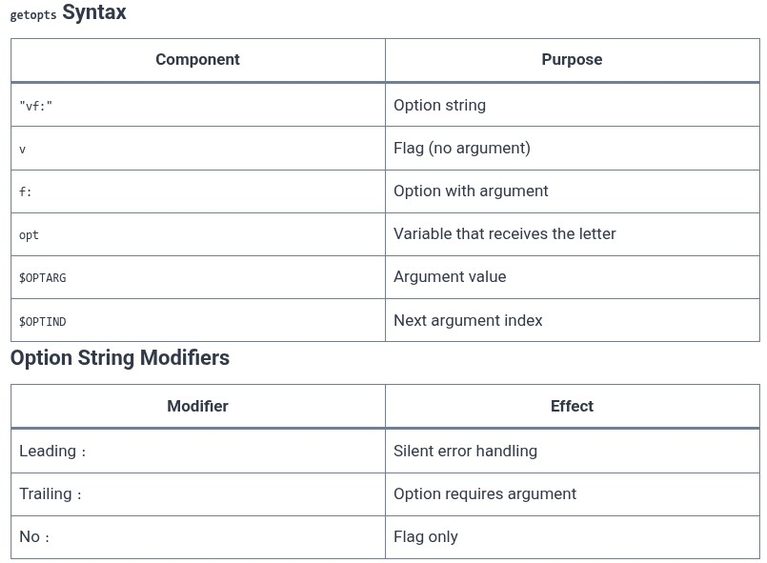
    The previous chapters covered the syntax of scripts: variables, conditionals, loops, functions, and arguments. This chapter covers the behavior of a script when something goes wrong. A script without error handling fails silently. A command fails, the script continues, and the failure is masked by a later successful command. The exit code is 0, the…
    Read More LFCS 127 🐧 Shell Scripting — Error HandlingContinue

  • LFCS 126 🐧 Shell Scripting — Arguments and Parsing
    Linux | Operating Systems | LFCS - Linux Foundation Certified Sysadmin

    LFCS 126 🐧 Shell Scripting — Arguments and Parsing

    ByKandZ October 29, 2026October 29, 2026

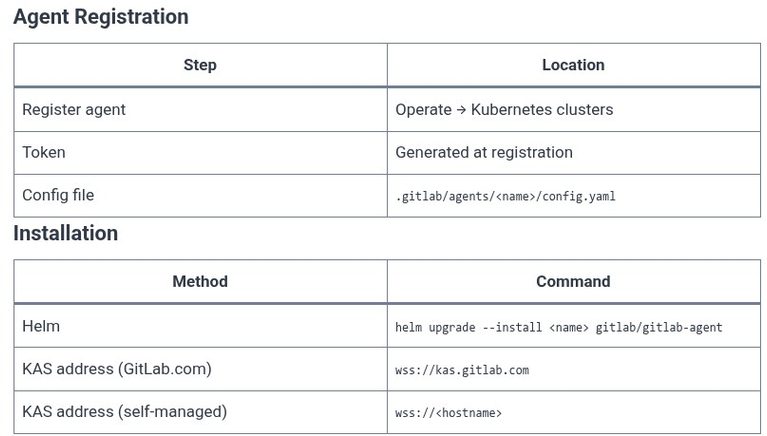
    The previous chapters covered positional parameters, special variables, and conditionals. This chapter focuses on the practical problem of argument parsing: how a script accepts options like -v, –verbose, or -f file, validates them, and behaves accordingly. The LFCS exam tests the getopts builtin, the manual while/case/shift pattern, and the difference between short options (-v) and…
    Read More LFCS 126 🐧 Shell Scripting — Arguments and ParsingContinue

  • GitLab 20 🦊 GitOps Workflows and Kubernetes Cluster Integrations
    Programming | Tools & Build Systems | Version Control | GitLab

    GitLab 20 🦊 GitOps Workflows and Kubernetes Cluster Integrations

    ByKandZ October 29, 2026October 29, 2026

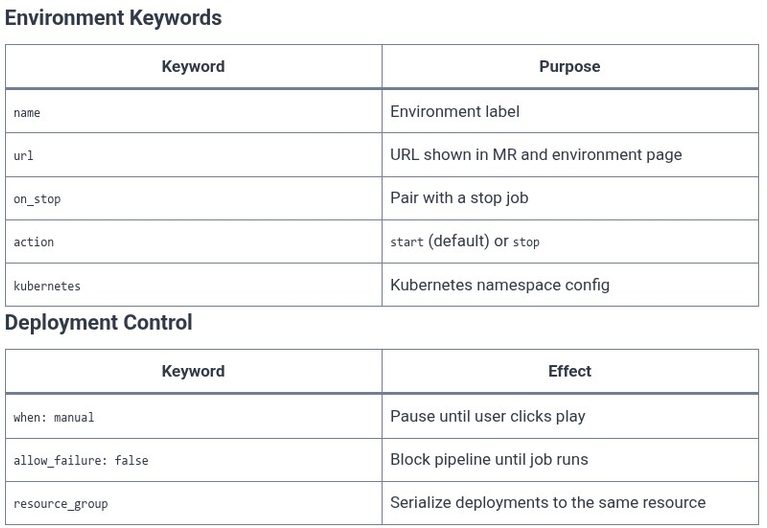
    The previous chapter covered deploying applications to named environments. This chapter covers the mechanism that connects GitLab to a Kubernetes cluster and the workflow that keeps the cluster synchronized with a Git repository. GitLab provides a Kubernetes agent that runs inside the cluster and maintains a bidirectional connection to GitLab. The recommended workflow is GitOps:…
    Read More GitLab 20 🦊 GitOps Workflows and Kubernetes Cluster IntegrationsContinue

  • GitLab 19 🦊 Deploying Applications to Environments (Staging and Production)
    Programming | Tools & Build Systems | Version Control | GitLab

    GitLab 19 🦊 Deploying Applications to Environments (Staging and Production)

    ByKandZ October 29, 2026October 29, 2026

    A pipeline that builds and tests without deploying is a pipeline that stops at the last mile. GitLab provides a structured deployment mechanism through environments: named targets (staging, production, review apps) with their own variables, deployment history, and protection rules. The exam tests the environment keyword, the distinction between a review app and a staging…
    Read More GitLab 19 🦊 Deploying Applications to Environments (Staging and Production)Continue

  • GitLab 18 🦊 DevSecOps Scanning: SAST, Secret Detection, and Dependency Scanning
    Programming | Tools & Build Systems | Version Control | GitLab

    GitLab 18 🦊 DevSecOps Scanning: SAST, Secret Detection, and Dependency Scanning

    ByKandZ October 29, 2026October 29, 2026

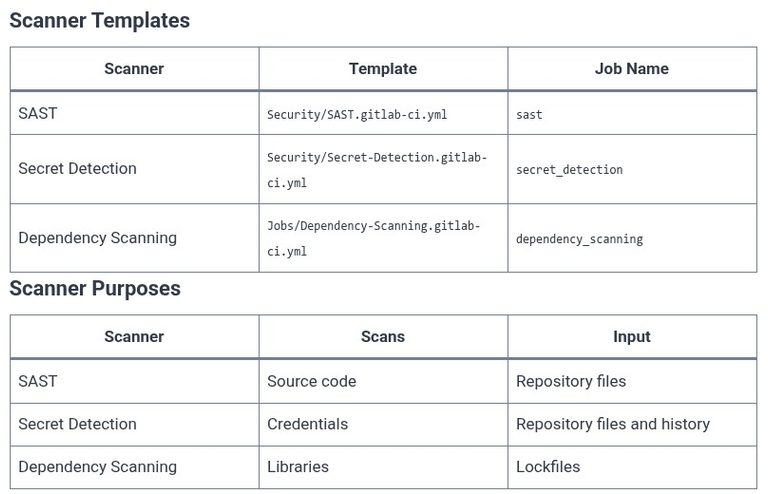
    A pipeline that builds and tests without scanning for vulnerabilities is a pipeline that ships risk. GitLab provides three core security scanners as CI/CD templates: Static Application Security Testing (SAST) analyzes source code for injection flaws and insecure patterns, Secret Detection scans for accidentally committed credentials, and Dependency Scanning checks third-party libraries against known vulnerability…
    Read More GitLab 18 🦊 DevSecOps Scanning: SAST, Secret Detection, and Dependency ScanningContinue

  • GitLab 17 🦊 Automated Testing, Code Quality, and Coverage Reports
    Programming | Tools & Build Systems | Version Control | GitLab

    GitLab 17 🦊 Automated Testing, Code Quality, and Coverage Reports

    ByKandZ October 29, 2026October 29, 2026

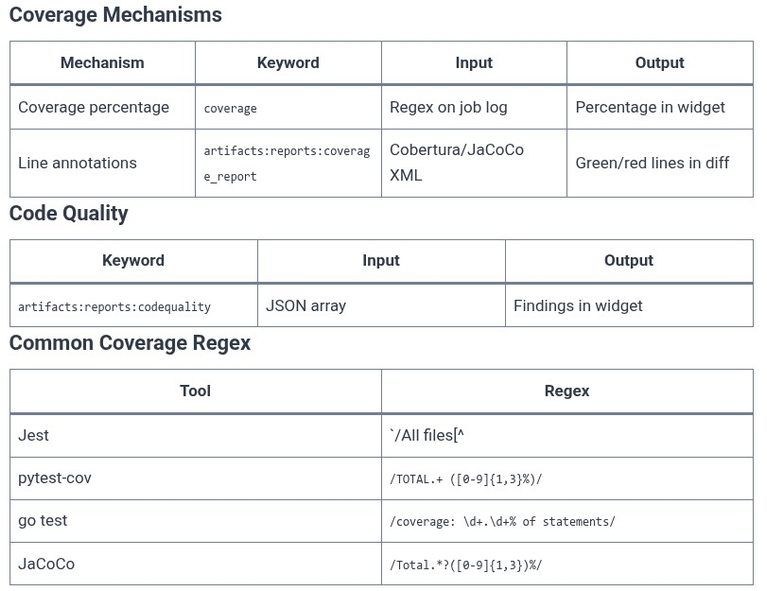
    A pipeline that builds and deploys without testing is a pipeline that ships bugs. GitLab provides three distinct mechanisms for quality assurance: the test job itself (which runs the suite and fails the pipeline on failure), the code quality report (which surfaces static analysis findings in the merge request), and the coverage report (which displays…

    Read More GitLab 17 🦊 Automated Testing, Code Quality, and Coverage ReportsContinue

Page navigation

Previous PagePrevious 1 … 14 15 16 17 18 … 256 Next PageNext
    Search