Skip to content

KandZ - Tuts

  • Operating Systems ▾
    • Linux ▾
      • Distros ▾
        • Fedora
        • Other Distros
        • Ubuntu
      • Gnome 48
      • KDE
      • LFCA - Linux Foundation Certified IT Associate
      • LFCS - Linux Foundation Certified Sysadmin
      • LFCE - Linux Foundation Certified Engineer (Sysadmin + Network Admin)
      • Linux CLI
      • Various
      • Bash Scripting
  • Paths ▾
    • Core Web Stack
    • React & Modern UI Stack
    • Linux Core
  • Programming ▾
    • Frontend (FED) ▾
      • React Ecosystem ▾
        • React
        • React Router
        • TanStack Router
        • TanStack Query (React Query)
        • Zustand
        • Redux Toolkit
      • Angular Ecosystem ▾
        • Angular
      • Vue Ecosystem ▾
        • Vue.js
      • Styling & UI Components ▾
        • Tailwind CSS
    • Languages & Runtimes ▾
      • CSS
      • Dart
      • HTML
      • JavaScript
      • Node.js
      • Rust
      • SQL
      • TypeScript
    • Tools & Build Systems ▾
      • Version Control ▾
        • GitHub
        • Git
        • GitLab
      • Package Managers ▾
        • npm
        • Bun
        • yarn
        • pnpm
      • DevOps & Containers ▾
        • Docker
  • Servers & Self-Hosting ▾
    • Internet ▾
      • Internet Backend - Coming Soon
      • Internet Beginner
      • Internet Frontend - Coming Soon
    • Networking & DNS ▾
      • REST API
  • Tools
  • Windows ▾
    • Windows 11
KandZ - Tuts
AngularBunCSSDartDockerGitGitHubGitLabHTMLJavaScriptNode.jsnpmpnpmReactReact RouterRedux ToolkitRustSQLTailwind CSSTanStack Query (React Query)TanStack RouterTypeScriptVue.jsyarnZustandBash ScriptingFedoraGnome 48KDELFCA - Linux Foundation Certified IT AssociateLFCE - Linux Foundation Certified Engineer (Sysadmin + Network Admin)LFCS - Linux Foundation Certified SysadminLinux CLIOther DistrosUbuntuVariousCore Web StackInternet Backend - Coming SoonInternet BeginnerInternet Frontend - Coming SoonLinux CoreReact & Modern UI StackREST APIToolsWindows 11
  • GitLab 16 🦊 Building and Publishing Container Images with GitLab Registry
    Programming | Tools & Build Systems | Version Control | GitLab

    GitLab 16 🦊 Building and Publishing Container Images with GitLab Registry

    ByKandZ October 29, 2026October 29, 2026

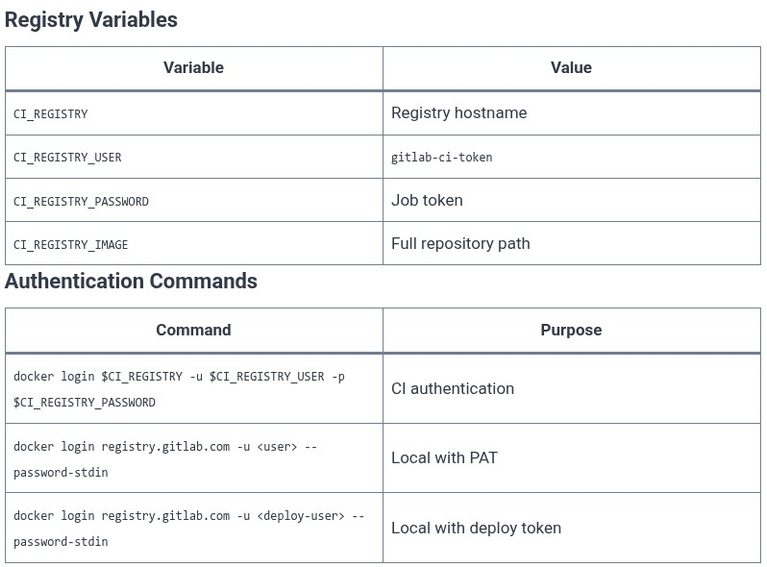
    The GitLab Container Registry is the built-in registry for storing Docker images and OCI artifacts alongside the source code. It is not an external service like Docker Hub; it is a component of the GitLab instance, accessible at registry.gitlab.com on GitLab.com or at a configured hostname on self-managed instances. The exam tests the CI/CD integration:…
    Read More GitLab 16 🦊 Building and Publishing Container Images with GitLab RegistryContinue

  • LFCS 125 🐧 Shell Scripting — Functions
    Linux | Operating Systems | LFCS - Linux Foundation Certified Sysadmin

    LFCS 125 🐧 Shell Scripting — Functions

    ByKandZ October 29, 2026October 29, 2026

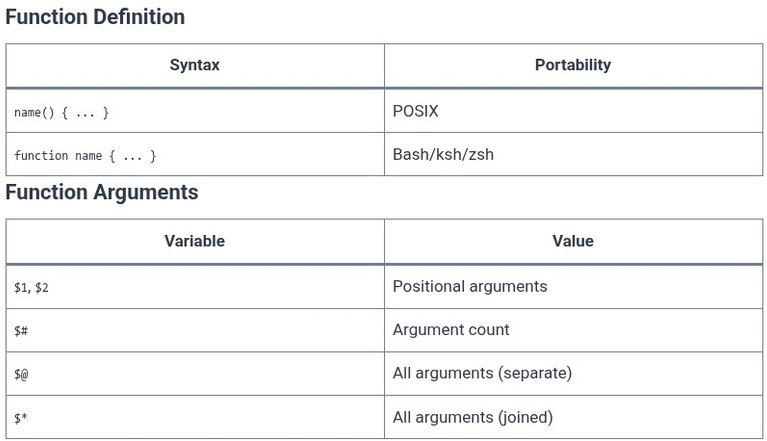
    A function is a named block of commands that can be called multiple times within a script. It is the mechanism for eliminating repetition and for encapsulating logic that would otherwise be duplicated. The LFCS exam tests the syntax of the function definition, the scope of variables within a function, the mechanism for returning values,…

    Read More LFCS 125 🐧 Shell Scripting — FunctionsContinue

  • LFCS 124 🐧 Shell Scripting — Loops
    Linux | Operating Systems | LFCS - Linux Foundation Certified Sysadmin

    LFCS 124 🐧 Shell Scripting — Loops

    ByKandZ October 29, 2026October 29, 2026

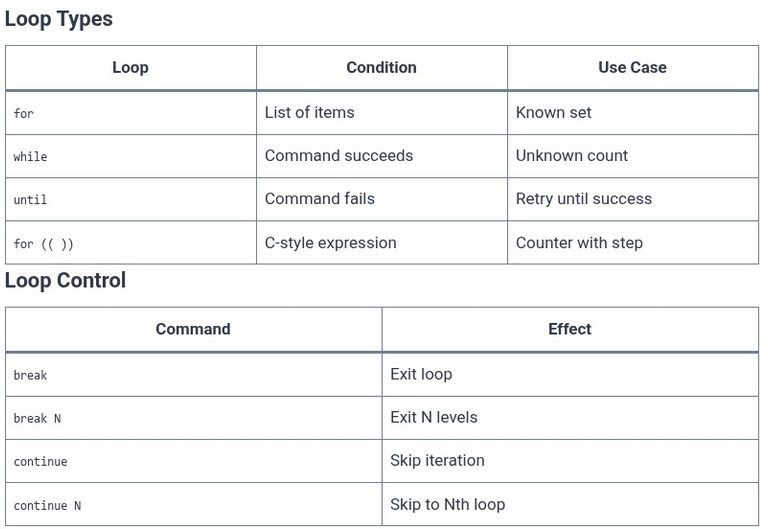
    The previous chapter covered conditionals: the if statement, the test command, and the case statement. This chapter covers loops: for, while, and until. These are the constructs that repeat a block of commands. The LFCS exam tests the syntax of the for loop over a list and over a range, the while loop with a…

    Read More LFCS 124 🐧 Shell Scripting — LoopsContinue

  • LFCS 123 🐧 Shell Scripting — Conditionals
    Linux | Operating Systems | LFCS - Linux Foundation Certified Sysadmin

    LFCS 123 🐧 Shell Scripting — Conditionals

    ByKandZ October 29, 2026October 29, 2026

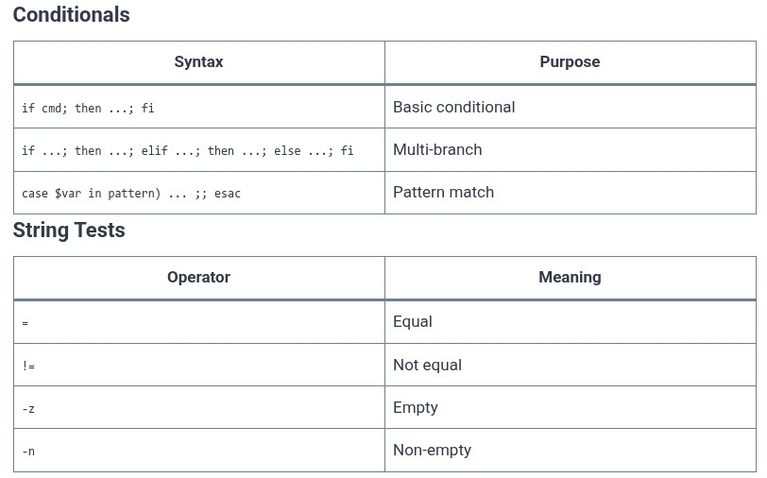
    The previous chapter covered special parameters: positional arguments and exit codes. This chapter focuses on conditionals: if, elif, else, case, and the test operators that determine which branch runs. The LFCS exam tests the syntax of the if statement, the difference between [ and [[, and the distinction between numeric comparison and string comparison. The…

    Read More LFCS 123 🐧 Shell Scripting — ConditionalsContinue

  • LFCS 122 🐧 Shell Scripting — Special Parameters
    Linux | Operating Systems | LFCS - Linux Foundation Certified Sysadmin

    LFCS 122 🐧 Shell Scripting — Special Parameters

    ByKandZ October 29, 2026October 29, 2026

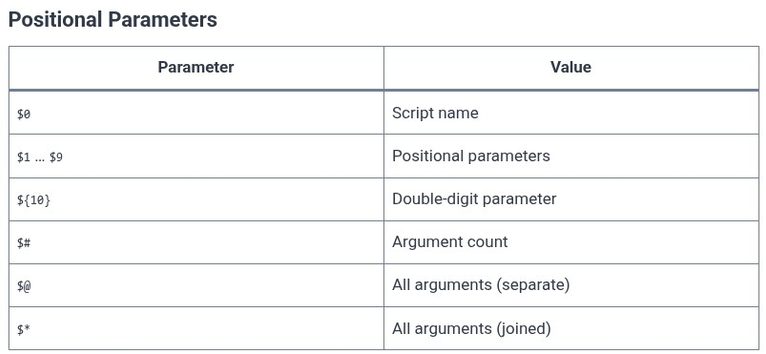
    The previous chapter covered ordinary variables: assignment, expansion, and quoting. This chapter covers the special parameters that the shell sets automatically: the positional parameters ($1, $2, …), the argument collection ($@ and $*), the argument count ($#), the script name ($0), the exit status ($?), the process ID ($$), and the background job ID ($!)….

    Read More LFCS 122 🐧 Shell Scripting — Special ParametersContinue

  • LFCS 121 🐧 Shell Scripting — Variables and Quoting
    Linux | Operating Systems | LFCS - Linux Foundation Certified Sysadmin

    LFCS 121 🐧 Shell Scripting — Variables and Quoting

    ByKandZ October 29, 2026October 29, 2026

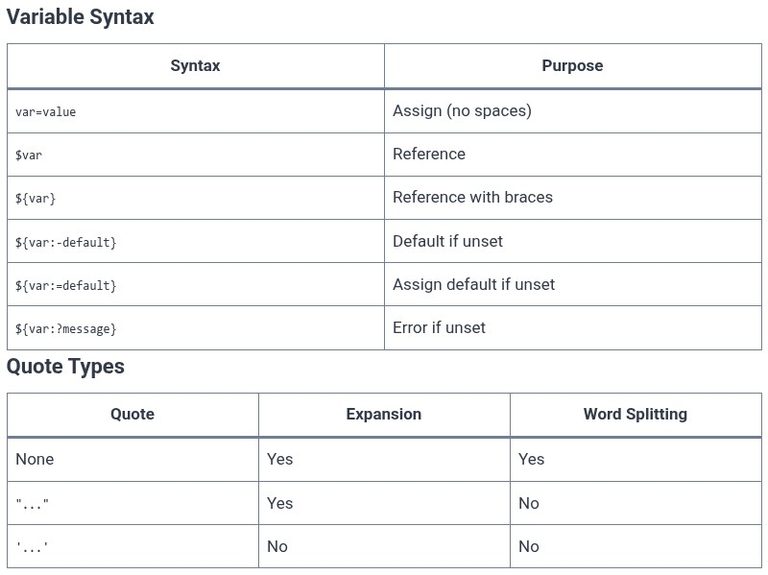
    The previous chapter introduced the first script: the shebang, the executable permission, and the exit codes. This chapter focuses on the most error-prone part of shell scripting: variables and quoting. A variable holds a string, but the shell treats unquoted strings as a set of words to be split and expanded. A quoted string is…

    Read More LFCS 121 🐧 Shell Scripting — Variables and QuotingContinue

  • GitLab 15 🦊 Registering and Configuring Self-Hosted GitLab Runners
    Programming | Tools & Build Systems | Version Control | GitLab

    GitLab 15 🦊 Registering and Configuring Self-Hosted GitLab Runners

    ByKandZ October 29, 2026October 29, 2026

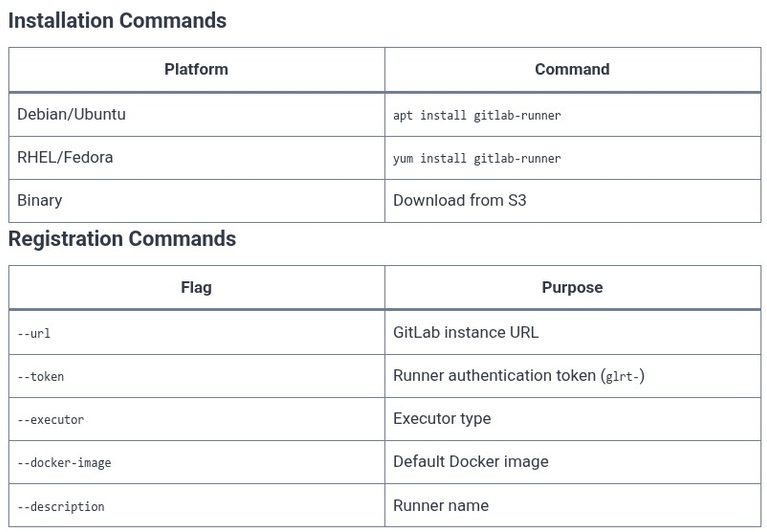
    A GitLab Runner is the agent that executes the jobs defined in the .gitlab-ci.yml file. Without a runner, a pipeline stays in the pending state indefinitely. The runner is a separate process from the GitLab server. It can run on the same machine as the server, on a dedicated build machine, or on a fleet…

    Read More GitLab 15 🦊 Registering and Configuring Self-Hosted GitLab RunnersContinue

  • GitLab 14 🦊 Managing CI/CD Environment Variables and Secure Secrets
    Programming | Tools & Build Systems | Version Control | GitLab

    GitLab 14 🦊 Managing CI/CD Environment Variables and Secure Secrets

    ByKandZ October 29, 2026October 29, 2026

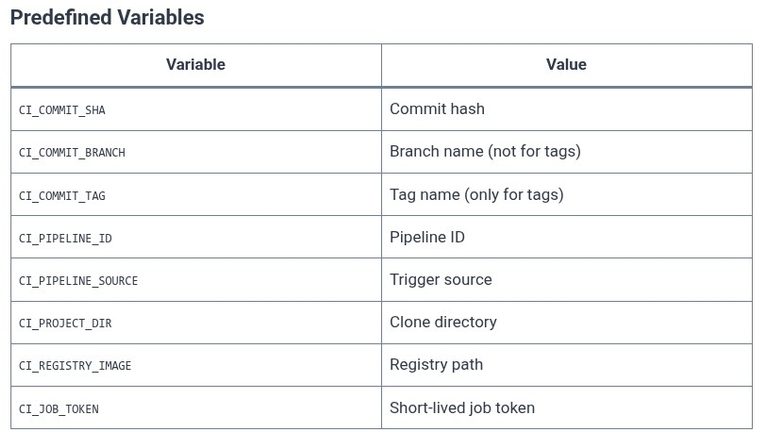
    A pipeline without variables is a pipeline that hardcodes its configuration. The repository URL, the container registry, the deployment token, the database password—each of these changes between environments, and none of them should be committed to the .gitlab-ci.yml file. GitLab provides predefined variables that describe the pipeline context, and project/group variables that store configuration and…

    Read More GitLab 14 🦊 Managing CI/CD Environment Variables and Secure SecretsContinue

  • GitLab 13 🦊 Controlling Job Execution with rules, only, and except
    Programming | Tools & Build Systems | Version Control | GitLab

    GitLab 13 🦊 Controlling Job Execution with rules, only, and except

    ByKandZ October 29, 2026October 29, 2026

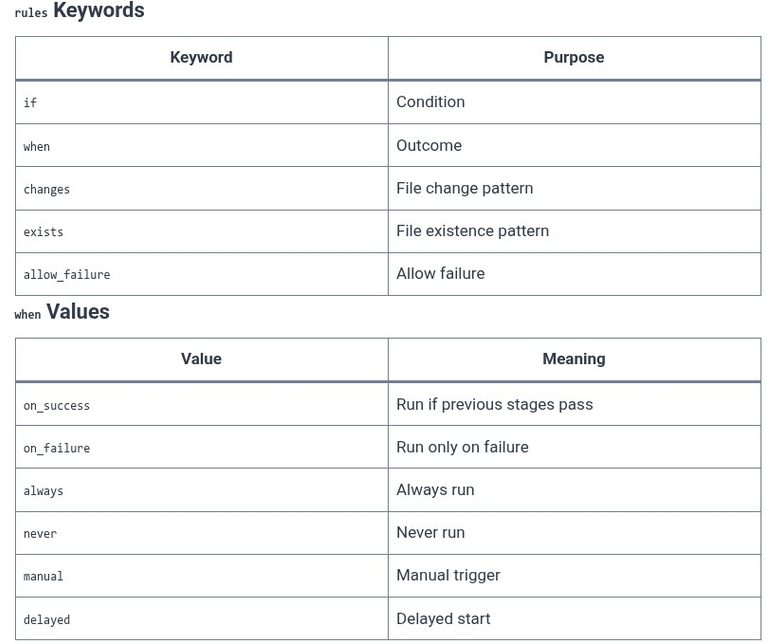
    A pipeline that runs the same jobs on every branch, every commit, and every tag is a pipeline that wastes resources and delays feedback. The rules, only, and except keywords control which jobs run and when. The LFCS exam does not test GitLab, but the GitLab Certified Associate exam does. The critical distinction is that…

    Read More GitLab 13 🦊 Controlling Job Execution with rules, only, and exceptContinue

  • GitLab 12 🦊 Using needs for Directed Acyclic Graph (DAG) Pipelines
    Programming | Tools & Build Systems | Version Control | GitLab

    GitLab 12 🦊 Using needs for Directed Acyclic Graph (DAG) Pipelines

    ByKandZ October 29, 2026October 29, 2026

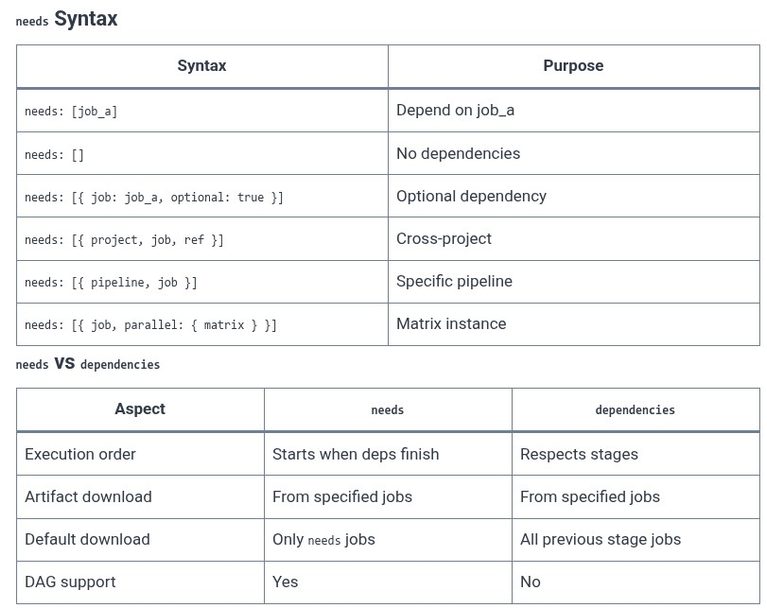
    The previous chapters established the stage-bound pipeline and the basic needs syntax. This chapter focuses on the DAG model as a whole: how GitLab builds the execution graph, how needs interacts with parallel:matrix, how the pipeline visualization reflects the actual dependencies, and how to debug a pipeline that fails to start because of a cycle…

    Read More GitLab 12 🦊 Using needs for Directed Acyclic Graph (DAG) PipelinesContinue

Page navigation

Previous PagePrevious 1 … 15 16 17 18 19 … 256 Next PageNext
    Search