Skip to content

KandZ - Tuts

  • Operating Systems ▾
    • Linux ▾
      • Distros ▾
        • Fedora
        • Other Distros
        • Ubuntu
      • Gnome 48
      • KDE
      • LFCA - Linux Foundation Certified IT Associate
      • LFCS - Linux Foundation Certified Sysadmin
      • Linux CLI
      • Various
  • Paths ▾
    • Core Web Stack
    • React & Modern UI Stack
  • Programming ▾
    • Frontend (FED) ▾
      • React Ecosystem ▾
        • React
        • React Router
        • TanStack Router
        • TanStack Query (React Query)
        • Zustand
        • Redux Toolkit
      • Angular Ecosystem ▾
        • Angular
      • Vue Ecosystem ▾
        • Vue.js
      • Styling & UI Components ▾
        • Tailwind CSS
    • Languages & Runtimes ▾
      • CSS
      • Dart
      • HTML
      • JavaScript
      • Node.js
      • Rust
      • SQL
      • TypeScript
    • Tools & Build Systems ▾
      • Version Control ▾
        • GitHub
        • Git
        • GitLab
      • Package Managers ▾
        • npm
        • Bun
        • yarn
        • pnpm
      • DevOps & Containers ▾
        • Docker
  • Servers & Self-Hosting ▾
    • Internet ▾
      • Internet Backend - Coming Soon
      • Internet Beginner
      • Internet Frontend - Coming Soon
    • Networking & DNS ▾
      • REST API
  • Tools
  • Windows ▾
    • Windows 11
KandZ - Tuts
AngularBunCSSDartDockerGitGitHubGitLabHTMLJavaScriptNode.jsnpmpnpmReactReact RouterRedux ToolkitRustSQLTailwind CSSTanStack Query (React Query)TanStack RouterTypeScriptVue.jsyarnZustandFedoraGnome 48KDELFCA - Linux Foundation Certified IT AssociateLFCS - Linux Foundation Certified SysadminLinux CLIOther DistrosUbuntuVariousCore Web StackInternet Backend - Coming SoonInternet BeginnerInternet Frontend - Coming SoonReact & Modern UI StackREST APIToolsWindows 11
  • LFCS 142 🐧 SELinux — Booleans
    Linux | LFCS - Linux Foundation Certified Sysadmin | Operating Systems

    LFCS 142 🐧 SELinux — Booleans

    ByKandZ October 30, 2026October 30, 2026

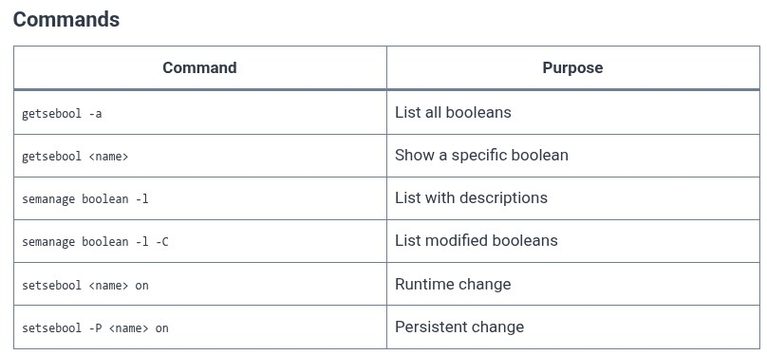
    The previous chapter covered security contexts and labels: the data that the SELinux policy uses to identify files and processes. This chapter covers the switches that adjust the policy without recompiling it. A SELinux boolean is a named toggle that the policy checks at runtime. When the toggle is on, a specific rule or set…
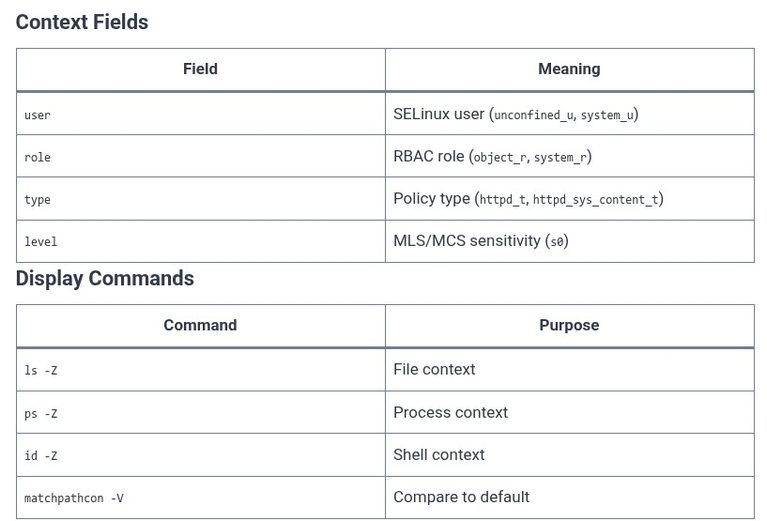
    Read More LFCS 142 🐧 SELinux — BooleansContinue

  • LFCS 141 🐧 SELinux — Contexts and Labels
    Linux | LFCS - Linux Foundation Certified Sysadmin | Operating Systems

    LFCS 141 🐧 SELinux — Contexts and Labels

    ByKandZ October 30, 2026October 30, 2026

    The previous chapter introduced the SELinux modes: Enforcing, Permissive, and Disabled. This chapter covers the data that the policy actually evaluates: the security context. Every process, file, directory, and socket in a SELinux system carries a label, and the policy rules match on the type field of that label, not on the file path or…

    Read More LFCS 141 🐧 SELinux — Contexts and LabelsContinue

  • TanStack Router 05 ⚛️ Navigation — Using Link components
    Programming | Frontend (FED) | React Ecosystem | TanStack Router

    TanStack Router 05 ⚛️ Navigation — Using Link components

    ByKandZ October 30, 2026October 30, 2026

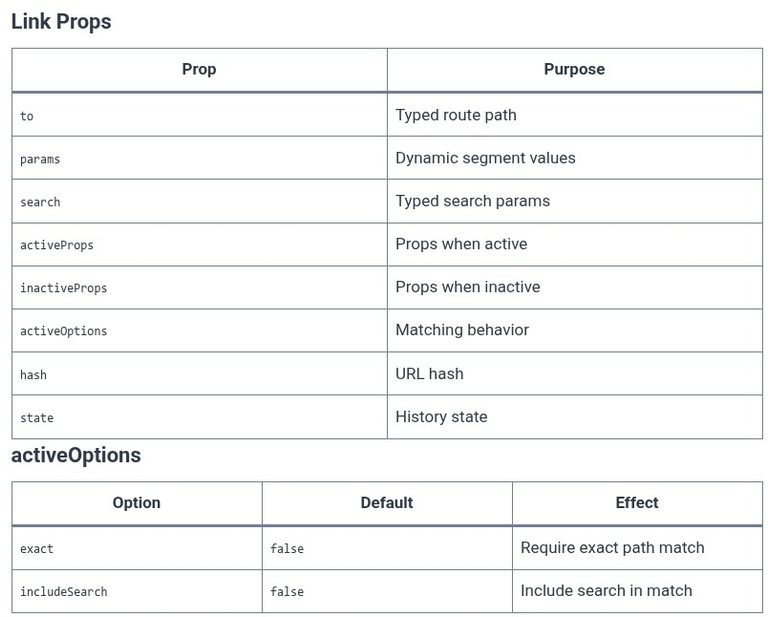
    The previous chapter covered the route tree and its type generation. This chapter covers the component that the user actually clicks to move between routes: the <Link> component. It is the TanStack Router equivalent of React Router’s <Link>, but the type safety is stricter. The to prop is not a generic string. It is a…

    Read More TanStack Router 05 ⚛️ Navigation — Using Link componentsContinue

  • TanStack Router 04 ⚛️ Route Trees — Building type-safe trees
    Programming | Frontend (FED) | React Ecosystem | TanStack Router

    TanStack Router 04 ⚛️ Route Trees — Building type-safe trees

    ByKandZ October 30, 2026October 30, 2026

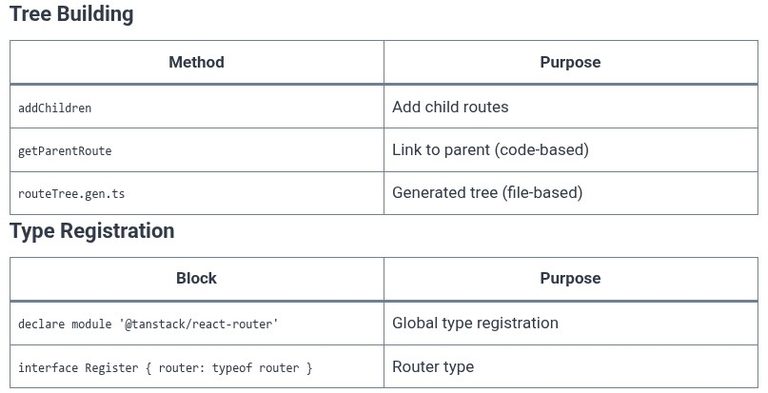
    The previous chapter covered the file conventions that map a directory structure to URLs. This chapter covers the route tree itself: the nested data structure that the router uses to match URLs and the generated types that make navigation type-safe. A route tree is not a flat list. It is a hierarchy of routes, where…

    Read More TanStack Router 04 ⚛️ Route Trees — Building type-safe treesContinue

  • TanStack Router 03 ⚛️ File-Based Routing — File convention & generation
    Programming | Frontend (FED) | React Ecosystem | TanStack Router

    TanStack Router 03 ⚛️ File-Based Routing — File convention & generation

    ByKandZ October 30, 2026October 30, 2026

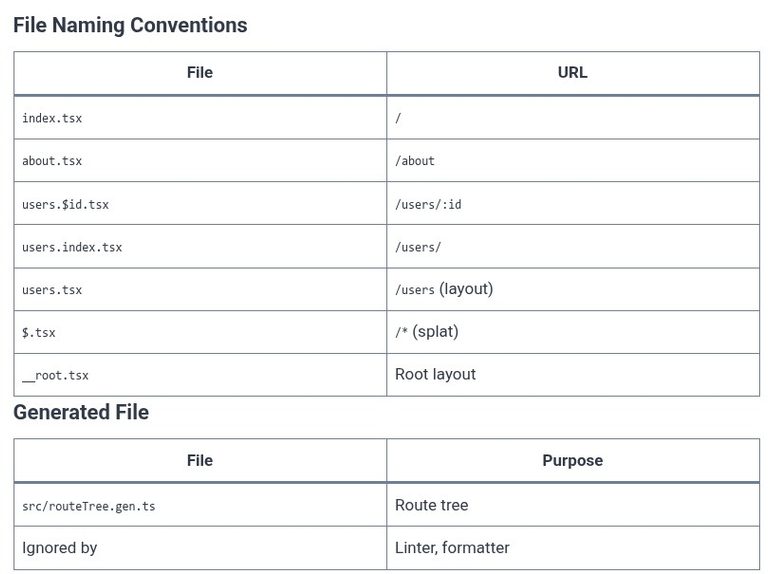
    The previous chapter created the root route and the layout. This chapter covers the file-based routing convention: the directory structure under src/routes/, the file naming rules that map a file to a URL, and the generated routeTree.gen.ts that connects the files to the router. The LFCS exam does not test TanStack Router, but the front-end…

    Read More TanStack Router 03 ⚛️ File-Based Routing — File convention & generationContinue

  • TanStack Router 02 ⚛️ Root Route — Creating the root layout
    Programming | Frontend (FED) | React Ecosystem | TanStack Router

    TanStack Router 02 ⚛️ Root Route — Creating the root layout

    ByKandZ October 30, 2026October 30, 2026

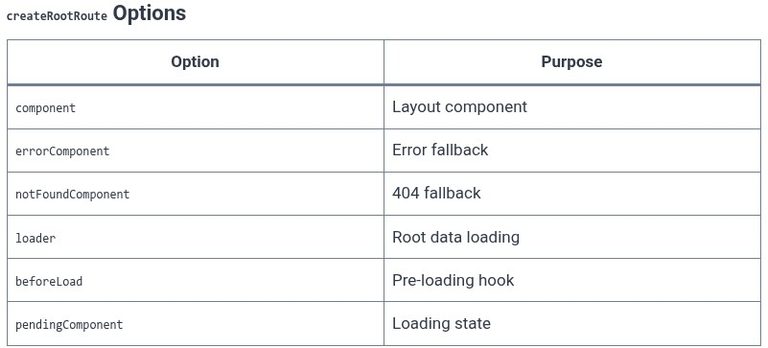
    The previous chapter installed TanStack Router and configured the Vite plugin. This chapter covers the root route, which is the foundation of the entire route tree. Every application has exactly one root route, created with createRootRoute or createRootRouteWithContext. The root route defines the layout that wraps every other route: the navigation header, the footer, the…

    Read More TanStack Router 02 ⚛️ Root Route — Creating the root layoutContinue

  • TanStack Router 01 ⚛️ Installation — Setup & dependencies
    Programming | Frontend (FED) | React Ecosystem | TanStack Router

    TanStack Router 01 ⚛️ Installation — Setup & dependencies

    ByKandZ October 30, 2026October 30, 2026

    TanStack Router is a type-safe routing library for React and Solid. Unlike React Router, which relies on runtime matching, TanStack Router generates a fully typed route tree that the TypeScript compiler can verify. The installation process is split into two paths: the CLI scaffold for new projects, and the manual setup for existing projects. The…

    Read More TanStack Router 01 ⚛️ Installation — Setup & dependenciesContinue

  • React Router 05 ⚛️ Navigation Links — Using Link components
    Programming | Frontend (FED) | React Ecosystem | React Router

    React Router 05 ⚛️ Navigation Links — Using Link components

    ByKandZ October 30, 2026October 30, 2026

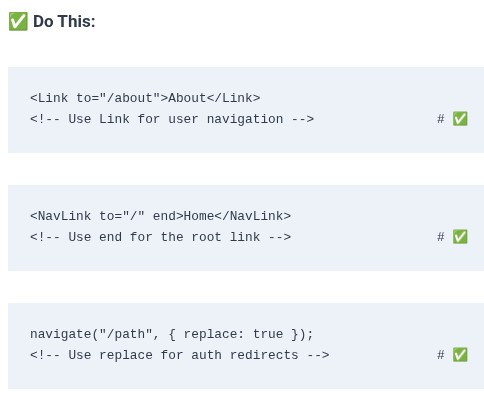
    The previous chapter covered the fallback route for unmatched URLs. This chapter covers the mechanism that users actually click to move between routes: the <Link>, <NavLink>, and <Navigate> components. A plain HTML <a href=”…”> triggers a full page reload. The browser sends a new HTTP request, the server returns a new HTML document, and the…

    Read More React Router 05 ⚛️ Navigation Links — Using Link componentsContinue

  • React Router 04 ⚛️ Fallback Routes — Handling 404 not found pages
    Programming | Frontend (FED) | React Ecosystem | React Router

    React Router 04 ⚛️ Fallback Routes — Handling 404 not found pages

    ByKandZ October 30, 2026October 30, 2026

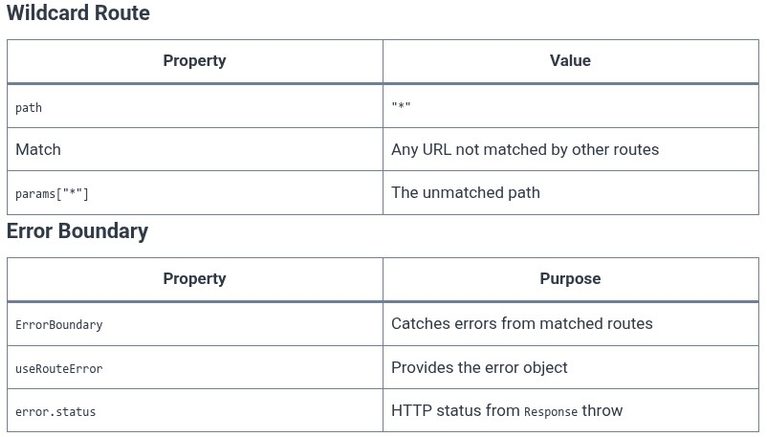
    The previous chapter covered how the router matches a URL against the route objects. This chapter covers the case where no route matches. The fallback route is the mechanism for handling unknown URLs. Without it, an unmatched URL renders nothing—an empty page with no navigation, no error message, and no way to recover except editing…

    Read More React Router 04 ⚛️ Fallback Routes — Handling 404 not found pagesContinue

  • React Router 03 ⚛️ Route Mapping — Matching paths to elements
    Programming | Frontend (FED) | React Ecosystem | React Router

    React Router 03 ⚛️ Route Mapping — Matching paths to elements

    ByKandZ October 30, 2026October 30, 2026

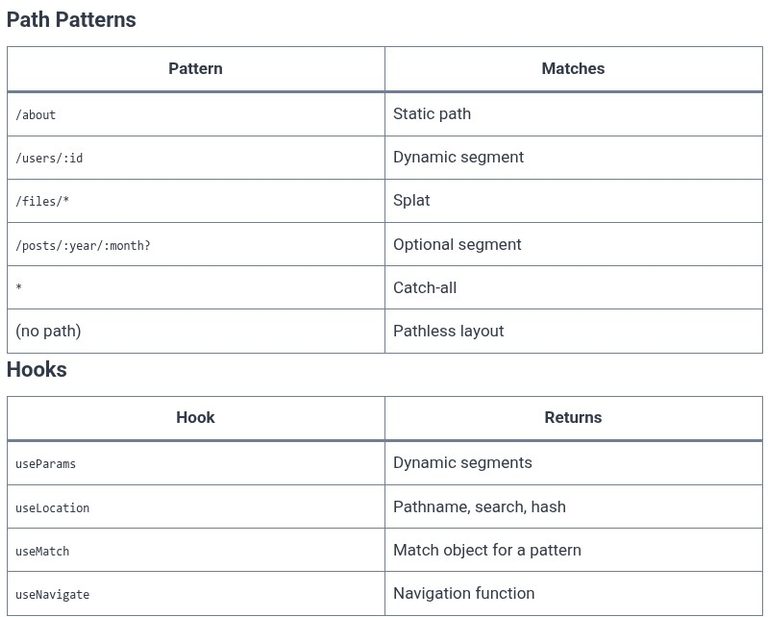
    The previous chapter created the router and attached it to the React tree with RouterProvider. This chapter covers the route objects that the router uses to decide which component renders for a given URL. A route object is a configuration record: it has a path, a component (or element), and optionally children, a loader, an…

    Read More React Router 03 ⚛️ Route Mapping — Matching paths to elementsContinue

Page navigation

Previous PagePrevious 1 … 3 4 5 6 7 … 248 Next PageNext
    Search