Skip to content

KandZ - Tuts

  • Operating Systems ▾
    • Linux ▾
      • Distros ▾
        • Fedora
        • Other Distros
        • Ubuntu
      • Gnome 48
      • KDE
      • LFCA - Linux Foundation Certified IT Associate
      • LFCS - Linux Foundation Certified Sysadmin
      • LFCE - Linux Foundation Certified Engineer (Sysadmin + Network Admin)
      • Linux CLI
      • Various
      • Bash Scripting
  • Paths ▾
    • Core Web Stack
    • React & Modern UI Stack
    • Linux Core
  • Programming ▾
    • Frontend (FED) ▾
      • React Ecosystem ▾
        • React
        • React Router
        • TanStack Router
        • TanStack Query (React Query)
        • Zustand
        • Redux Toolkit
      • Angular Ecosystem ▾
        • Angular
      • Vue Ecosystem ▾
        • Vue.js
      • Styling & UI Components ▾
        • Tailwind CSS
    • Languages & Runtimes ▾
      • CSS
      • Dart
      • HTML
      • JavaScript
      • Node.js
      • Rust
      • SQL
      • TypeScript
    • Tools & Build Systems ▾
      • Version Control ▾
        • GitHub
        • Git
        • GitLab
      • Package Managers ▾
        • npm
        • Bun
        • yarn
        • pnpm
      • DevOps & Containers ▾
        • Docker
  • Servers & Self-Hosting ▾
    • Internet ▾
      • Internet Backend - Coming Soon
      • Internet Beginner
      • Internet Frontend - Coming Soon
    • Networking & DNS ▾
      • REST API
  • Tools
  • Windows ▾
    • Windows 11
KandZ - Tuts
AngularBunCSSDartDockerGitGitHubGitLabHTMLJavaScriptNode.jsnpmpnpmReactReact RouterRedux ToolkitRustSQLTailwind CSSTanStack Query (React Query)TanStack RouterTypeScriptVue.jsyarnZustandBash ScriptingFedoraGnome 48KDELFCA - Linux Foundation Certified IT AssociateLFCE - Linux Foundation Certified Engineer (Sysadmin + Network Admin)LFCS - Linux Foundation Certified SysadminLinux CLIOther DistrosUbuntuVariousCore Web StackInternet Backend - Coming SoonInternet BeginnerInternet Frontend - Coming SoonLinux CoreReact & Modern UI StackREST APIToolsWindows 11
  • LFCS 69 🐧 System Targets
    Linux | Operating Systems | LFCS - Linux Foundation Certified Sysadmin

    LFCS 69 🐧 System Targets

    ByKandZ October 20, 2026October 20, 2026

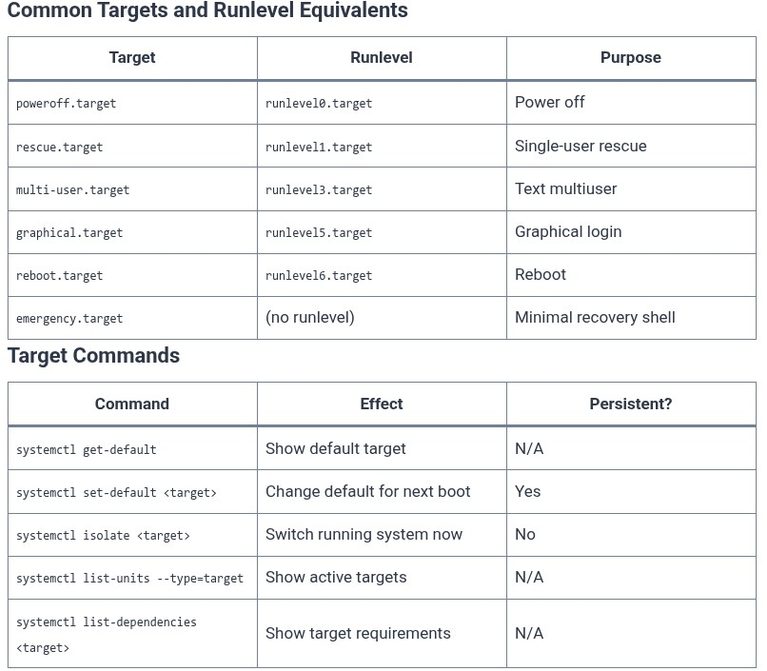
    Systemd targets are the replacement for SysV runlevels. They are synchronization points that group units together, defining what services and capabilities the system should have at a given stage of boot or operation . For the LFCS exam, the key distinction is between the default target (what the system boots into next time) and the…
    Read More LFCS 69 🐧 System TargetsContinue

  • LFCS 68 🐧 Boot Process — Overview
    Linux | Operating Systems | LFCS - Linux Foundation Certified Sysadmin

    LFCS 68 🐧 Boot Process — Overview

    ByKandZ October 20, 2026October 20, 2026

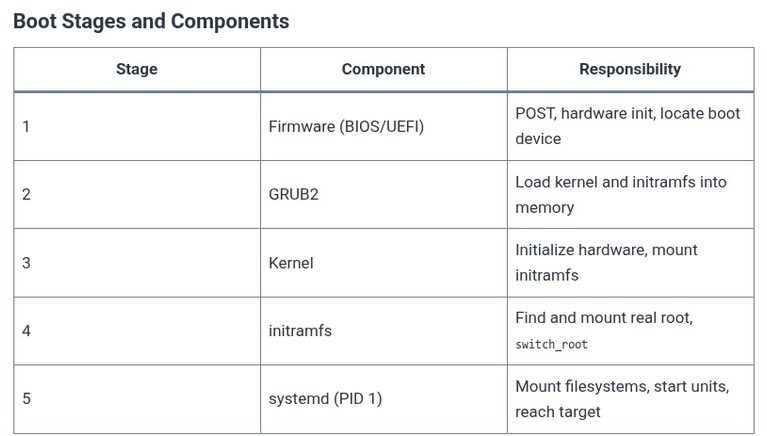
    The Linux boot process is a sequence of handoffs: firmware to bootloader, bootloader to kernel, kernel to initramfs, and initramfs to the real root filesystem where systemd takes over as PID 1. For the LFCS exam, the objective is not to memorize every driver load but to understand the stages, the components responsible for each,…

    Read More LFCS 68 🐧 Boot Process — OverviewContinue

  • LFCS 67 🐧 Cron and At Access Control
    Linux | Operating Systems | LFCS - Linux Foundation Certified Sysadmin

    LFCS 67 🐧 Cron and At Access Control

    ByKandZ October 20, 2026October 20, 2026

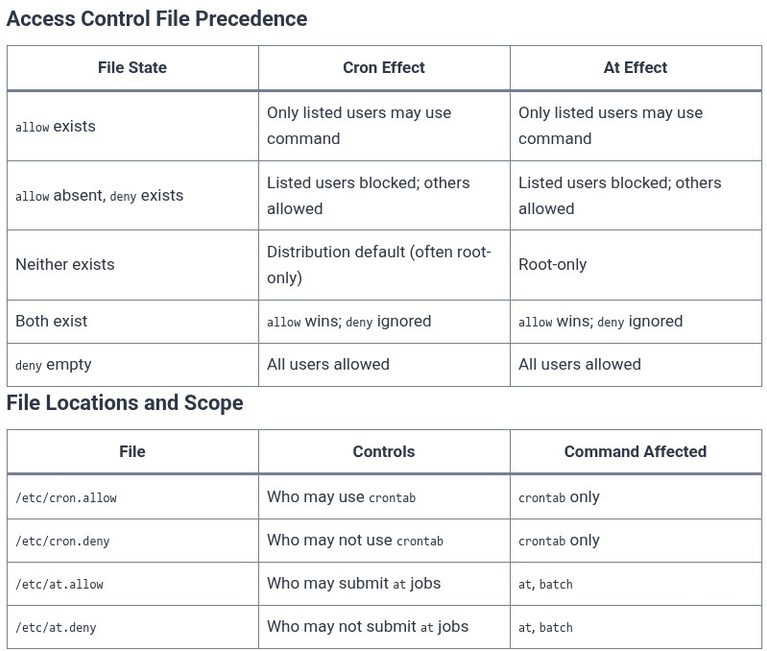
    Access control for scheduled jobs is a deceptively simple topic with a critical distinction: the files that restrict who may create a job are not the same as the files that control whether an existing job runs. For the LFCS exam, this distinction is the difference between answering the objective correctly and creating a false…

    Read More LFCS 67 🐧 Cron and At Access ControlContinue

  • LFCS 66 🐧 At Jobs — One-Time Scheduling
    Linux | Operating Systems | LFCS - Linux Foundation Certified Sysadmin

    LFCS 66 🐧 At Jobs — One-Time Scheduling

    ByKandZ October 20, 2026October 20, 2026

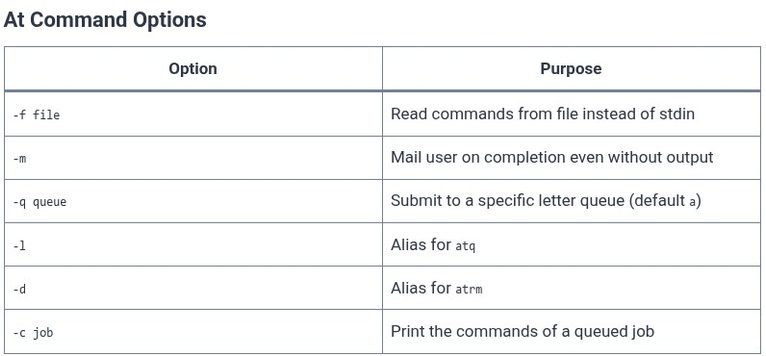
    The at command is the standard Linux utility for scheduling a command to run exactly once at a specified future time. Unlike cron, which repeats jobs on a schedule, at is designed for one-off tasks: a backup that needs to run in an hour, a reminder that must fire tomorrow morning, or a maintenance script…

    Read More LFCS 66 🐧 At Jobs — One-Time SchedulingContinue

  • Vue.js 80 🟢 Headless Component Patterns and Integration with Tailwind CSS
    Programming | Frontend (FED) | Vue.js

    Vue.js 80 🟢 Headless Component Patterns and Integration with Tailwind CSS

    ByKandZ October 20, 2026October 20, 2026

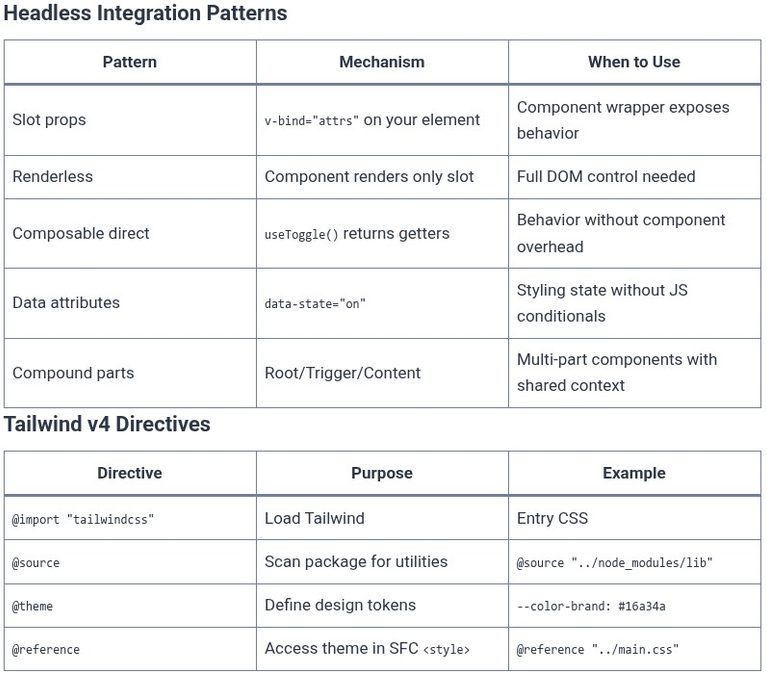
    Headless components invert the traditional relationship between a UI library and its styling. Instead of shipping pre-styled components that you override with CSS, a headless library provides the behavior—state management, accessibility attributes, keyboard navigation, focus handling—and leaves every visual decision to you. Tailwind CSS is a natural fit for this model because it gives you…

    Read More Vue.js 80 🟢 Headless Component Patterns and Integration with Tailwind CSSContinue

  • Vue.js 79 🟢 Vue Application Internationalization (i18n) with vue-i18n
    Programming | Frontend (FED) | Vue.js

    Vue.js 79 🟢 Vue Application Internationalization (i18n) with vue-i18n

    ByKandZ October 20, 2026October 20, 2026

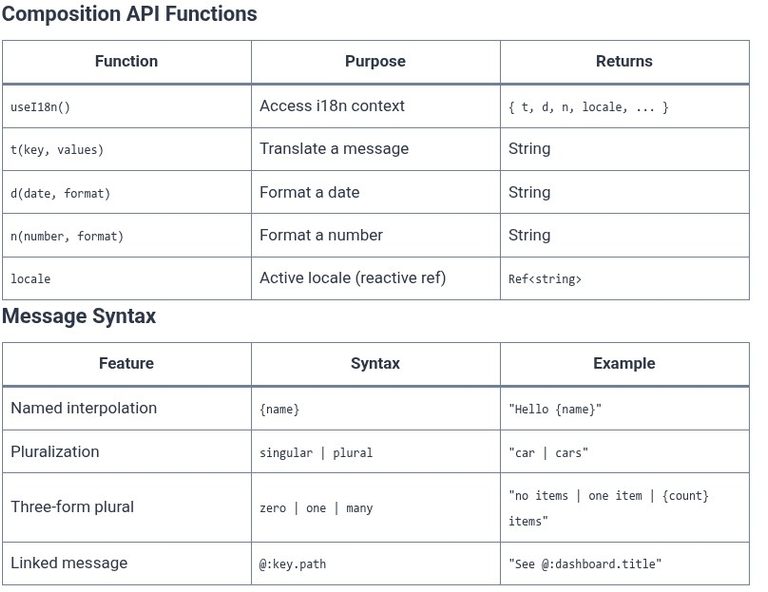
    Internationalization is not a feature you add at the end of a project; it is a structural decision that touches every string, date, and number the user sees. vue-i18n is the standard library for this in Vue, and its modern Composition API mode changes how translation state flows through an application. Unlike a simple dictionary…

    Read More Vue.js 79 🟢 Vue Application Internationalization (i18n) with vue-i18nContinue

  • Vue.js 78 🟢 Micro-Frontend Architectures with Vue and Module Federation
    Programming | Frontend (FED) | Vue.js

    Vue.js 78 🟢 Micro-Frontend Architectures with Vue and Module Federation

    ByKandZ October 20, 2026October 20, 2026

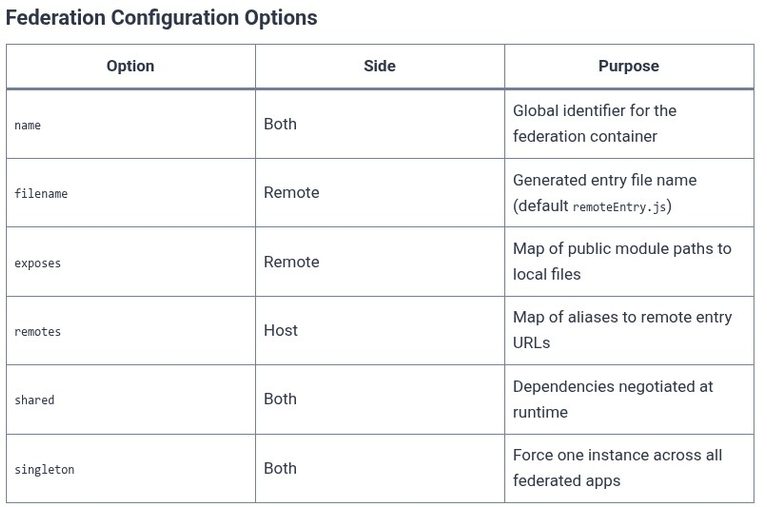
    Micro-frontends apply the principle of service decomposition to the browser. Instead of one monolithic Vue application, the UI is split into independently developed, tested, and deployed fragments that a shell application composes at runtime. Module Federation is the mechanism that makes this composition practical: it allows a JavaScript application to expose modules to other applications…

    Read More Vue.js 78 🟢 Micro-Frontend Architectures with Vue and Module FederationContinue

  • Vue.js 77 🟢 Nuxt Modules, Server Engine Rules, and Auto-Imports System
    Programming | Frontend (FED) | Vue.js

    Vue.js 77 🟢 Nuxt Modules, Server Engine Rules, and Auto-Imports System

    ByKandZ October 20, 2026October 20, 2026

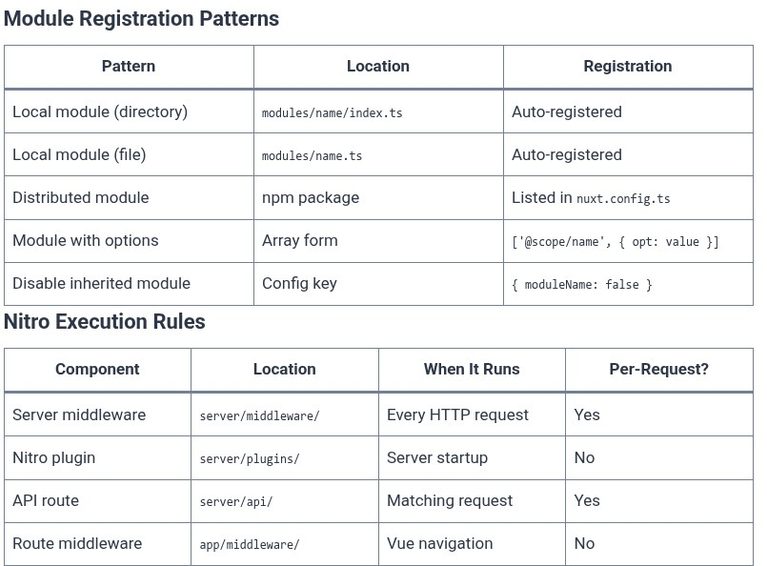
    Nuxt’s power comes not just from routing and data fetching, but from three interlocking systems that make the framework extensible, deployable, and ergonomic. Modules let you package and share framework modifications. The Nitro server engine compiles your server code into a standalone output that runs anywhere. Auto-imports eliminate the boilerplate of explicit imports while preserving…

    Read More Vue.js 77 🟢 Nuxt Modules, Server Engine Rules, and Auto-Imports SystemContinue

  • Vue.js 76 🟢 Full-Stack Framework Integration with Nuxt (File-System Routing, Data Fetching, Nitro Server)
    Programming | Frontend (FED) | Vue.js

    Vue.js 76 🟢 Full-Stack Framework Integration with Nuxt (File-System Routing, Data Fetching, Nitro Server)

    ByKandZ October 20, 2026October 20, 2026

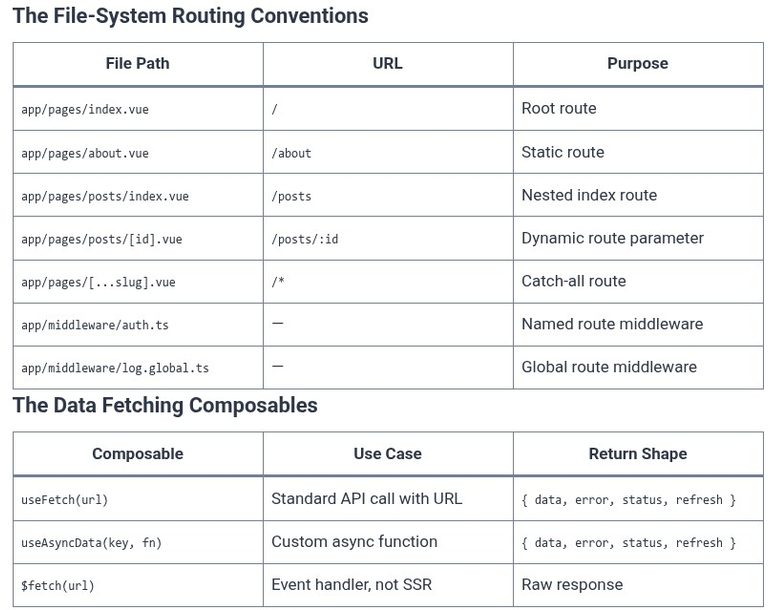
    Nuxt is the full-stack framework built on top of Vue. It takes the component model you already know and wraps it in a server engine, a routing system, and a data-fetching layer that work together without configuration. Where a plain Vue application requires you to assemble Vue Router, decide on a build tool, and wire…

    Read More Vue.js 76 🟢 Full-Stack Framework Integration with Nuxt (File-System Routing, Data Fetching, Nitro Server)Continue

  • Node.js 85 🟢 Cheatsheet
    Programming | Languages & Runtimes | Node.js

    Node.js 85 🟢 Cheatsheet

    ByKandZ October 20, 2026October 20, 2026

    CLI & Runtime Flags Flag Purpose node file.js Run a script node -e “code” Evaluate inline code node –watch file.js Auto-restart on change node –env-file=.env app.js Load env file natively node –inspect app.js Start inspector on :9229 node –inspect-brk app.js Break on first line node –prof app.js Generate V8 CPU profile node –prof-process isolate-*.log Read…

    Read More Node.js 85 🟢 CheatsheetContinue

Page navigation

Previous PagePrevious 1 … 50 51 52 53 54 … 260 Next PageNext
    Search