Skip to content

KandZ - Tuts

  • Operating Systems ▾
    • Linux ▾
      • Distros ▾
        • Fedora
        • Other Distros
        • Ubuntu
      • Gnome 48
      • KDE
      • LFCA - Linux Foundation Certified IT Associate
      • LFCS - Linux Foundation Certified Sysadmin
      • LFCE - Linux Foundation Certified Engineer (Sysadmin + Network Admin)
      • Linux CLI
      • Various
      • Bash Scripting
  • Paths ▾
    • Core Web Stack
    • React & Modern UI Stack
    • Linux Core
  • Programming ▾
    • Frontend (FED) ▾
      • React Ecosystem ▾
        • React
        • React Router
        • TanStack Router
        • TanStack Query (React Query)
        • Zustand
        • Redux Toolkit
      • Angular Ecosystem ▾
        • Angular
      • Vue Ecosystem ▾
        • Vue.js
      • Styling & UI Components ▾
        • Tailwind CSS
    • Languages & Runtimes ▾
      • CSS
      • Dart
      • HTML
      • JavaScript
      • Node.js
      • Rust
      • SQL
      • TypeScript
    • Tools & Build Systems ▾
      • Version Control ▾
        • GitHub
        • Git
        • GitLab
      • Package Managers ▾
        • npm
        • Bun
        • yarn
        • pnpm
      • DevOps & Containers ▾
        • Docker
  • Servers & Self-Hosting ▾
    • Internet ▾
      • Internet Backend - Coming Soon
      • Internet Beginner
      • Internet Frontend - Coming Soon
    • Networking & DNS ▾
      • REST API
  • Tools
  • Windows ▾
    • Windows 11
KandZ - Tuts
AngularBunCSSDartDockerGitGitHubGitLabHTMLJavaScriptNode.jsnpmpnpmReactReact RouterRedux ToolkitRustSQLTailwind CSSTanStack Query (React Query)TanStack RouterTypeScriptVue.jsyarnZustandBash ScriptingFedoraGnome 48KDELFCA - Linux Foundation Certified IT AssociateLFCE - Linux Foundation Certified Engineer (Sysadmin + Network Admin)LFCS - Linux Foundation Certified SysadminLinux CLIOther DistrosUbuntuVariousCore Web StackInternet Backend - Coming SoonInternet BeginnerInternet Frontend - Coming SoonLinux CoreReact & Modern UI StackREST APIToolsWindows 11
  • React 86 ⚛️ Mocking API Calls with MSW (Mock Service Worker)
    Programming | Frontend (FED) | React

    React 86 ⚛️ Mocking API Calls with MSW (Mock Service Worker)

    ByKandZ October 19, 2026October 19, 2026

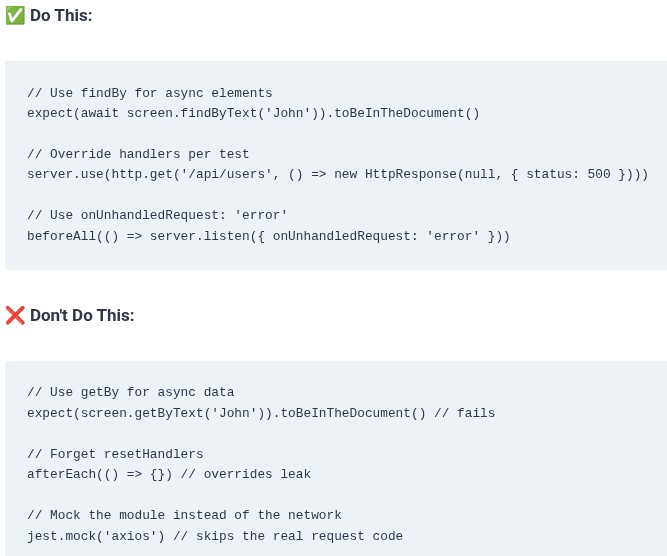
    Mock Service Worker is not a Jest mock. It is a network-level interceptor. When your React component calls fetch(‘/api/users’), MSW intercepts that request before it leaves the process, matches it against the handlers you defined, and returns the mocked response as if it came from a real server . The component’s actual fetch call runs,…
    Read More React 86 ⚛️ Mocking API Calls with MSW (Mock Service Worker)Continue

  • SQL 110 🛢️ Spatial Data Processing and PostGIS / Geospatial Extensions
    Programming | Languages & Runtimes | SQL

    SQL 110 🛢️ Spatial Data Processing and PostGIS / Geospatial Extensions

    ByKandZ October 19, 2026October 19, 2026

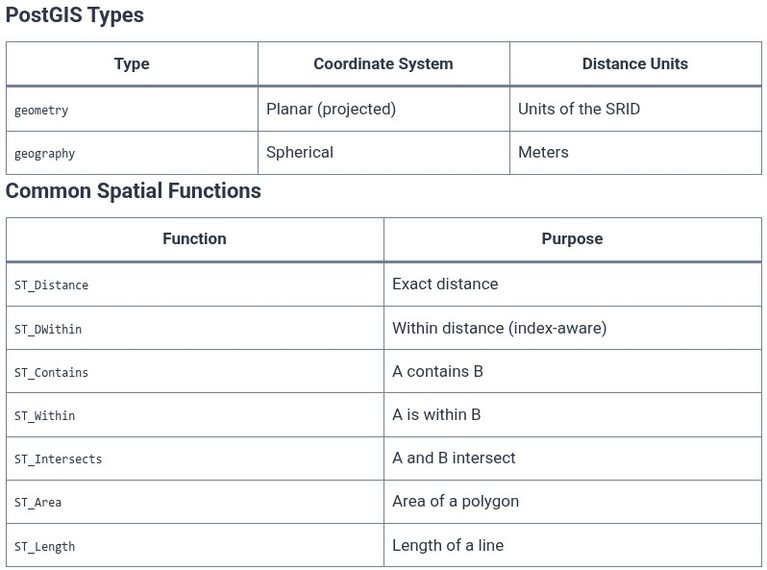
    Spatial data represents information about the physical location and shape of geometric objects—points, lines, polygons, and the relationships between them . A database that can store coordinates is not automatically a spatial database. A spatial database must understand the geometry’s structure, support the operations that answer spatial questions (does this point fall inside that polygon?…

    Read More SQL 110 🛢️ Spatial Data Processing and PostGIS / Geospatial ExtensionsContinue

  • SQL 109 🛢️ Specialized Index Structures: GiST, GIN, BRIN, and R-Trees
    Programming | Languages & Runtimes | SQL

    SQL 109 🛢️ Specialized Index Structures: GiST, GIN, BRIN, and R-Trees

    ByKandZ October 19, 2026October 19, 2026

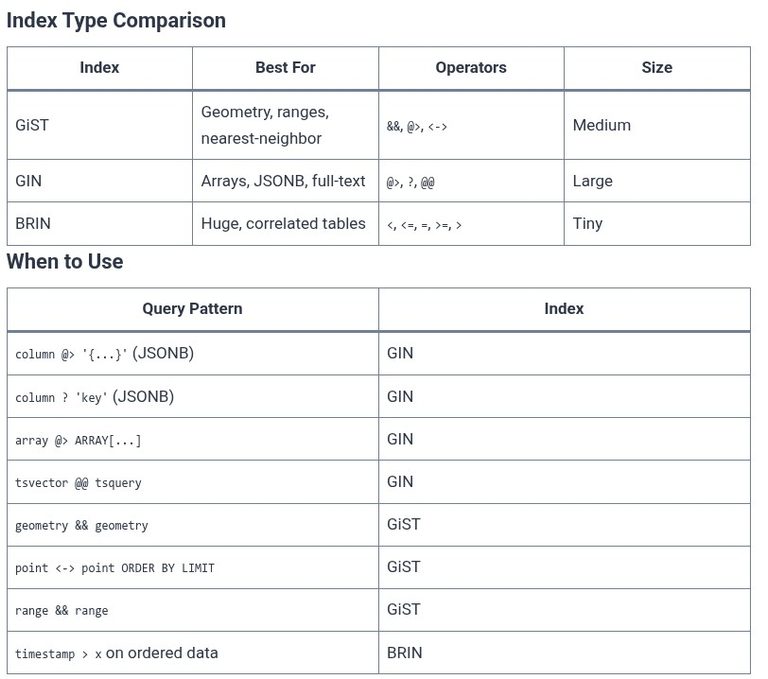
    A B-tree index answers one question well: does this value fall within this ordered range? It is the correct index for equality and range predicates on scalar columns, and it is the default because most queries ask exactly that question. But a query that asks “which documents contain the word ‘index’” or “which geometric shapes…

    Read More SQL 109 🛢️ Specialized Index Structures: GiST, GIN, BRIN, and R-TreesContinue

  • SQL 108 🛢️ Query Execution Engine: Volcano Iterator Model vs Vectorized Execution
    Programming | Languages & Runtimes | SQL

    SQL 108 🛢️ Query Execution Engine: Volcano Iterator Model vs Vectorized Execution

    ByKandZ October 19, 2026October 19, 2026

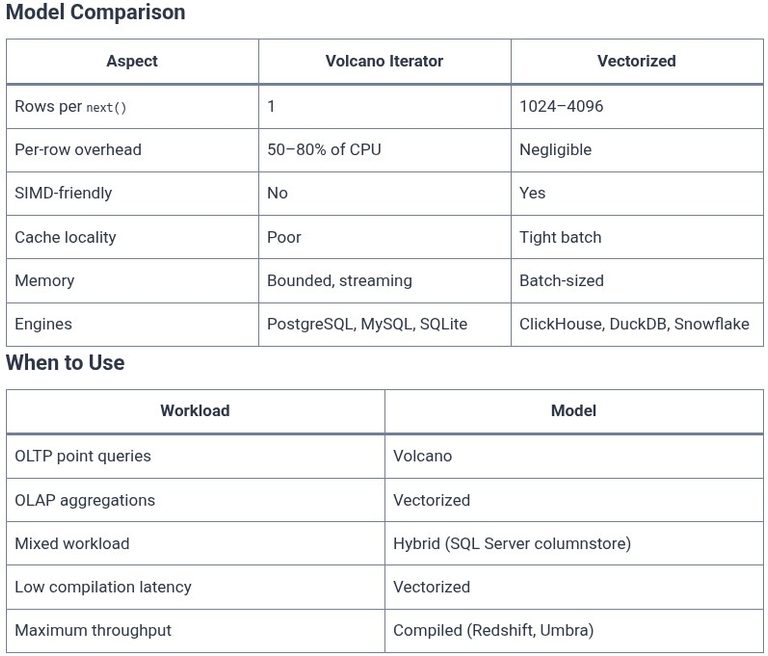
    The query execution engine is the component that takes the physical plan chosen by the optimizer and actually runs it. The optimizer decides what to do—which join algorithm, which index, which order. The execution engine decides how fast to do it. Two execution models dominate the landscape: the Volcano iterator model and vectorized execution. The…

    Read More SQL 108 🛢️ Query Execution Engine: Volcano Iterator Model vs Vectorized ExecutionContinue

  • SQL 107 🛢️ Join Algorithms: Nested Loop, Hash Join, and Merge Join
    Programming | Languages & Runtimes | SQL

    SQL 107 🛢️ Join Algorithms: Nested Loop, Hash Join, and Merge Join

    ByKandZ October 19, 2026October 19, 2026

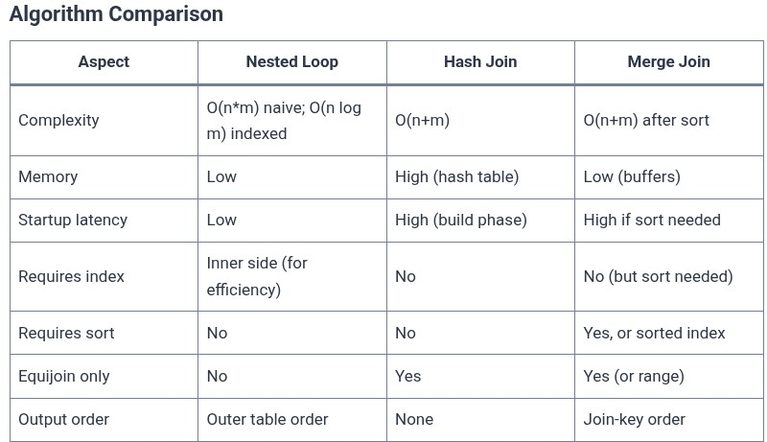
    A join is the operation that combines rows from two tables based on a condition. The SQL statement says what to join; the optimizer chooses how to join it. That choice is one of three physical algorithms: nested loop, hash join, or merge join. Each has a different cost profile, a different set of conditions…

    Read More SQL 107 🛢️ Join Algorithms: Nested Loop, Hash Join, and Merge JoinContinue

  • SQL 106 🛢️ Cost-Based Optimizer (CBO) Statistics and Histograms
    Programming | Languages & Runtimes | SQL

    SQL 106 🛢️ Cost-Based Optimizer (CBO) Statistics and Histograms

    ByKandZ October 19, 2026October 19, 2026

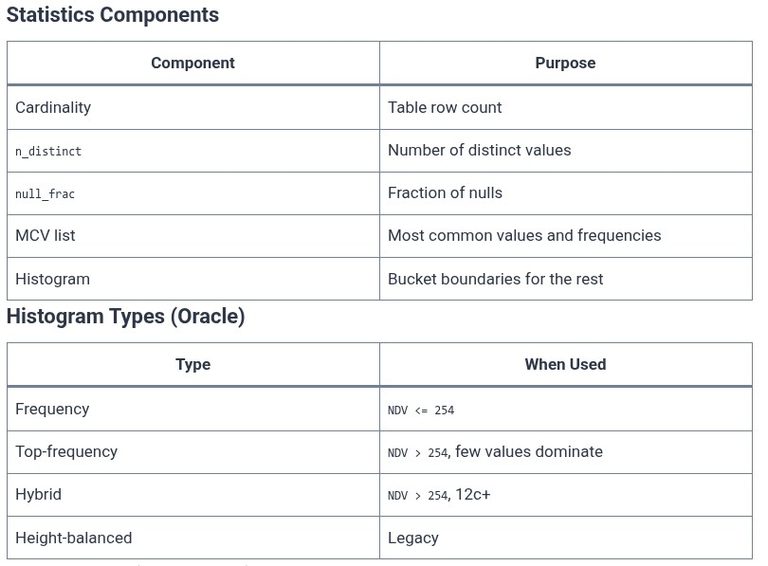
    The cost-based optimizer is the component of a database that decides how to execute a query. It does not guess. It reads statistics about the tables, columns, and indexes involved, estimates how many rows each step of the plan will produce, and assigns a cost to every candidate plan. The plan with the lowest cost…

    Read More SQL 106 🛢️ Cost-Based Optimizer (CBO) Statistics and HistogramsContinue

  • Core Web Stack
    Paths | Core Web Stack

    Core Web Stack

    ByKandZ October 19, 2026October 29, 2026

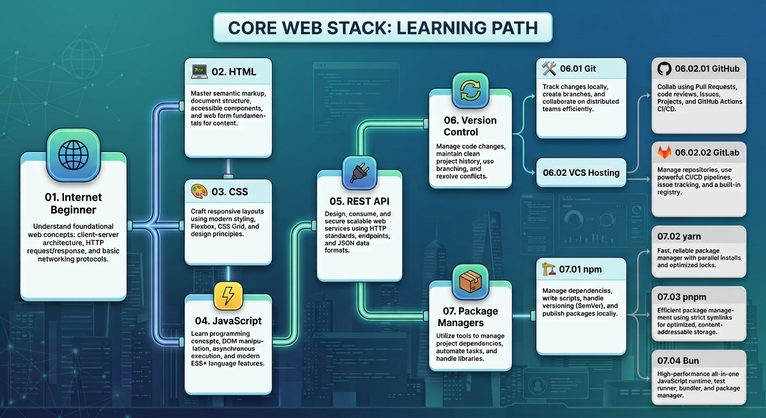
    Intro The Core Web Stack path covers the essential foundation required to design, build, and deploy modern web applications. From understanding basic web protocols and standard client-side markup to building REST APIs, managing source code with version control, and handling package dependencies, this roadmap provides a complete developer toolkit. Tutorials

    Read More Core Web StackContinue

  • npm 05 🌐 Installing Packages (dependencies vs devDependencies)
    Programming | npm | Tools & Build Systems

    npm 05 🌐 Installing Packages (dependencies vs devDependencies)

    ByKandZ October 19, 2026October 19, 2026

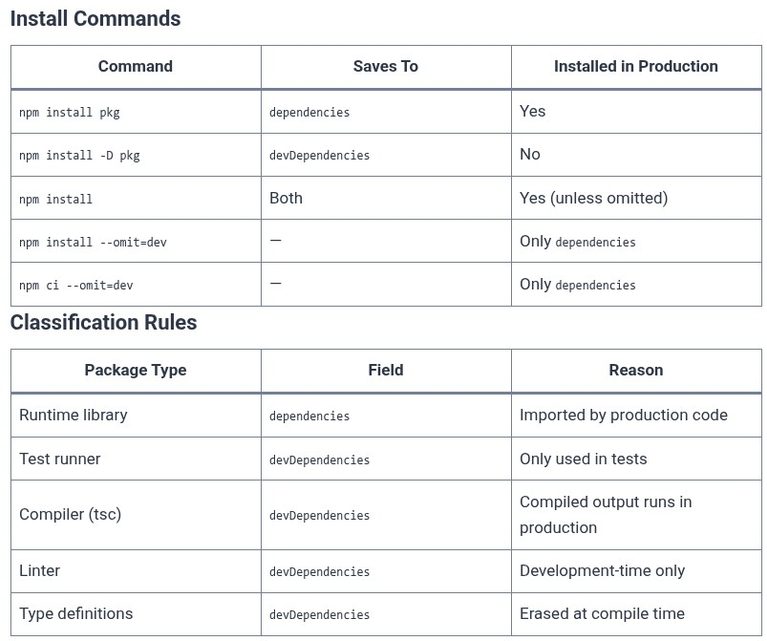
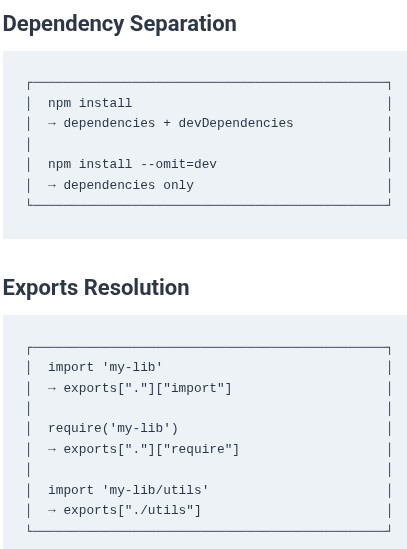
    Every package you install with npm lands in one of two places in your package.json: dependencies or devDependencies. The distinction is not cosmetic. It determines whether the package is installed when you build for production, whether it is shipped in your deployment artifact, and whether your production server can actually run the code after deployment….

    Read More npm 05 🌐 Installing Packages (dependencies vs devDependencies)Continue

  • npm 04 🌐 The package.json File Breakdown
    Programming | npm | Tools & Build Systems

    npm 04 🌐 The package.json File Breakdown

    ByKandZ October 19, 2026October 19, 2026

    The package.json file is the single most important file in a Node.js project. It is the manifest that tells npm what the project is, what it depends on, and how to run it. Every npm install, npm run, and npm publish reads this file. The npm documentation describes it as “the whole interface” to npm—without…

    Read More npm 04 🌐 The package.json File BreakdownContinue

  • npm 03 🌐 Initializing Projects (npm init & npm init -y)
    Programming | npm | Tools & Build Systems

    npm 03 🌐 Initializing Projects (npm init & npm init -y)

    ByKandZ October 19, 2026October 19, 2026

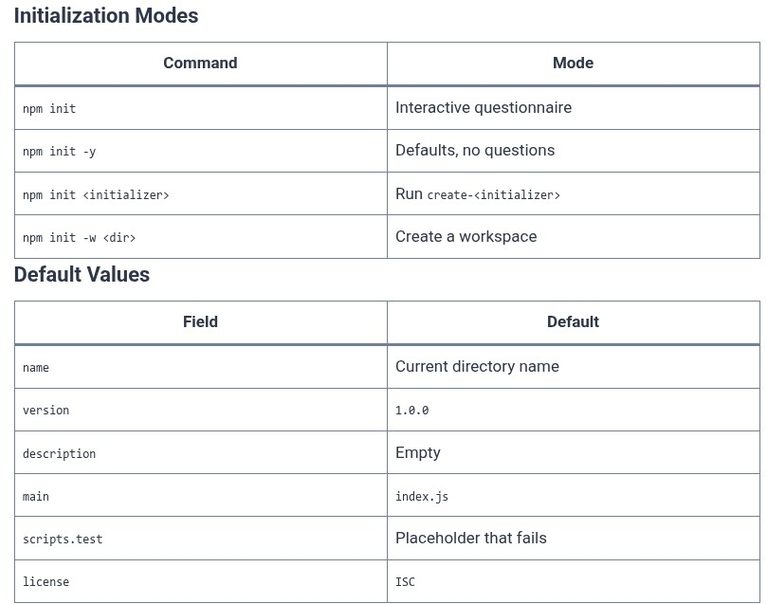
    Every Node.js project begins with a package.json file. It is the manifest that records the project’s name, its version, its scripts, and the dependencies it needs. Creating that file by hand is possible but error-prone: a missing name, a version that does not follow semantic versioning, or a typo in the scripts key produces a…

    Read More npm 03 🌐 Initializing Projects (npm init & npm init -y)Continue

Page navigation

Previous PagePrevious 1 … 58 59 60 61 62 … 260 Next PageNext
    Search