DevTuts

  • HTML 3b 💻 Video

    3b. Video For embedding video files.1. What is the video Element?The video element is an HTML5 semantic element used to embed video content directly into web pages without requiring third-party plugins like Flash. It provides a standardized way to display videos that works across all modern browsers.Basic Syntax and Structure2. Video Common AttributesEssential AttributessrcSpecifies the…
  • |

    JavaScript 3 🧬 Comments

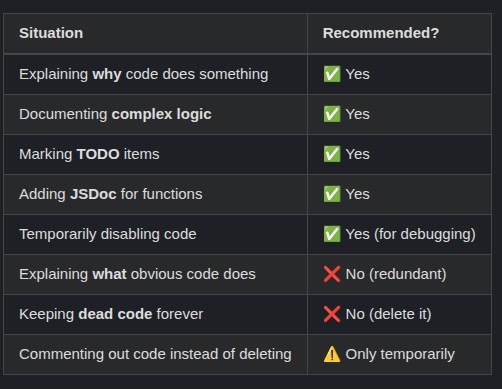
    Comments are used to explain your code or disable a portion of it. They are ignored by JavaScript and are purely for humans (including your future self). Overview of Comment Types Type Syntax Use Case Single-line // comment Brief explanations, inline notes Multi-line /* comment */ Longer explanations, disabling code blocks a. JavaScript Comments Comments…

  • CSS 4 🎨 How To Cascade, Specificity, and Inheritance

    4. How-To Cascade, Specificity, and Inheritance How to Check CSS Rule Priority Using Specificity Steps: Example: How to Create a CSS Cascade with Multiple Sources Steps: Example: How to Use Inheritance to Style Child Elements Steps: Example: How to Resolve Conflicting CSS Rules Steps: Example: How to Apply Inheritance Selectively Steps: Example: How to Create…

  • |

    CSS 4 💻 colors and color properties

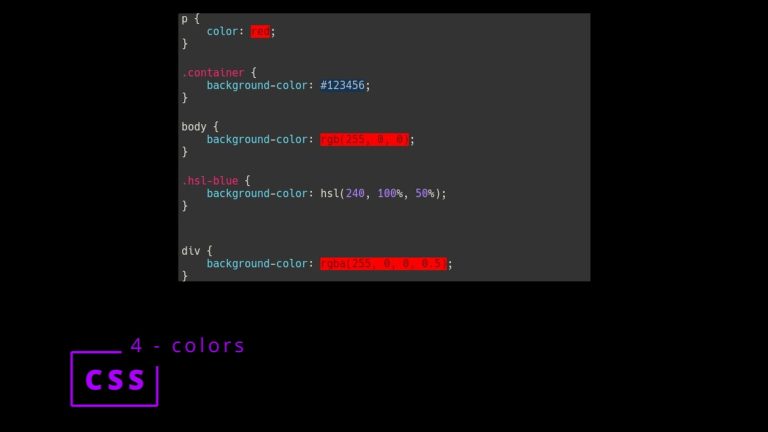
    CSS provides multiple ways to specify colors, allowing you to style text, backgrounds, borders, and more. Understanding color formats and properties is essential for creating visually appealing web pages. Color Formats Format Example Description Named Colors red, blue, yellow Predefined color names Hexadecimal #FF0000, #F00 6-digit or 3-digit hex values RGB rgb(255, 0, 0) Red,…

  • |

    Git 4a 🧩 Rebasing

    4. Advanced Git Concepts & Collaboration 4a Rebasing Git rebase is a powerful feature that allows you to rewrite commit history by applying your branch’s commits on top of another branch’s latest commits. Instead of creating a merge commit, rebase integrates changes by replaying your commits sequentially onto the target branch. Basic Rebase Command git…

  • |

    Git 4b 🧩 Stashing Changes

    4b Stashing Changes Git stashing is a useful feature that allows you to temporarily save your uncommitted changes without making a commit. This is particularly helpful when you need to switch between different tasks or branches but don’t want to commit incomplete work. Basic Stash Commands git stash list git stash pop git stash apply…

  • |

    Git 4c 🧩 Cherry Picking

    4c Cherry-Picking Cherry-picking is a powerful Git command that allows you to apply a specific commit from one branch to another. Instead of merging entire branches, cherry-picking lets you selectively choose individual commits, which is particularly useful for applying hotfixes or taking specific changes from feature branches. Basic Cherry-Pick Command git cherry-pick [commit-hash]This command applies…

  • |

    Git 4d 🧩 Tagging Releases

    4d Git Tagging Releases Git tagging is a powerful feature that allows you to mark specific points in your repository’s history as important milestones. Tags are commonly used for version releases, marking stable builds, or any other significant point in your project’s development. Basic Tag Creation Lightweight TagsLightweight tags are simply pointers to specific commits…

  • |

    Git 4e 🧩 Ignoring Files

    4e Ignoring Files What is .gitignore? The .gitignore file is a text file that tells Git which files or directories to ignore when tracking changes in your repository. It’s essential for keeping your repository clean by excluding unnecessary files like build artifacts, temporary files, and sensitive data. Basic .gitignore Syntax Ignore a specific directorynode_modules/ Ignore…