Skip to content

KandZ - Tuts

  • Operating Systems ▾
    • Linux ▾
      • Distros ▾
        • Fedora
        • Other Distros
        • Ubuntu
      • Gnome 48
      • KDE
      • LFCA - Linux Foundation Certified IT Associate
      • LFCS - Linux Foundation Certified Sysadmin
      • LFCE - Linux Foundation Certified Engineer (Sysadmin + Network Admin)
      • Linux CLI
      • Various
      • Bash Scripting
  • Paths ▾
    • Core Web Stack
    • React & Modern UI Stack
    • Linux Core
  • Programming ▾
    • Frontend (FED) ▾
      • React Ecosystem ▾
        • React
        • React Router
        • TanStack Router
        • TanStack Query (React Query)
        • Zustand
        • Redux Toolkit
      • Angular Ecosystem ▾
        • Angular
      • Vue Ecosystem ▾
        • Vue.js
      • Styling & UI Components ▾
        • Tailwind CSS
    • Languages & Runtimes ▾
      • CSS
      • Dart
      • HTML
      • JavaScript
      • Node.js
      • Rust
      • SQL
      • TypeScript
    • Tools & Build Systems ▾
      • Version Control ▾
        • GitHub
        • Git
        • GitLab
      • Package Managers ▾
        • npm
        • Bun
        • yarn
        • pnpm
      • DevOps & Containers ▾
        • Docker
  • Servers & Self-Hosting ▾
    • Internet ▾
      • Internet Backend - Coming Soon
      • Internet Beginner
      • Internet Frontend - Coming Soon
    • Networking & DNS ▾
      • REST API
  • Tools
  • Windows ▾
    • Windows 11
KandZ - Tuts
AngularBunCSSDartDockerGitGitHubGitLabHTMLJavaScriptNode.jsnpmpnpmReactReact RouterRedux ToolkitRustSQLTailwind CSSTanStack Query (React Query)TanStack RouterTypeScriptVue.jsyarnZustandBash ScriptingFedoraGnome 48KDELFCA - Linux Foundation Certified IT AssociateLFCE - Linux Foundation Certified Engineer (Sysadmin + Network Admin)LFCS - Linux Foundation Certified SysadminLinux CLIOther DistrosUbuntuVariousCore Web StackInternet Backend - Coming SoonInternet BeginnerInternet Frontend - Coming SoonLinux CoreReact & Modern UI StackREST APIToolsWindows 11
  • Node.js 68 🟢 OpenTelemetry Integration for Distributed Tracing and Observability
    Programming | Languages & Runtimes | Node.js

    Node.js 68 🟢 OpenTelemetry Integration for Distributed Tracing and Observability

    ByKandZ October 17, 2026October 17, 2026

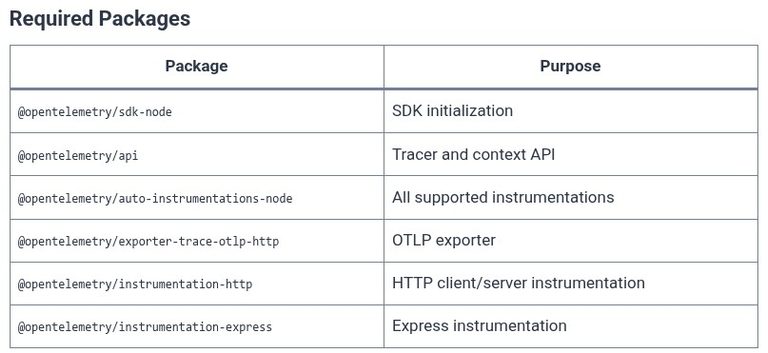
    A request enters your API, calls a database, invokes a payment service, and returns. Something is slow, but the logs tell you nothing useful—just timestamps and messages from different services with no way to connect them. Distributed tracing solves this by attaching a shared identifier to every operation across every service, so a single request…
    Read More Node.js 68 🟢 OpenTelemetry Integration for Distributed Tracing and ObservabilityContinue

  • Node.js 67 🟢 Structured Logging Strategies with Pino and Winston
    Programming | Languages & Runtimes | Node.js

    Node.js 67 🟢 Structured Logging Strategies with Pino and Winston

    ByKandZ October 17, 2026October 17, 2026

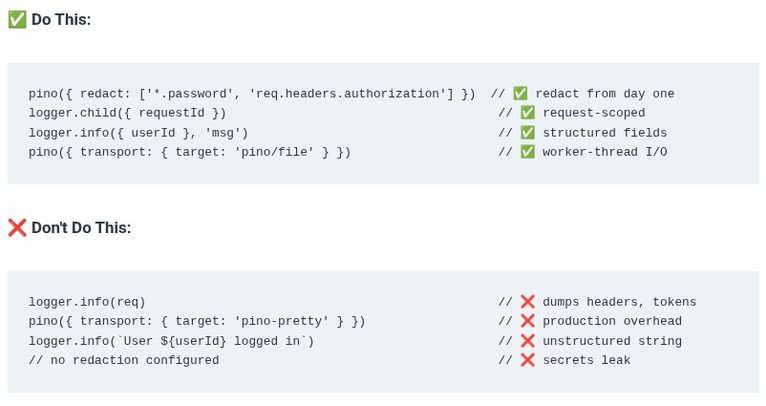
    Structured logging is the practice of emitting log entries as machine-readable objects—typically JSON—rather than unstructured text. The difference matters at scale. A console.log(“user logged in”) line is readable by a human but nearly useless to a log aggregator that needs to filter by user ID, count errors per endpoint, or correlate entries across services. A…

    Read More Node.js 67 🟢 Structured Logging Strategies with Pino and WinstonContinue

  • Node.js 66 🟢 Production Process Management and Monitoring with PM2
    Programming | Languages & Runtimes | Node.js

    Node.js 66 🟢 Production Process Management and Monitoring with PM2

    ByKandZ October 17, 2026October 17, 2026

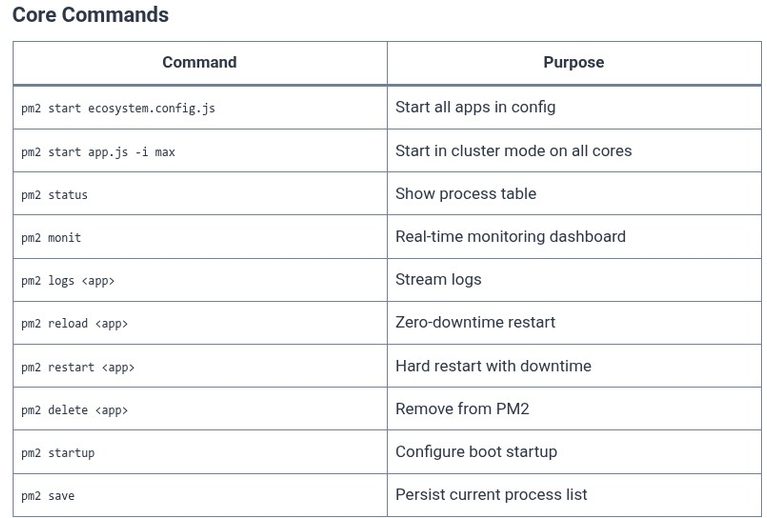
    Running a Node.js process in production with node app.js is a single point of failure. If the process crashes, it stays down. If it consumes too much memory, it takes the server with it. If you need to deploy a new version, you stop the old process and start the new one—creating a window where…

    Read More Node.js 66 🟢 Production Process Management and Monitoring with PM2Continue

  • Docker 70 🐳 containerd CLI Integration: Interacting directly via ctr and nerdctl
    Programming | Docker | Tools & Build Systems

    Docker 70 🐳 containerd CLI Integration: Interacting directly via ctr and nerdctl

    ByKandZ October 17, 2026October 17, 2026

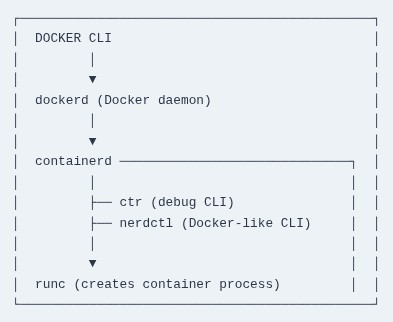
    Docker Engine has always been a layered system. When you run docker run, the CLI talks to dockerd, which delegates to containerd, which in turn uses runc to create the actual container process . The containerd layer is the core runtime: it manages images, snapshots, and container lifecycle, and it is the component that Kubernetes…

    Read More Docker 70 🐳 containerd CLI Integration: Interacting directly via ctr and nerdctlContinue

  • Docker 69 🐳 Translating Compose Manifests to Kubernetes Objects using kompose
    Programming | Docker | Tools & Build Systems

    Docker 69 🐳 Translating Compose Manifests to Kubernetes Objects using kompose

    ByKandZ October 17, 2026October 17, 2026

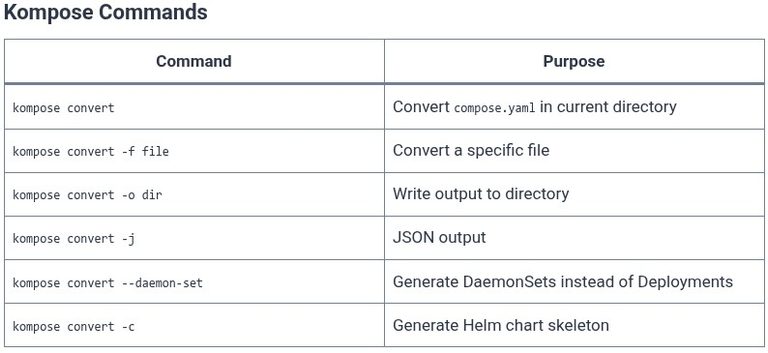
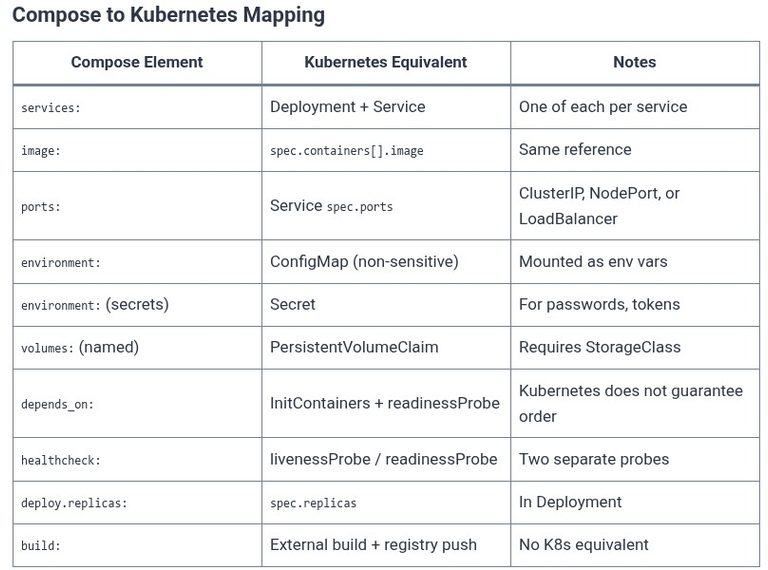
    kompose is the official Kubernetes project for converting Docker Compose files into Kubernetes or OpenShift manifests . Its purpose is mechanical translation: it reads the services, volumes, and port definitions in a compose.yaml file and produces Deployments, Services, and PersistentVolumeClaims that the Kubernetes API can accept . The tool is explicitly designed as a starting…

    Read More Docker 69 🐳 Translating Compose Manifests to Kubernetes Objects using komposeContinue

  • Docker 68 🐳 Transitioning from Docker Compose to Kubernetes: Objects, Pods, and Architecture Differences
    Programming | Docker | Tools & Build Systems

    Docker 68 🐳 Transitioning from Docker Compose to Kubernetes: Objects, Pods, and Architecture Differences

    ByKandZ October 17, 2026October 17, 2026

    Docker Compose and Kubernetes both run containers, but they are built on fundamentally different assumptions about what a deployment is. Compose assumes a single host, a single Docker Engine, and a developer who wants to start a multi-container application with one command. Kubernetes assumes a cluster of machines, a control plane that continuously reconciles desired…

    Read More Docker 68 🐳 Transitioning from Docker Compose to Kubernetes: Objects, Pods, and Architecture DifferencesContinue

  • Docker 67 🐳 High Availability Homelab / Server Deployment with Docker Swarm and Portainer
    Programming | Docker | Tools & Build Systems

    Docker 67 🐳 High Availability Homelab / Server Deployment with Docker Swarm and Portainer

    ByKandZ October 17, 2026October 17, 2026

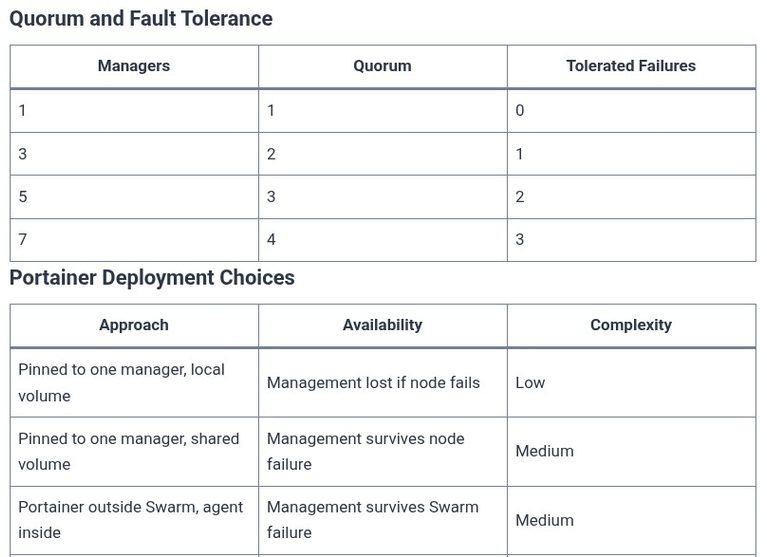
    A homelab or small server deployment that runs on a single machine is not highly available. When that machine reboots, every service goes down. When a disk fails, every container is lost. The purpose of building a Swarm cluster for a homelab is not to match the scale of a cloud provider—it is to eliminate…

    Read More Docker 67 🐳 High Availability Homelab / Server Deployment with Docker Swarm and PortainerContinue

  • Docker 66 🐳 Swarm Secrets and Configs: Native Encrypted State Distribution Across Cluster Nodes
    Programming | Docker | Tools & Build Systems

    Docker 66 🐳 Swarm Secrets and Configs: Native Encrypted State Distribution Across Cluster Nodes

    ByKandZ October 17, 2026October 17, 2026

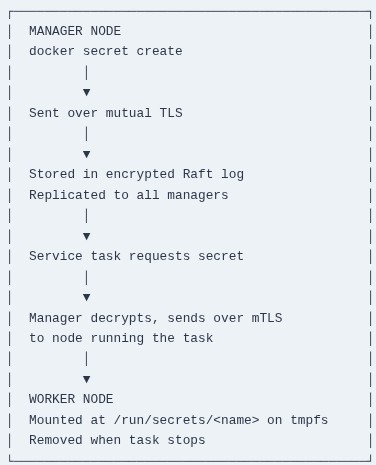
    Docker Swarm provides two native cluster objects for delivering data to services: secrets for sensitive information and configs for non-sensitive configuration. Both solve the same fundamental problem—how to inject data into containers without baking it into images or passing it through environment variables—but they differ in one critical dimension: secrets are encrypted at rest in…

    Read More Docker 66 🐳 Swarm Secrets and Configs: Native Encrypted State Distribution Across Cluster NodesContinue

  • Internet Beginner 10 🌐 Inspecting Networks with Browser DevTools
    Servers & Self-Hosting | Internet | Internet Beginner

    Internet Beginner 10 🌐 Inspecting Networks with Browser DevTools

    ByKandZ October 17, 2026October 17, 2026

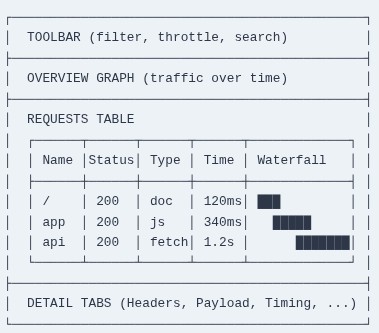
    Every page load is a conversation between your browser and a server, but the conversation is invisible. You see the result—the rendered page—but not the requests that fetched it, the headers that carried the metadata, or the timing that explains why one resource arrived instantly while another took two seconds. Browser DevTools makes that conversation…

    Read More Internet Beginner 10 🌐 Inspecting Networks with Browser DevToolsContinue

  • Internet Beginner 09 🌐 Browsers and How They Work
    Servers & Self-Hosting | Internet | Internet Beginner

    Internet Beginner 09 🌐 Browsers and How They Work

    ByKandZ October 17, 2026October 17, 2026

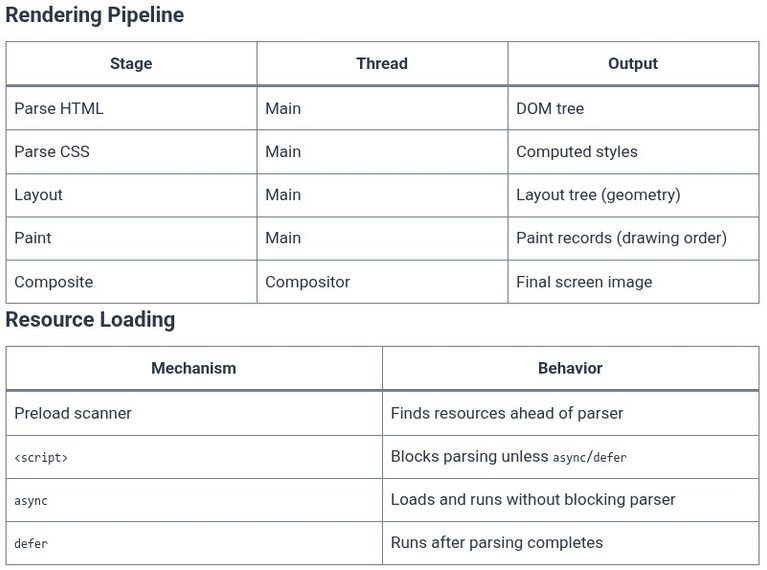
    A web browser is not a single program. It is a collection of processes and threads working together, each responsible for a different part of the job: one process handles the address bar and tabs, another fetches data from the network, and another turns HTML, CSS, and JavaScript into the page you see and interact…

    Read More Internet Beginner 09 🌐 Browsers and How They WorkContinue

Page navigation

Previous PagePrevious 1 … 72 73 74 75 76 … 261 Next PageNext
    Search